
悬停效应在移动设备上产生奇怪的行为
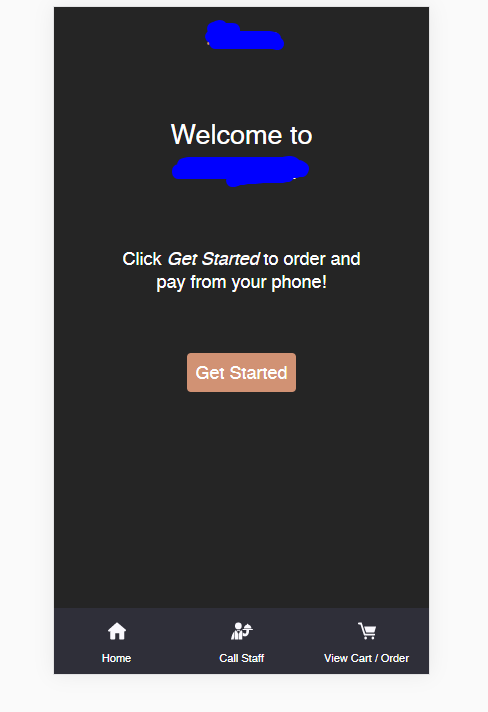
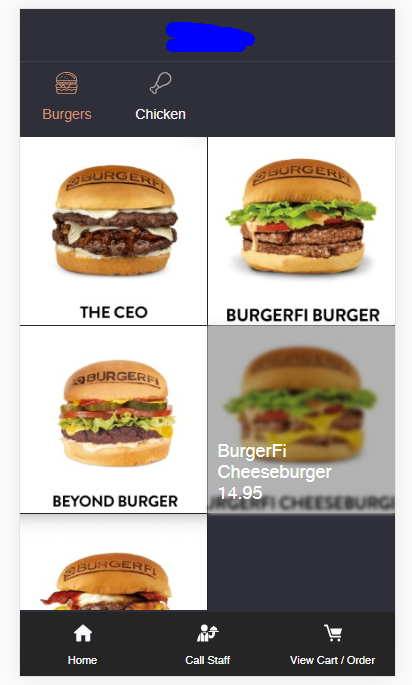
我有个很奇怪的问题。那就试着解释一下你。我正在开发将在手机上使用的web应用程序。一切都很顺利,但我遇到了一个非常严重的问题。这个应用程序很简单,我们有欢迎屏幕,在点击这个按钮后,在2x2网格中显示产品列表,点击这个按钮后,你就可以在界面上看到名为Get Strated的按钮了。每个产品都有悬停效应,模糊了形象,显示了产品的名称和价格。所以我希望到现在为止一切听起来都很好?当用户单击“开始”和页面呈现后出现的问题时,会自动显示与按钮“悬停”位于同一位置的项目,这似乎是奇怪的行为,因为您不会看到预选的任何项目。
第一步:当用户单击Get Started按钮时,主要欢迎屏幕:
第二步:由于悬停效应,用户单击了,启动了,并进入产品列表,其中一项标记为选择/单击
这里是html/css,只是一个常规的悬停效果,即添加模糊并显示prodcut &price:
<ul className="list-products">
    {productsStore.menuProducts.filter(p => p.sectionId == productsStore.activeSectionId).map((product, index) => {
        return (
            <li key={index} onClick={() => handleOnProductClick(product.id)}>
                <button>
                    <small style={{ backgroundImage: "url(" + getDefaultImage(product.image) + ")" }}></small>
                    <strong id={product.id}>
                        <span>
                            {product.name}
                            <em>{product.price.toFixed(2)}</em>
                        </span>
                    </strong>
                </button>
            </li>
        )
    })}
</ul>

.list-products { display: -moz-flex; display: -ms-flex; display: -o-flex; display: flex; flex-wrap: wrap; }
.list-products li { width: 50%; position: relative; padding-bottom: 50%; border-bottom: 1px solid #252525; }
.list-products li:nth-child(odd) { border-right: 1px solid #252525; }
.list-products li button { position: absolute; top: 0; left: 0; width: 100%; height: 100%; background-color: #fff; border: 0; border-radius: 0; }
.list-products li button strong { position: absolute; top: 0; left: 0; width: 100%; height: 100%; font-weight: 400; background: rgba(0,0,0,.3); opacity: 0; }
.list-products li button:hover strong { opacity: 1; }
.list-products li button strong { display: -moz-flex; display: -ms-flex; display: -o-flex; display: flex; align-items: flex-end; justify-content: center; padding: 10px; }
.list-products li button span { display: inline-block; font-size: 18px; text-align: left; width: 100% }
.list-products li button span em { font-style: normal; display: block; }
.list-products li button small { background-size: cover; background-position: center; position: absolute; top: 0; left: 0; width: 100%; height: 100%; }
.list-products li button:hover small { filter: blur(2px); -webkit-filter: blur(2px); }
我忘了说我用的是反应。而且,即使在启用移动视图的情况下,这种行为也不能在PC上复制。它只有在移动设备上才有可能,我已经用safari浏览器在iphone上进行了测试。
我认为正在发生的事情是:既然我们在移动设备上,当用户单击屏幕上的某个位置,直到用户单击另一个位置时,就会触发悬停效应,直到用户单击另一个位置为止,悬停一直停留在那里,并且由于我们单击“开始”(按钮的右侧),浏览器认为我们在那里徘徊,这就是为什么它显示为“悬停”?但现在有什么解决办法呢?
回答 1
Stack Overflow用户
发布于 2020-06-26 15:25:08
你的猜测完全正确。悬停效果在移动环境下不能正常工作。当用户单击该元素时,它会在将其带到下一个链接之前快速触发悬停效果。有时,手机会缓存触发悬停效应,并使其始终如此。而不是悬停效果,您将只想使用点击效果的移动.也许有一天我们的手机会支持这个更好。
https://stackoverflow.com/questions/62597475
复制相似问题
腾讯云开发者

Copyright © 2013 - 2026 Tencent Cloud. All Rights Reserved. 腾讯云 版权所有
深圳市腾讯计算机系统有限公司 ICP备案/许可证号:粤B2-20090059  粤公网安备44030502008569号
腾讯云计算(北京)有限责任公司 京ICP证150476号 | 京ICP备11018762号