
URL重写无效证书
因此,我们在IIS 10.0上运行,并且在ISP上注册了多个域,这些域都指向我们的we服务器的公共IP。has服务器只有一个证书分配给通配符子域。所以#.rootdomain.nl
我设置了一个URL重写来将所有不同的域重写到我们的根域:https://www.rootdomain.nl,但是我遇到的问题是,第一个重定向没有问题,但是第二个没有被重定向,而是浏览器说这个域没有有效的证书。
URL配置:
<rule name="Redirects to www.domain.com" enabled="true" patternSyntax="ECMAScript" stopProcessing="true">
    <match url=".*" />
    <conditions logicalGrouping="MatchAny">
        <add input="{HTTP_HOST}" pattern="^(www.)?rootdomain.(com|be|de)$" />
    </conditions>
    <action type="Redirect" url="https://www.rootdomain.nl/{R:0}" redirectType="Permanent" />
</rule>
我想要达到的目标是:.com to .nl www.rootdomain.com ->>重定向-> www.rootdomain.nl rootdomain.com ->>重定向->> www.rootdomain.nl
.de to .nl www.rootdomain.de->>重定向->> www.rootdomain.nl rootdomain.de->>重定向->> www.rootdomain.nl
.be to .nl www.rootdomain.be->>重定向->> www.rootdomain.nl rootdomain.be->重定向->> www.rootdomain.nl
当然,所有的http贸易必须重定向到HTTPS,所以这是第二条规则:
<rule name="Redirect to HTTPS" enabled="false" patternSyntax="Wildcard" stopProcessing="true">
    <match url="*" />
    <conditions logicalGrouping="MatchAny" trackAllCaptures="false">
        <add input="{HTTPS}" pattern="OFF" />
    </conditions>
<action type="Redirect" url="https://{HTTP_HOST}{REQUEST_URI}" appendQueryString="false" />
这就是我的经历:
www.rootdomain.com ->>无效证书(单击go ) -->>重定向-> https://www.rootdomain.nl rootdomain.com -->无效证书(单击go )->>重定向->> https://www.rootdomain.nl
回答 1
Stack Overflow用户
发布于 2020-07-01 08:11:44
我们必须确保HTTPS站点绑定配置了有效的证书。服务器拥有的每个域名都与证书的主题相对应,否则,当我们访问浏览器时,浏览器将提示有关无效证书的错误。
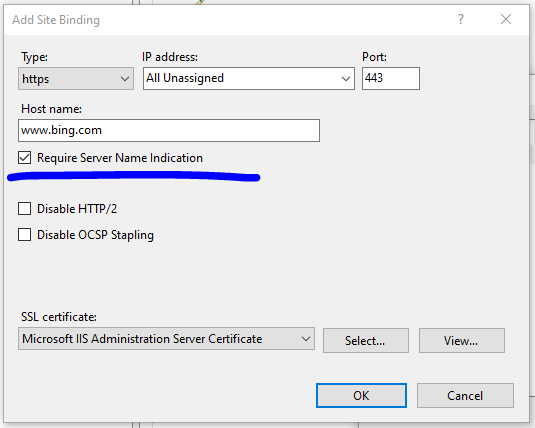
为了将多个证书绑定到每个域名的同一个端口,我们需要勾选下面的选项。
结果。
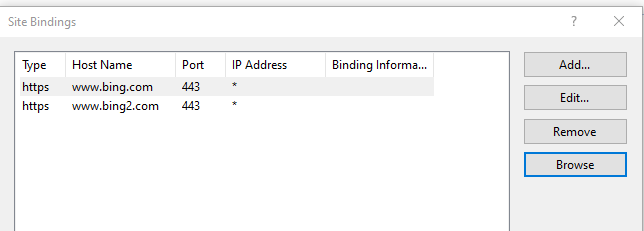
最后,我们可以应用我们喜欢的URL规则。
<system.webServer>
       <rewrite>
        <rules>
          <rule name="MyRule" enabled="true" stopProcessing="true">
            <match url="(.*)" ignoreCase="false" />
            <conditions logicalGrouping="MatchAll" trackAllCaptures="false">
                <add input="{http_host}" pattern="www.bing2.com" />
            </conditions>
            <action type="Redirect" url="https://www.bing.com" redirectType="Permanent" />
          </rule>
        </rules>
      </rewrite>
</system.webServer>
如果有什么需要我帮忙的,请随时通知我。
https://stackoverflow.com/questions/62656301
复制相似问题
腾讯云开发者

Copyright © 2013 - 2026 Tencent Cloud. All Rights Reserved. 腾讯云 版权所有
深圳市腾讯计算机系统有限公司 ICP备案/许可证号:粤B2-20090059  粤公网安备44030502008569号
腾讯云计算(北京)有限责任公司 京ICP证150476号 | 京ICP备11018762号