
如何获得帧内嵌套帧的总数
包含3个嵌套框架的Frame_top快照:
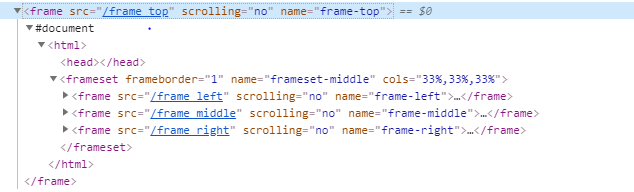
代码:
WebElement topframe = driver.findElement(By.xpath("//frame[@name='frame-top']"));
String frame1 =  driver.switchTo().frame(topframe).switchTo().frame("frame-left").findElement(By.xpath("//body")).getText();
System.out.println(frame1);
List<WebElement> nestedFrames = driver.switchTo().frame(topframe).findElements(By.tagName("frame"));
System.out.println(nestedFrames.size());
在顶部,您可以看到这个页面在框架(Frame_top)中有嵌套的框架。
使用第1-3行,我可以得到每个嵌套帧的文本。但是,我无法得到“Frame_top”中的帧数(第4-5行)。
如何获得"frame_top“中的帧总数?提前感谢
回答 1
Stack Overflow用户
发布于 2020-07-05 17:48:48
要获得父<frame>中嵌套帧的总数,您需要:
对于所需的帧的frameToBeAvailableAndSwitchToIt.
- Induce (),
- 为visibilityOfAllElementsLocatedBy()诱导WebDriverWait。
- 您可以使用以下的Locator Strategies之一:使用cssSelector和tagName的
- :
新WebDriverWait(驱动程序,新WebDriverWait(驱动程序,10).until(ExpectedConditions.visibilityOfAllElementsLocatedBy(By.tagName("frame"))).size()); )
10).until(ExpectedConditions.frameToBeAvailableAndSwitchToIt(By.xpath("//frame@name='frame-top'")));System.out.println(驱动程序,新WebDriverWait(驱动程序,10).until(ExpectedConditions.visibilityOfAllElementsLocatedBy(By.tagName("frame"))).size());))
参考文献
您可以在以下几个方面找到相关的讨论:
https://stackoverflow.com/questions/62719676
复制相似问题
腾讯云开发者

Copyright © 2013 - 2026 Tencent Cloud. All Rights Reserved. 腾讯云 版权所有
深圳市腾讯计算机系统有限公司 ICP备案/许可证号:粤B2-20090059  粤公网安备44030502008569号
腾讯云计算(北京)有限责任公司 京ICP证150476号 | 京ICP备11018762号