
当ImageSource需要字符串时,WPF旋转图像标签的源
当ImageSource需要字符串时,WPF旋转图像标签的源
提问于 2020-07-05 11:16:11
我有我的图像标签代码:
<Image Source="{Binding ImageSource}">
    <Image.LayoutTransform>
        <RotateTransform Angle="{Binding RotateAngle}" />
    </Image.LayoutTransform>
</Image> 我的工作是旋转图像标签。我从<RotateTransform Angle="{Binding RotateAngle}" />的视图模型中绑定了<RotateTransform Angle="{Binding RotateAngle}" />。
一切都很好:
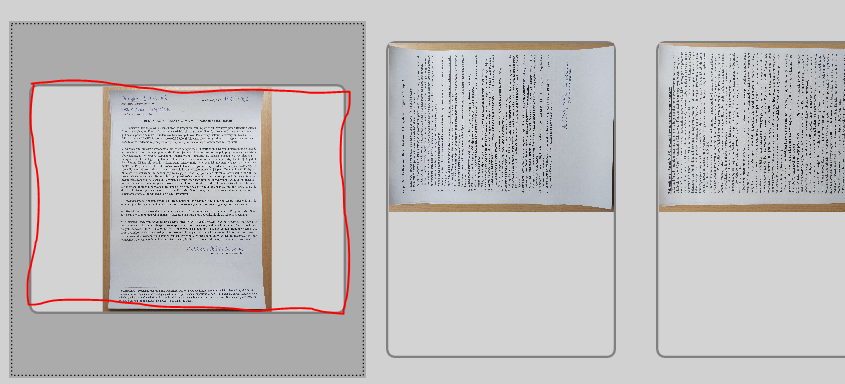
但是如何使Image标签保持在相同的位置(比如屏幕上的第二和第三位置)和只有Source of my Image翻转(Source="{Binding ImageSource})的位置?
我可以这么做:
将string)
- write加载为
System.Drawing.Bitmap(现在它是一个类似于: Bitmap.RotateFlip(rotateFlipType);ImageSource = ImageUtilities.BitmapToBitmapSource(Bitmap);
)的System.Drawing.Bitmap
- 从xaml和csharp代码中删除
RotateAngle(现在不需要)
一切都会好起来的:
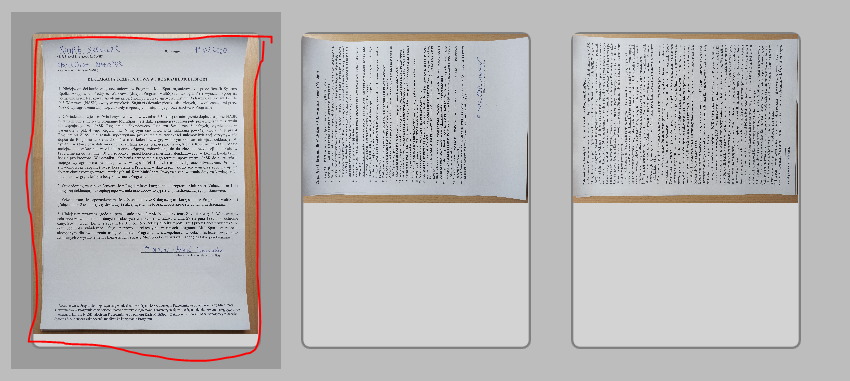
但在我的例子中,我不认为ImageSource是一个字符串,而不是Bitmap。如何只旋转Image Source而不创建Bitmap/BitmapImage/BitmapSource对象?
回答 1
Stack Overflow用户
回答已采纳
发布于 2020-07-05 11:59:50
如果您只想以90°的倍数旋转,您可以使用TransformedBitmap。
修改视图模型如下所示,并绑定到其RotatedImage属性如下
<Image Source="{Binding RotatedImage}">视图模型
public class ViewModel : INotifyPropertyChanged
{
    public event PropertyChangedEventHandler PropertyChanged;

    private BitmapSource imageSource;
    private double rotateAngle;

    public BitmapSource ImageSource
    {
        get { return imageSource; }
        set
        {
            imageSource = value;
            PropertyChanged?.Invoke(
                this, new PropertyChangedEventArgs(nameof(ImageSource)));
            PropertyChanged?.Invoke(
                this, new PropertyChangedEventArgs(nameof(RotatedImage)));
        }
    }

    public double RotateAngle
    {
        get => rotateAngle;
        set
        {
            rotateAngle = value;
            PropertyChanged?.Invoke(
                this, new PropertyChangedEventArgs(nameof(RotateAngle)));
            PropertyChanged?.Invoke(
                this, new PropertyChangedEventArgs(nameof(RotatedImage)));
        }
    }

    public BitmapSource RotatedImage
    {
        get
        {
            return new TransformedBitmap(
                ImageSource, new RotateTransform(RotateAngle));
        }
    }
}页面原文内容由Stack Overflow提供。腾讯云小微IT领域专用引擎提供翻译支持
原文链接:
https://stackoverflow.com/questions/62739931
复制相关文章
相似问题
腾讯云开发者

Copyright © 2013 - 2026 Tencent Cloud. All Rights Reserved. 腾讯云 版权所有
深圳市腾讯计算机系统有限公司 ICP备案/许可证号:粤B2-20090059  粤公网安备44030502008569号
腾讯云计算(北京)有限责任公司 京ICP证150476号 | 京ICP备11018762号