
将asp.net核心web与Blazor程序集(如角SPA )连接起来
我是Bazor web程序集的新手(Blazor Client)。
我已经创建了一个项目与Asp.net核心web与角应用程序。为了使用asp.net核心web和ar角,我可以使用以下默认功能
AddSpaStaticFiles UseSpa
我怎样才能像角度一样使用Blazor组件呢?或者如何用Blazor客户端取代现有的角度SPA?
有些链接提供了Blazor程序集预览的解决方案。但在最新版本中没有找到相同的功能。
https://csharp.christiannagel.com/2019/08/27/blazorserverandclient/
    app.UseClientSideBlazorFiles<Client.Startup>();

    app.UseEndpoints(endpoints =>
    {
      endpoints.MapDefaultControllerRoute();
      endpoints.MapFallbackToClientSideBlazor<Client.Startup>("index.html");
});回答 1
Stack Overflow用户
发布于 2020-07-14 02:42:19
请记住,创建Web组件应用程序是为了像其他SPA一样以角或响应的方式工作,这意味着在独立项目中创建视图演示文稿或Blazor Web Assembly应用程序,然后从一些Web服务(例如,在.net Core3.1中制造的Rest )获得数据,以创建,您只需转到File -> New -> Project -> Blazor WebAssembly App,不要选择ASP.NET core托管选项,这将像MVC项目一样直接将项目附加到.Net核心后端。
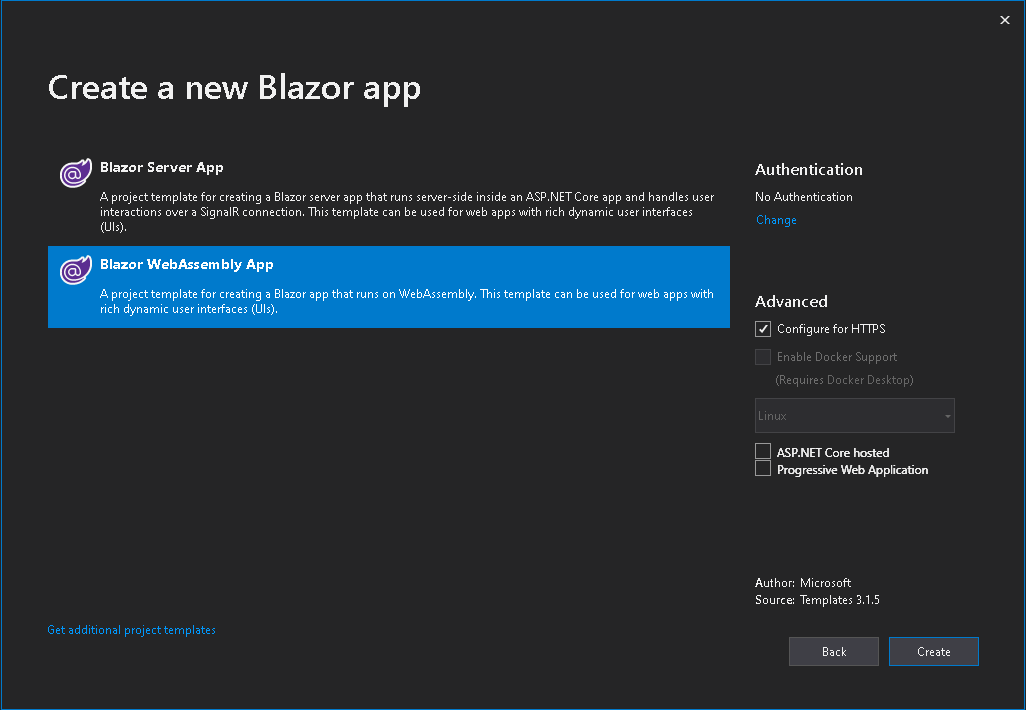
创建新项目后,只需使用内置的Http客户端库调用后端端点,就可以使用.Net HttpClient创建自己的库,并使用依赖注入将其注入到组件或页面中,如果您想创建自己的库,请遵循以下过程:
首先创建这个HttpObject:
public class HttpResultObject<T>
    {
        public bool IsSuccessful { get; set; }
        public HttpStatusCode HttpResultCode { get; set; }
        public T Result { get; set; }
    }
然后创建您的库类:
public class MyLibrary : IMyLibrary
{
    public string GetApiUri(string server)
    {

         if (server.Equals("auth"))
             return "https://localhost:8080/api/";

             return "https://localhost:8080/api/";
    }

    //Http Get Method Example
    public async Task<HttpResultObject<U>> SetAppMethodGetParametersAsync<U>(string server, string method, Dictionary<string, object> parameters, CancellationToken token) where U : class
    {
         string getParameters = string.Empty;

         foreach(var p in parameters)
         {
              if (p.Value.GetType() == typeof(string))
                  getParameters = getParameters.Equals(string.Empty) ? "?" + p.Value.ToString() : "&" + p.Value.ToString();
         }

         var uri = new System.Uri(GetApiUri(server) + method + "/" + getParameters) ;

         var response = await CallAppMethodGetAsync(uri, token);

         var result = new HttpResultObject<U>()
         {
             IsSuccessful = response.IsSuccessStatusCode,
             HttpResultCode = response.StatusCode,
             Result = JsonSerializer.Deserialize<U>(response?.Content?.ReadAsStringAsync()?.Result)
         };

         return result;
    }

    private async Task<HttpResponseMessage> CallAppMethodGetAsync(System.Uri uri, CancellationToken token)
    {
        Console.WriteLine(uri.ToString());

        HttpStatusCode responseStatus = HttpStatusCode.BadRequest;
        try
        {
            HttpClient client = new HttpClient
            {
                Timeout = TimeSpan.FromMilliseconds(240000)
            };

            HttpResponseMessage response = new HttpResponseMessage(responseStatus);
            HttpRequestMessage request = new HttpRequestMessage()
            {
                RequestUri = uri,
                Method = HttpMethod.Get
            };

            var authToken = this.GetLocalStorageItem("authToken");

            client.DefaultRequestHeaders.Accept.Add(new MediaTypeWithQualityHeaderValue("application/json"));

            if (authToken != null && authToken.GetType() == typeof(string))
                client.DefaultRequestHeaders.Authorization = new AuthenticationHeaderValue("Bearer", Convert.ToString(authToken));

            token.ThrowIfCancellationRequested();

            response = await client.SendAsync(request, token);

            responseStatus = response == null ? HttpStatusCode.BadRequest : response.StatusCode;

            if (response != null && responseStatus != HttpStatusCode.OK && responseStatus != HttpStatusCode.Accepted)
            {

                HttpResponseMessage result = new HttpResponseMessage(responseStatus)
                {
                    Content = new StringContent(response.Content?.ReadAsStringAsync()?.Result, Encoding.UTF8, "application/json")
                };


                return response;
            }

            return response;
        }
        catch (WebException webException)
        {

        }
        catch (System.Net.Sockets.SocketException socketException)
        {

        }
        catch (HttpRequestException httpRequestException)
        {

        }
        catch (ArgumentException argumentException)
        {

        }
        catch (System.Exception exception)
        {

        }

        return new HttpResponseMessage(responseStatus);
    }
}
现在创建您的ILibrary接口并声明实现的方法:
public interface IMyLibrary
{

     string GetApiUri(string server);

     Task<HttpResultObject<U>> SetAppMethodGetParametersAsync<U>(string server, string method, Dictionary<string, object> parameters, CancellationToken token) where U : class;

}
在startup.cs中的ConfigureServices方法中声明依赖项注入:
public void ConfigureServices(IServiceCollection services)
{
    services.AddTransient<IMyLibrary, MyLibrary>();
}
现在,如果您想在某个Razor组件或Page中使用您的库,只需按如下方式注入:
@inject IMyLibrary  _myLibrary

@code
{

    private async Task MyHttpGetCall()
    {
       var cts = new CancellationTokenSource();

       var result = await _myLibrary.SetAppMethodPostParametersAsync<HttpResultObject<MyCustomObject>>("auth", new Dictionary<string, object>(), cts.Token);

       if (result.IsSuccesful)
       {
          //whatever you want to do
       }
    }
}
这就是所有的!,这是2种方式连接您的前端网站开发的Blazor网站组装应用程序到您的后端,就像你做的角度或反应。
https://stackoverflow.com/questions/62760596
复制相似问题
腾讯云开发者

Copyright © 2013 - 2026 Tencent Cloud. All Rights Reserved. 腾讯云 版权所有
深圳市腾讯计算机系统有限公司 ICP备案/许可证号:粤B2-20090059  粤公网安备44030502008569号
腾讯云计算(北京)有限责任公司 京ICP证150476号 | 京ICP备11018762号