
dotnet发布概要文件忽略pubxml文件。
我有下面的pubxml文件,我是通过Visual 2019创建的:
<Project ToolsVersion="4.0" xmlns="http://schemas.microsoft.com/developer/msbuild/2003">
  <PropertyGroup>
    <WebPublishMethod>FileSystem</WebPublishMethod>
    <PublishProvider>FileSystem</PublishProvider>
    <LastUsedBuildConfiguration>Release</LastUsedBuildConfiguration>
    <LastUsedPlatform>Any CPU</LastUsedPlatform>
    <SiteUrlToLaunchAfterPublish />
    <LaunchSiteAfterPublish>True</LaunchSiteAfterPublish>
    <ExcludeApp_Data>False</ExcludeApp_Data>
    <TargetFramework>netcoreapp3.1</TargetFramework>
    <RuntimeIdentifier>win-x64</RuntimeIdentifier>
    <ProjectGuid>143a6329-27d9-474e-9521-835be634c293</ProjectGuid>
    <SelfContained>true</SelfContained>
    <publishUrl>bin\Release\netcoreapp3.1\publish\</publishUrl>
    <DeleteExistingFiles>True</DeleteExistingFiles>
  </PropertyGroup>
</Project>当我运行时,dotnet.exe publish src\MyProject.Web.sln -p:PublishProfile=Properties\PublishProfiles\ProductionPublish.pubxml发行版不包含任何内容,并在Debug文件夹上发布(调试生成)。为什么会发生这种情况,而pubxml却被忽略?
更新#1
Structure
src\MyProject\MyProject.csproj
src\MyProject.Utils\ect.Utils.csproj
src\MyProject.Web\MyProject.Web.csproj
src\MyProject.Web.sln
以及pubxml的路径
src\MyProject.Web\Properties\PublishProfiles\ProductionPublish.pubxml回答 3
Stack Overflow用户
发布于 2020-07-17 12:48:40
您需要使用以下命令:
dotnet build -c Release /p:DeployOnBuild=true /p:PublishProfile=FolderProfile- 我是
build,不是publish。 - 即使我的FolderProfile的配置被设置为发行版,我也必须包含
-c Release,因为在其他情况下,依赖的项目是使用调试配置构建的。 - 如果在没有
/p:DeployOnBuild=true的情况下调用,文件没有复制到目标位置。 - 仅仅是名称
FolderProfile-without扩展-就足够了 档案档案。或者你可以给出道路/p:PublishProfile=Properties\PublishProfiles\FolderProfile.pubxml
参见Microsoft中的文件夹发布示例。
Stack Overflow用户
发布于 2022-03-09 06:58:54
在VS2022和Core6上找到了一个解决方案,可以在没有指示CLI输出路径的情况下发布到特定文件夹。
我创建了一个名为IISC的配置文件
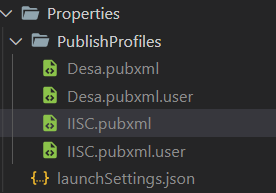
如果打开发布配置文件,您将看到PublishUrl属性如下所示
<PublishUrl>bin\Release\net6.0\publish\IISC</PublishUrl>在我的例子中,我发布到解决方案文件夹bin\releas.\IISC
诀窍是添加另一个名为PublishDir的属性
<PublishDir>bin\Release\net6.0\publish\IISC</PublishDir>现在,您可以使用以下内容发布:
dotnet publish -c Release /p:PublishProfile=IISC查找Bellow我的完整配置文件,并添加一个特定于此配置文件和项组的环境变量,以排除除appsettings.json和appsettings.IISC.json以外的所有应用程序设置
<?xml version="1.0" encoding="utf-8"?>
<!--
https://go.microsoft.com/fwlink/?LinkID=208121.
-->
<Project>
  <PropertyGroup>
    <ASPNETCORE_ENVIRONMENT>iisc</ASPNETCORE_ENVIRONMENT>
    <DeleteExistingFiles>true</DeleteExistingFiles>
    <ExcludeApp_Data>false</ExcludeApp_Data>
    <LaunchSiteAfterPublish>true</LaunchSiteAfterPublish>
    <LastUsedBuildConfiguration>Release</LastUsedBuildConfiguration>
    <LastUsedPlatform>Any CPU</LastUsedPlatform>
    <PublishProvider>FileSystem</PublishProvider>
    <PublishUrl>bin\Release\net6.0\publish\IISC</PublishUrl>
    <PublishDir>bin\Release\net6.0\publish\IISC</PublishDir>
    <WebPublishMethod>FileSystem</WebPublishMethod>
    <SiteUrlToLaunchAfterPublish />
    <TargetFramework>net6.0</TargetFramework>
    <ProjectGuid>3e4c25a6-2051-4ccc-a518-645d46d120dd</ProjectGuid>
    <SelfContained>false</SelfContained>
  </PropertyGroup>

    <ItemGroup>
        <Content Update="appsettings.*.json">
            <CopyToPublishDirectory>Never</CopyToPublishDirectory>
        </Content>
        <Content Update="appsettings.$(ASPNETCORE_ENVIRONMENT).json">
            <CopyToPublishDirectory>Always</CopyToPublishDirectory>
        </Content>
    </ItemGroup>
    <ItemGroup>
        <Folder Include="Properties\PublishProfiles\" />
    </ItemGroup>

</Project>Stack Overflow用户
发布于 2021-08-26 14:43:04
我要回答那些像我一样想要使用发布命令的人,因为它是为此而设计的。
根据关于选项发布命令的节,您可以使用选项configuration和output来解决问题:
dotnet publish -c Release -o "<where you want>" -p:PublishProfile=<your profile name>请注意,您希望"/Properties/PublishProfiles").的可以是绝对路径,而配置文件名只是配置文件的名称,没有"pubxml“,也没有相对路径(当且仅当配置文件在中)。
https://stackoverflow.com/questions/62787426
复制相似问题
腾讯云开发者

Copyright © 2013 - 2026 Tencent Cloud. All Rights Reserved. 腾讯云 版权所有
深圳市腾讯计算机系统有限公司 ICP备案/许可证号:粤B2-20090059  粤公网安备44030502008569号
腾讯云计算(北京)有限责任公司 京ICP证150476号 | 京ICP备11018762号