
Android独特的飞溅屏幕:如何使它填充屏幕?
我有一个独特的splash屏幕,名为splash.png,大小为1280x1280,150 don,我在React中使用了react-native-bootsplash,但我认为这并不重要。
我的问题很简单:如何使我的飞溅屏幕,在纵向模式,是充分的高度,而不是少,不多,并保持其纵横比,以便图片填充屏幕。就像css中的background-size: cover。或者像一个简单的<Image resizeMode="cover" style={{ height: '100%' }} />在反应本土化。
所以我有:
android/app/src/main/res/values/styles.xml
<resources>

    <!-- Base application theme. -->
    <style name="AppTheme" parent="Theme.AppCompat.Light.NoActionBar">
        <!-- Customize your theme here. -->
        <item name="android:textColor">#000000</item>
    </style>

    <!-- BootTheme should inherit from AppTheme -->
    <style name="BootTheme" parent="AppTheme">
        <!-- set the generated bootsplash.xml drawable as activity background -->
        <item name="android:windowBackground">@drawable/bootsplash</item>
        <item name="android:windowNoTitle">true</item>
    </style>

</resources>
android/app/src/main/res/drawable/bootsplash.xml
<?xml version="1.0" encoding="utf-8"?>
<layer-list xmlns:android="http://schemas.android.com/apk/res/android"
  android:orientation="vertical"
  android:layout_width="fill_parent"
  android:layout_height="fill_parent">
    <item>
      <!-- your logo, centered horizontally and vertically -->
      <bitmap
        android:layout_height="fill_parent"
        android:src="@drawable/splash"
        android:scaleType="centerInside"
        android:gravity="center" />
    </item>
</layer-list>和我的splash.png in android/app/src/main/res/drawable/splash.png
我尝试了很多东西,很多android:layout_height,android:scaleType和all的组合,最后我总是在屏幕高度上看到一个飞溅的图像的高度。
这里的编辑是原始图像,它的大小已经足够小,可以用于堆栈溢出。

这就是它在屏幕上的表现..。
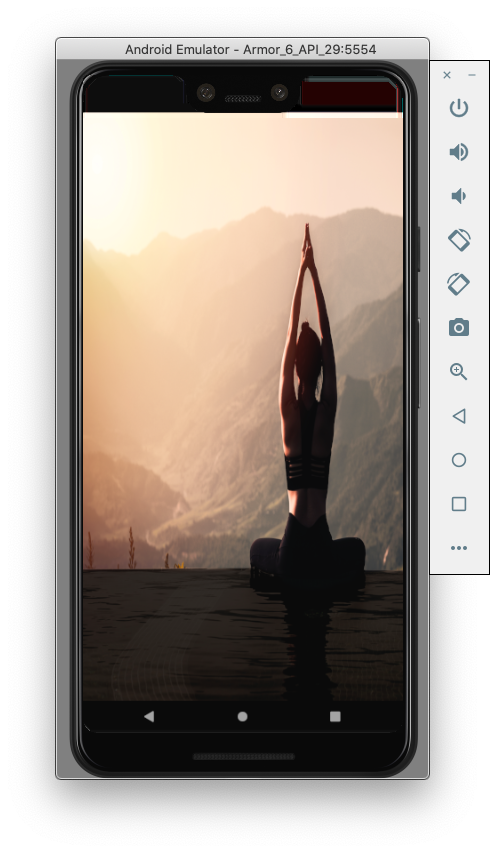
回答 5
Stack Overflow用户
发布于 2020-07-16 00:24:43
我认为这里的关键是android:gravity="fill"。
在我的应用程序中实现它时,我也遇到了同样的问题。
我的android/app/src/main/res/values/styles.xml
<resources>

<!-- Base application theme. -->
<style name="AppTheme" parent="Theme.AppCompat.Light.NoActionBar">
    <!-- Customize your theme here. -->
    <item name="android:textColor">#000000</item>
</style>
 <style name="BootTheme" parent="AppTheme">
<!-- set bootsplash.xml as background -->
<item name="android:background">@drawable/bootsplash</item>还有我的android/app/src/main/res/drawable/bootsplash.xml
<?xml version="1.0" encoding="utf-8"?>

<layer-list xmlns:android="http://schemas.android.com/apk/res/android" android:opacity="opaque">
    <item>
        <bitmap android:src="@mipmap/launch_screen" android:gravity="fill" />
    </item>
</layer-list>Stack Overflow用户
发布于 2020-07-22 06:22:40
对于中心图像和背景图像填充..。step1:在可绘制的res中创建一个可绘制的资源文件,step2:粘贴下面的代码,用背景图像替换为您的图像和徽标
<layer-list xmlns:android="http://schemas.android.com/apk/res/android">
<item android:drawable="@drawable/backgroundmapsneww"
    android:gravity="fill"
    />
<item
    android:height="100dp"
    android:width="100dp"
    android:gravity="center"
    android:drawable="@drawable/logo"
    >
</item>Stack Overflow用户
发布于 2020-07-20 22:13:03
飞溅屏幕实现作为一个启动主题,主要是为了显示标识,而不是完整的图像。您可以尝试为不同分辨率的图像进行九次修补,请使用以下网站:
http://ticons.fokkezb.nl/
上传您的图像(使用3:4纵横比,例如,1080x1920,以获得最佳效果),并选择->水花。它将为您生成9个补丁图像,然后您需要将其上传到您的res/drawable-hdpi、res/drawalbe-mdpi、res/drawable-xhdpi、res/drawable-xxhdpi和res/drawable-xxxhdpi目录。如果它们还不存在,您可以直接创建它们。
上传了9个补丁的图片后,就这样使用它:
<?xml version="1.0" encoding="utf-8"?>
<layer-list xmlns:android="http://schemas.android.com/apk/res/android">
<item>
    <bitmap
        android:src="@drawable/background"
        android:gravity="fill" />
</item>
</layer-list>我能够取得合理的结果使用您提供的图像。告诉我,如果这有帮助的话。这是你能得到的最好的。其他选项是创建您自己的SplashActivity,这将在短时间内为您显示该图像。
https://stackoverflow.com/questions/62809424
复制相似问题
腾讯云开发者

Copyright © 2013 - 2026 Tencent Cloud. All Rights Reserved. 腾讯云 版权所有
深圳市腾讯计算机系统有限公司 ICP备案/许可证号:粤B2-20090059  粤公网安备44030502008569号
腾讯云计算(北京)有限责任公司 京ICP证150476号 | 京ICP备11018762号