
无法将数据发布到数据库,而且Robo 3T (MongoDB/Mongoose/Express)中没有显示数据库
我是一个初学者web开发人员(目前处于学习阶段)。
因此,我试图做我的第一个小后端项目(一个todo应用程序),并遇到了一个数据库的问题。
我使用MongoDB和Mongoose作为数据库设置,使用express以NodeJS作为后端(使用ejs作为模板引擎)。
问题是我无法将内容发布到数据库中。当我提交表单时,它会产生错误(POST方法)。
并且在建立连接后,它没有显示在Robo3T上。
我不知道我哪里出了问题。请帮我解决这个问题。
已使用的文件附后。
目录结构
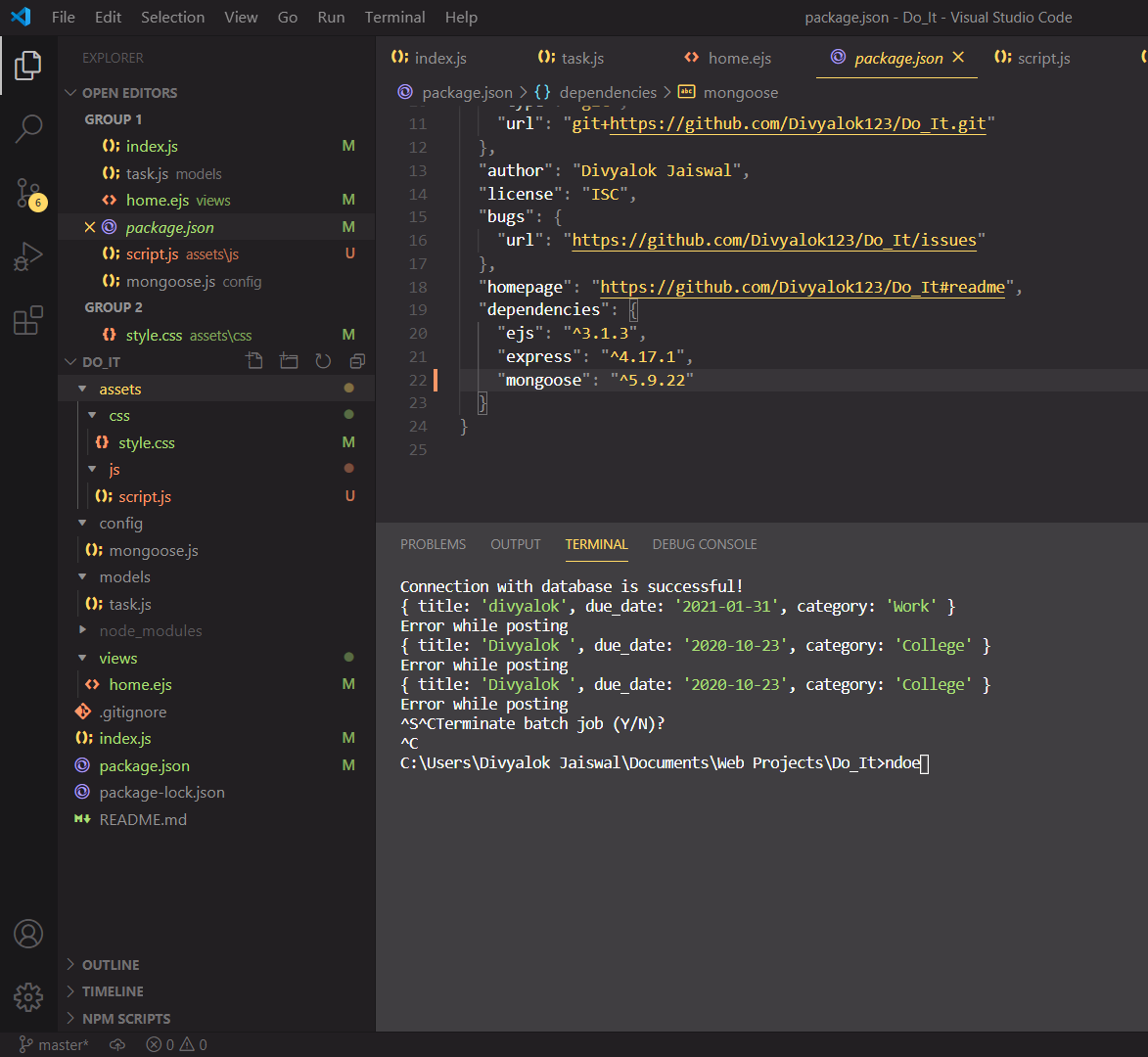
index.js
/** @format */

//requiring express
const express = require("express");

//setting up the port
const port = 1111;

//this module provides a way to work with directories and file paths
const path = require("path");

//requiring configuration for setting up the database to be accessed by mongoose
const db = require("./config/mongoose");

//requiring Task schema/model
//using this we will create entries and populate our collection
const Task = require("./models/task");
const { create } = require("./models/task");

//firing up express
const app = express();

app.set("view engine", "ejs");
app.set("views", path.join(__dirname, "views"));

app.use(express.urlencoded({ extended: true }));
app.use(express.static(__dirname + "/assets"));

let task_list = [
    {
        title: "College",
        due_date: "2012-12-13",
        category: "College"
    },
    {
        title: "Home",
        due_date: "2012-12-13",
        category: "Home"
    },
    {
        title: "Work",
        due_date: "2012-12-13",
        category: "Work"
    },
    {
        title: "Group",
        due_date: "2012-12-13",
        category: "Group"
    },
];

app.get("/", function (req, res) {
    Task.find({}, function (err, task) {
        if (err) {
            console.log("Error occured!");
            return;
        }
        return res.render("home", {
            tasks: task
        });
    });
});

app.post("/new-task", function (req, res) {
    console.log(req.body);
    Task.create(
        {
            title: req.body.title,
            due_date: req.body.due_date,
            category: req.body.category
        },
        function (err, newt) {
            if (err) {
                console.log("Error while posting");
                return;
            }
            console.log("Newtask created!: ", newt);
            return res.redirect("back");
        }
    );
});

//creating a listener to the specified port
app.listen(port, function (err) {
    if (err) {
        console.log(`Some error occured at port: ${port}
        Please try again later`);

        return;
    }
    console.log("Yay! Server is running at @ port:", port);
});注意:i使用task_list数组来检查post是否工作,并且它正在工作。但是,当我使用持久数据库(MongoDB)尝试它时,就会出现问题。
mongoose.js (用于与数据库的连接)
//requiring mongoose to set up connection with database
const mongoose = require('mongoose');

//setting up connection
mongoose.connect('mongodb://localhost:27017/tasks_db', {useNewUrlParser: true, useUnifiedTopology: true});

//to check if the connection is successful or some error occured
const db = mongoose.connection;
db.on('error', console.error.bind(console, "!! Error setting up connection with database !!"));
db.once('open', function() {
    console.log("Connection with database is successful!");
});
task.js (包含模式)
//requiring mongoose
const mongoose = require('mongoose');

//creating the schema for the document of collection
const taskSchema = new mongoose.Schema({
    title: {
        type: String,
        required: true
    },
    due_data: {
        type: Date,
        required: true,
        get: value => value.toDateString()
    },
    category: {
        type: String,
    }
});

//compiling our schema into a model (a class for interacting with MongoDB) (an instance of model is called a document)
const Task = mongoose.model('Task', taskSchema);
module.exports = Task;
home.ejs (包含视图)
<!DOCTYPE html>
<html>

<head>
    <meta charset="UTF-8" />
    <meta name="viewport" content="width=device-width, initial-scale=1.0" />
    <title>Your TO-DO List</title>
    <script src="https://kit.fontawesome.com/fcba9de078.js" crossorigin="anonymous"></script>
    <link rel="stylesheet" href="/css/style.css" />
</head>

<body class="toggler">
    <!-- The main box containing the list and the form to add or remove item -->
    <div id="todo-box-div" class="flex-row sizi">
        <!-- div containing form for adding items to todo-list -->
        <div id="todo-form-div" class="flex-column sizi">
            <!-- div header -->
            <h1>Do It!</h1>
            <!-- form for adding items -->
            <form action="/new-task" method="POST" id="to-do-form" class="flex-column up-down">
                <input id="title" name="title" class="bottom-b font-4" type="text" placeholder="I have to do this..." required />
                <!-- <textarea id="description" class="bottom-b font-4" type="text"></textarea> -->
                <!-- date and category will be inline for bigger widths -->
                <div id="input-inline" class="flex-row">
                    <input id="date" name="due_date" min="2020-07-20" class="bottom-b font-2" type="date" required />
                    <select id="category" name="category" class="bottom-b font-2 dropdown" type="text">
                        <option value="default" selected disabled>Choose a category</option>
                        <option value="Work">Work</option>
                        <option value="College">College</option>
                        <option value="Home">Home</option>
                        <option value="Group">Group</option>
                    </select>
                </div>
                <!-- button for adding item -->
                <button type="submit" class="font-4" id="add"><i class="fas fa-plus"></i>Add to list</button>
            </form>
        </div>
        <!-- div containing list items (scrollable) and button to delete items -->
        <div id="todo-list-div" class="flex-column sizi">
            <!-- button for deleting items -->
            <button type="submit" class="font-4" id="delete"><i class="far fa-trash-alt"></i>Done</button>
            <!-- list containing todo items -->
            <ul>
                <% for(let a of tasks) { %>
                <li>
                    <div class="list-item">
                        <input type="checkbox" class="pointer" />
                        <div class="name-date font-3">
                            <p><%= a.title %></p>
                            <p><i class="far fa-calendar-alt"></i><%= a.due_date %></p>
                        </div>
                        <div id="redundant"></div>
                        <div class="categ-button font-2 disp"><%= a.category %></div>
                    </div>
                </li>
                <% } %>
            </ul>
        </div>
    </div>
    <script src="/js/script.js"></script>
</body>

</html>注意:表单在todo- form -div下面的todo-box-div.
示例错误:
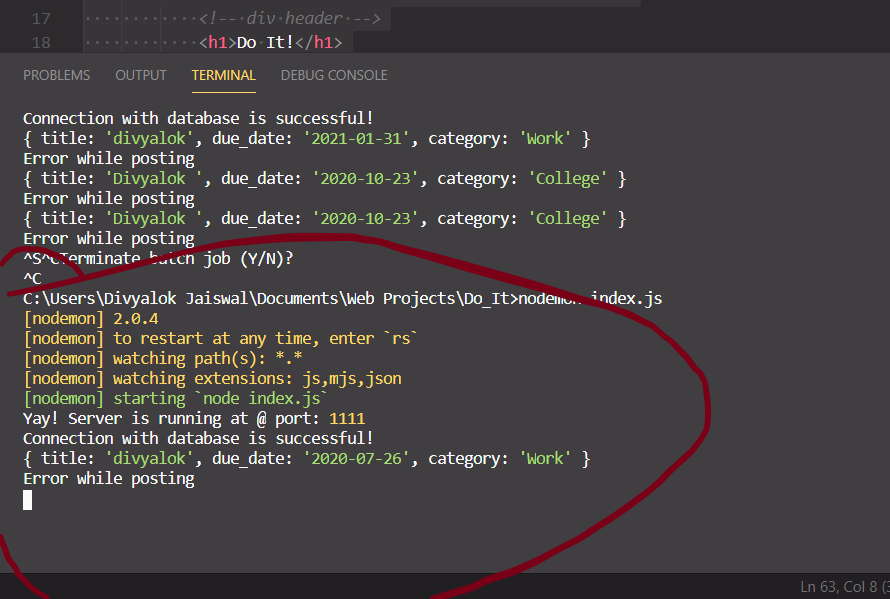
在这里,如果您看到它是打印“错误,同时张贴”在提交表单。req.body正在印刷。此错误消息位于app.post()方法在index.js中的错误处理中。
我被困得太久了,决定把它贴在这里,并得到一些指导。请帮我解决这个问题。
回答 1
Stack Overflow用户
发布于 2020-07-09 05:50:09
在post方法中尝试下面的方法而不是Task.create(),并让我知道它是否有效
const task = new Task({title: "Work",
        due_date: "2012-12-13",
        category: "Work"})
task.save();https://stackoverflow.com/questions/62808085
复制相似问题
腾讯云开发者

Copyright © 2013 - 2026 Tencent Cloud. All Rights Reserved. 腾讯云 版权所有
深圳市腾讯计算机系统有限公司 ICP备案/许可证号:粤B2-20090059  粤公网安备44030502008569号
腾讯云计算(北京)有限责任公司 京ICP证150476号 | 京ICP备11018762号