
在Android中必须用AppBarLayout包装工具栏吗?
在Android中必须用AppBarLayout包装工具栏吗?
提问于 2020-07-13 06:02:09
代码A来自项目建筑样本,工具栏使用AppBarLayout包装。
我删除了AppBarLayout,得到了代码B,代码B和代码A一样工作良好。
在Android中必须用AppBarLayout包装工具栏吗?
码A (tasks_act.xml)
<androidx.drawerlayout.widget.DrawerLayout
    xmlns:android="http://schemas.android.com/apk/res/android"
    xmlns:app="http://schemas.android.com/apk/res-auto"
    xmlns:tools="http://schemas.android.com/tools"
    android:id="@+id/drawer_layout"
    android:layout_width="match_parent"
    android:layout_height="match_parent"
    tools:context=".tasks.TasksActivity"
    tools:openDrawer="start">

    <LinearLayout
        android:layout_width="match_parent"
        android:layout_height="match_parent"
        android:orientation="vertical">

        <com.google.android.material.appbar.AppBarLayout
            android:layout_width="match_parent"
            android:layout_height="wrap_content">

            <androidx.appcompat.widget.Toolbar
                android:id="@+id/toolbar"
                android:layout_width="match_parent"
                android:layout_height="wrap_content"
                android:minHeight="?attr/actionBarSize"
                android:theme="@style/Toolbar"
                app:popupTheme="@style/ThemeOverlay.AppCompat.Light" />
        </com.google.android.material.appbar.AppBarLayout>

        <fragment
            android:id="@+id/nav_host_fragment"
            android:name="androidx.navigation.fragment.NavHostFragment"
            android:layout_width="match_parent"
            android:layout_height="match_parent"

            app:defaultNavHost="true"
            app:navGraph="@navigation/nav_graph" />

    </LinearLayout>

    <!-- Navigation Drawer -->
    <com.google.android.material.navigation.NavigationView
        android:id="@+id/nav_view"
        android:layout_width="wrap_content"
        android:layout_height="match_parent"
        android:layout_gravity="start"
        android:fitsSystemWindows="true"
        app:headerLayout="@layout/nav_header"
        app:itemIconTint="@drawable/drawer_item_color"
        app:itemTextColor="@drawable/drawer_item_color"
        app:menu="@menu/drawer_actions" />

</androidx.drawerlayout.widget.DrawerLayout>
码B (tasks_act.xml)
<androidx.drawerlayout.widget.DrawerLayout
    xmlns:android="http://schemas.android.com/apk/res/android"
    xmlns:app="http://schemas.android.com/apk/res-auto"
    xmlns:tools="http://schemas.android.com/tools"
    android:id="@+id/drawer_layout"
    android:layout_width="match_parent"
    android:layout_height="match_parent"
    tools:context=".tasks.TasksActivity"
    tools:openDrawer="start">

    <LinearLayout
        android:layout_width="match_parent"
        android:layout_height="match_parent"
        android:orientation="vertical">

       <androidx.appcompat.widget.Toolbar
           android:id="@+id/toolbar"
           android:layout_width="match_parent"
           android:layout_height="wrap_content"
           android:minHeight="?attr/actionBarSize"
           android:theme="@style/Toolbar"
           app:popupTheme="@style/ThemeOverlay.AppCompat.Light" />


        <fragment
            android:id="@+id/nav_host_fragment"
            android:name="androidx.navigation.fragment.NavHostFragment"
            android:layout_width="match_parent"
            android:layout_height="match_parent"

            app:defaultNavHost="true"
            app:navGraph="@navigation/nav_graph" />

    </LinearLayout>

    <!-- Navigation Drawer -->
    <com.google.android.material.navigation.NavigationView
        android:id="@+id/nav_view"
        android:layout_width="wrap_content"
        android:layout_height="match_parent"
        android:layout_gravity="start"
        android:fitsSystemWindows="true"
        app:headerLayout="@layout/nav_header"
        app:itemIconTint="@drawable/drawer_item_color"
        app:itemTextColor="@drawable/drawer_item_color"
        app:menu="@menu/drawer_actions" />

</androidx.drawerlayout.widget.DrawerLayout>回答 2
Stack Overflow用户
回答已采纳
发布于 2020-07-13 06:07:51
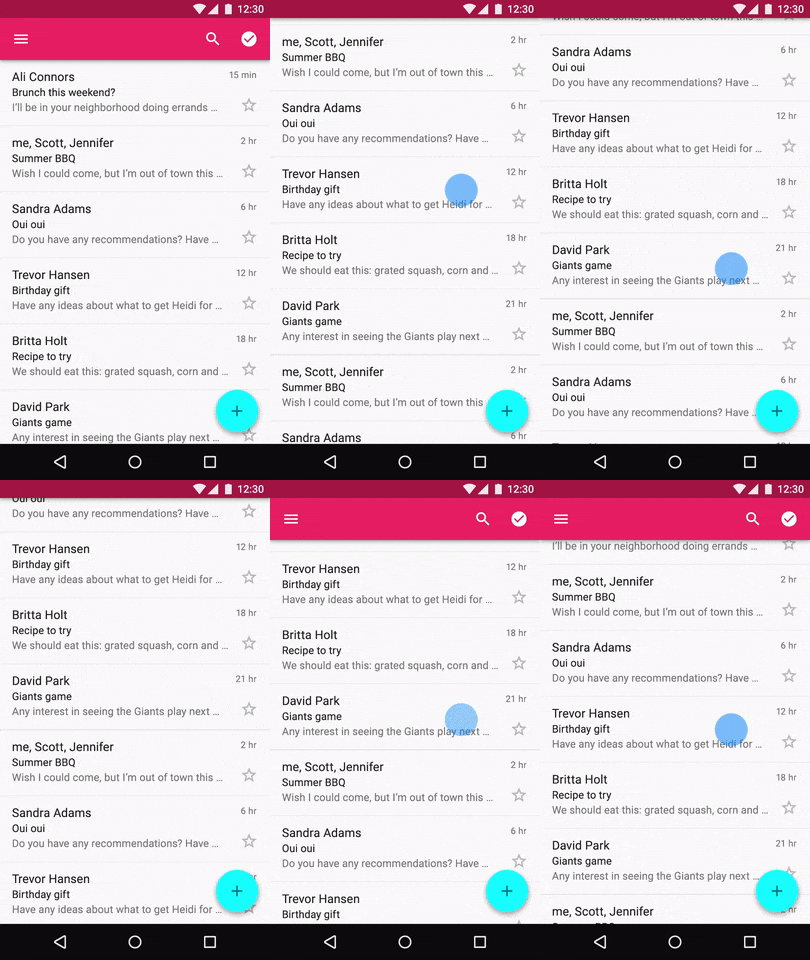
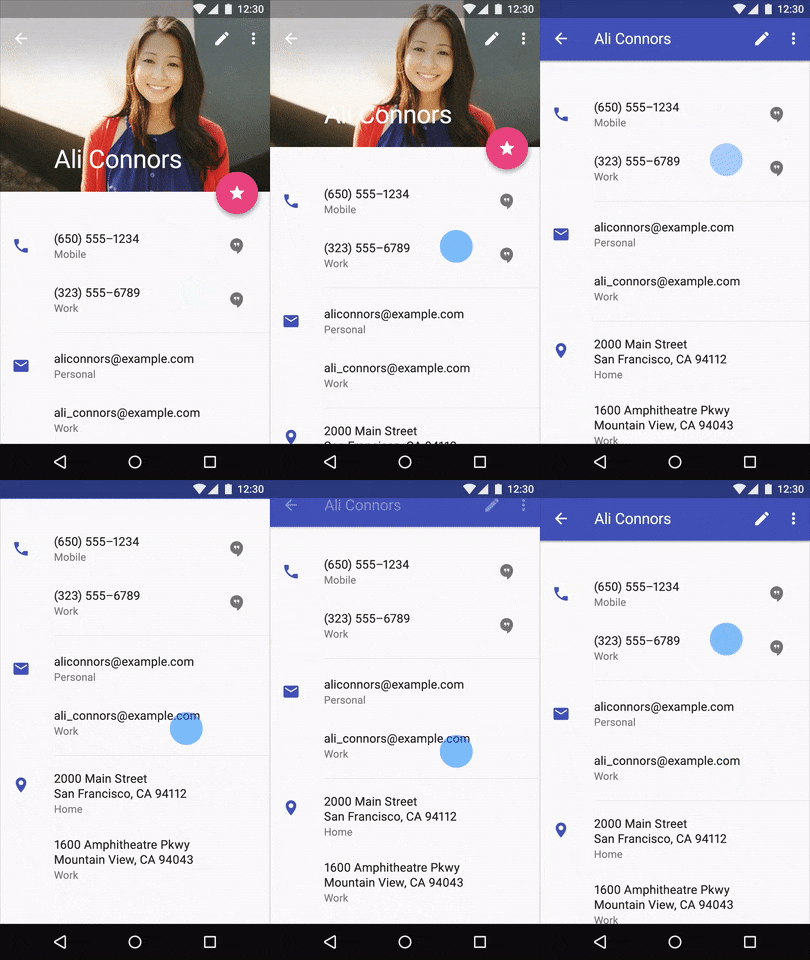
你不能在工具栏上有滚动效果。所以使用AppBarLayout,请看下面的图片,您可以通过只使用AppBarLayout来实现。
Stack Overflow用户
发布于 2020-07-13 06:08:46
Toolbar只是一个普通的View,它可以放置在任何您想要的地方,甚至很少放在一个XML中。AppBarLayout用于包装Toolbar (或其他View,例如TabLayout),并在滚动容器(如ScrollView或RecyclerView )之上添加一些滚动行为更改的可能性(那时您可能希望使用Nested版本)。
查看AppBarLayout文档顶部的摘要中列出的嵌套类-所有这些都与滚动有关(例如,OnOffsetChangedListener或ScrollingViewBehavior)
页面原文内容由Stack Overflow提供。腾讯云小微IT领域专用引擎提供翻译支持
原文链接:
https://stackoverflow.com/questions/62870040
复制相关文章
相似问题
腾讯云开发者

Copyright © 2013 - 2026 Tencent Cloud. All Rights Reserved. 腾讯云 版权所有
深圳市腾讯计算机系统有限公司 ICP备案/许可证号:粤B2-20090059  粤公网安备44030502008569号
腾讯云计算(北京)有限责任公司 京ICP证150476号 | 京ICP备11018762号