
Photoshop脚本:如何导出PathItem名称
我正拼命地想弄清楚如何为photoshop编写一个js,它只输出一个特定的路径,而不是在我的PS文档中的“路径”选项卡下的所有包含的路径导出到Illustrator文件中。例如,在图片中:
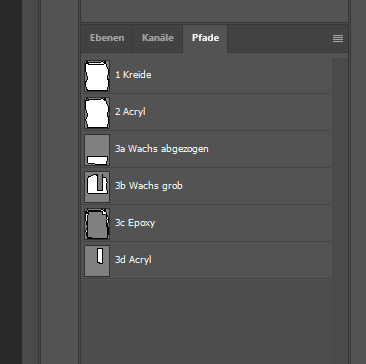
我只想通过使用脚本导出名为"2 Acryl“的路径。我已经有一个工作脚本,可以将所有路径导出到一个AI文件中。我只是不知道如何引用单个路径的名称并导出它。
function unSaved() {
try {
    activeDocument.path;
    /* Finish Unsaved Document Error Check - Part A: Try */

    /* Main Code Start */

    /* Based on the following topic thread:
    https://community.adobe.com/t5/photoshop/exporting-all-paths-to-illustrator-error/m-p/8796143 */

    var doc = app.activeDocument;
    var docPath = doc.path;
    var docName = doc.name.replace(/\.[^\.]+$/, '');
    var newFile = File(docPath + '/' + docName + '_Paths' + '.ai');
    var expOptions = new ExportOptionsIllustrator;
    expOptions.path = IllustratorPathType.ALLPATHS;
    doc.exportDocument(newFile, ExportType.ILLUSTRATORPATHS, expOptions);
    // alert('All Photoshop paths have been exported as a single Illustrator file in:' + '\r' + docPath);

    /* Main Code Finish */

    /* Start Unsaved Document Error Check - Part B: Catch */
} catch (err) {
    alert('An image must be both open and/or saved before running this script!')
}
}
回答 2
Stack Overflow用户
发布于 2020-07-14 19:51:58
这可以通过根据您的需要更改ExportOptionsIllustrator对象来实现。
var expOptions = new ExportOptionsIllustrator;要导出单个路径,必须将ExportOptionsIllustrator.path属性设置为
expOptions.path = IllustratorPathType.NAMEDPATH;在此之后,您可以使用以下方法选择所需路径的名称:
expOptions.pathName = '2 Acryl';编辑:
显然,由于Photoshop本身的错误,导出选项IllustratorPathType.NAMEDPATH被忽略了。Photoshop将始终导出所有路径,无论发生什么。
不过,这里有个麻烦的解决办法。Photoshop脚本提供了PathItems对象,它包含文档中所有路径的列表。所以我的想法是:
document
- iterate
- 在克隆
- 中的所有路径上创建当前
的克隆,删除除希望保持
- 作为插图文件导出克隆路径以外的所有路径,关闭克隆,而不保存
<代码>G 220
下面是更新的脚本:
try {
    var doc = app.activeDocument;
    var docPath = doc.path;
    var docName = doc.name.replace(/\.[^\.]+$/, '');
    var newFile = File(docPath + '/' + docName + '_Paths' + '.ai');
    var expOptions = new ExportOptionsIllustrator;

    var duplicate = app.activeDocument.duplicate('duplicate');

    for(a = duplicate.pathItems.length-1; a>=0; a--)
    {
        if(duplicate.pathItems[a].name != '2 Acryl')
        {
            duplicate.pathItems[a].remove();
        }
    }

    duplicate.exportDocument(newFile, ExportType.ILLUSTRATORPATHS, expOptions);
    duplicate.close(SaveOptions.DONOTSAVECHANGES);

} catch (err) {
    alert('An image must be both open and/or saved before running this script!')
}
Edit2:
如果这仍然失败,还有最后的办法。Photoshop有一个内置功能,可以将路径导出到Illustrator。只需转到:
文件*导出*路径->插图.
并在弹出对话框中选择您想要的路径。
Stack Overflow用户
发布于 2020-07-16 10:51:46
为了记录在案:@obscure的第一个答案编辑工作得很好。如果它不适用于确切的代码,请尝试在:duplicate.exportDocument(newFile, ExportType.ILLUSTRATORPATHS, expOptions);之后添加延迟
在关闭ps文件之前,或者只是不要执行关闭ps文档的代码行。
再次感谢!
https://stackoverflow.com/questions/62902796
复制相似问题
腾讯云开发者

Copyright © 2013 - 2026 Tencent Cloud. All Rights Reserved. 腾讯云 版权所有
深圳市腾讯计算机系统有限公司 ICP备案/许可证号:粤B2-20090059  粤公网安备44030502008569号
腾讯云计算(北京)有限责任公司 京ICP证150476号 | 京ICP备11018762号