
下移:菜单应该关闭,直到找不到结果。
下移:菜单应该关闭,直到找不到结果。
提问于 2020-07-15 08:07:32
我面临着Reactjs前端代码库的问题。我们使用一个库名反应-最自以为是来实现自动完成功能,但是lead已经决定从反应-最自以为是转向下移。我阅读了这方面的文档,并使用useCombobox钩子实现了这一点,但他提出了一些问题,并告诉我在没有任何指导的情况下解决这些问题。我为这些问题创建了一个清晰的版本。
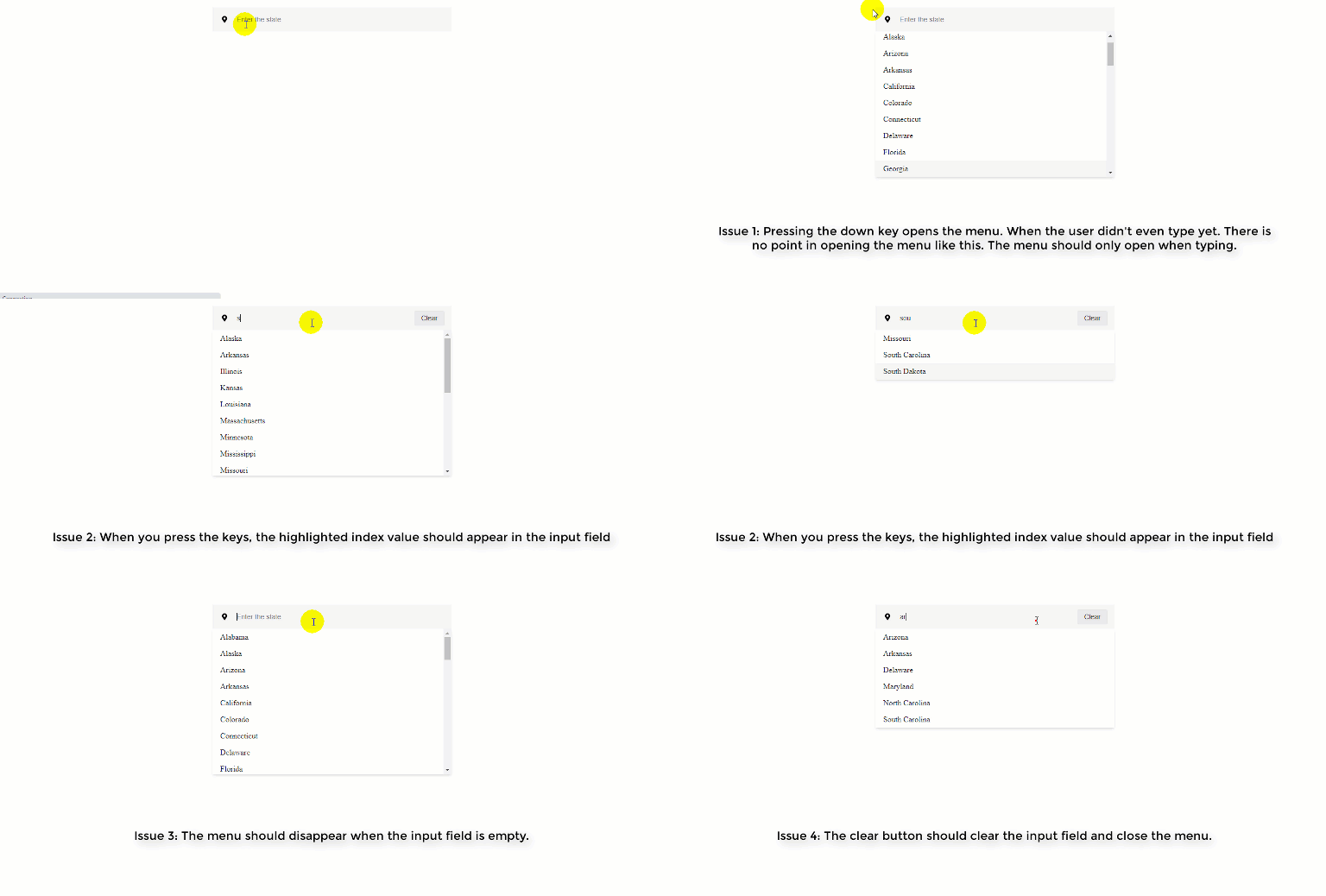
首先,我正在解析issue-4 ,清除按钮应该清除输入字段并关闭菜单。但是,当我单击“清除”按钮时,输入字段为空,但菜单仍处于打开状态。你能给我一些关于如何在下移中做这些事情的指导吗?
下面是来自对象数组的代码框链接过滤数据:在这里查看代码沙箱
App.js
const App = () => {

    // Array of objects
    const [inputItems, setInputItems] = useState(data);

    // State for all primitive types
    const [value, setValue] = useState('');


    /**
     * It will returns the new filtered array.
     * @param data Array<Object> - The array to iterate over
     * @param inputValue {string} - Your input value
     * @return Array<Object> - Returns the new filtered array
     */
    const filterByName = (data, inputValue) => {
        return data.filter(item => {
            return item.name.toLowerCase().indexOf(inputValue.toLowerCase()) !== -1;
        });
    };

    // props for the combobox
    const comboboxProps = {
        className: 'search has-icons-left has-buttons-right'
    };

    // props for the input
    const inputProps = {
        type: 'text',
        className: 'form-control',
        placeholder: 'Enter the state'
    };

    // props for the menu
    const menuProps = {
        className: 'menu'
    };


    // useComboBox
    const {
        isOpen,
        getComboboxProps,
        getInputProps,
        getMenuProps,
        getItemProps,
        highlightedIndex,
        selectItem,
    } = useCombobox({
        items: inputItems,
        onInputValueChange: ({inputValue}) => {
            setValue(inputValue);
            setInputItems(filterByName(data, inputValue));
        },
        itemToString: (item) => item ? item.name : '',
    });


    return (
        <div className="app">
            <div {...getComboboxProps(comboboxProps)}>
                <input {...getInputProps(inputProps)} />
                <span className="icon is-left"><MarkerIcon/></span>
                {(typeof value === 'string' && value.length > 0) ?
                    (<span className="button is-right">
                        <button className="btn btn-clear" onClick={() => selectItem(null)}>Clear</button>
                    </span>) : null}
                {/* Suggestions */}
                <ul {...getMenuProps(menuProps)}>
                    {isOpen && inputItems.map((item, index) => (
                        <li key={index} {...getItemProps({item, index})}
                            style={highlightedIndex === index ? {backgroundColor: "#f5f5f5"} : null}>
                            {item.name}
                        </li>
                    ))}
                </ul>
            </div>
        </div>
    );
};

export default App;回答 1
Stack Overflow用户
回答已采纳
发布于 2020-07-15 09:18:38
#1,如果没有输入值,则防止打开:
<input {
  ...getInputProps({
    ...inputProps,
    onKeyDown: e => {
      if(!value) {
        return e.nativeEvent.preventDownshiftDefault = true
      }
    }
  })
} />#2可能很棘手,因为如果您想修改状态,筛选器就会被激活。我建议对它们的输入进行一些布局,如果inputItems[highlightedIndex]的话,highlightedIndex > -1会显示什么?
  const completeValue =
    highlightedIndex > -1 ? inputItems[highlightedIndex].name : null;

 return (
   <div className="app">
     ...
{
  completeValue
  ? <input {...getInputProps(inputProps)} value={completeValue} />
    : (
      <input
        {...getInputProps({
          ...inputProps,
          onKeyDown: e => {
            if (!value) {
              return (e.nativeEvent.preventDownshiftDefault = true);
            }
          }
        })}
      />
    )
}
     ...
   </div>
 )
#3,关闭建议框:
  const {
    isOpen,
    getComboboxProps,
    getInputProps,
    getMenuProps,
    getItemProps,
    highlightedIndex,
    closeMenu, // <= use this inbuilt functionality
    selectItem
  } = useCombobox({

And at the button click just call it by manually:

    <button
      className="btn btn-clear"
      onClick={() => {
        selectItem(null);
        setValue("");
        closeMenu();
      }}
    >
      Clear
</button>页面原文内容由Stack Overflow提供。腾讯云小微IT领域专用引擎提供翻译支持
原文链接:
https://stackoverflow.com/questions/62910311
复制相关文章
相似问题
腾讯云开发者

Copyright © 2013 - 2026 Tencent Cloud. All Rights Reserved. 腾讯云 版权所有
深圳市腾讯计算机系统有限公司 ICP备案/许可证号:粤B2-20090059  粤公网安备44030502008569号
腾讯云计算(北京)有限责任公司 京ICP证150476号 | 京ICP备11018762号