
devops管道yaml忽略DotNetCoreCLI@2任务的失败测试
devops管道yaml忽略DotNetCoreCLI@2任务的失败测试
提问于 2020-07-17 11:16:48
我有一个devops管道,它运行DotNetCoreCLI@2任务来恢复、构建和测试。
在这种情况下,一个或多个测试失败,我希望管道继续并发布为devops发布做好准备的输出。
最初,对于失败的测试,整个管道执行将报告“构建失败”。在构建管道顶部添加以下内容后,yaml:
  jobs:
  - job: Build
    continueOnError: true
我现在得到“部分成功的构建”。
但是,当我检查管道执行摘要页面时,我看到有0件工件:

即使测试失败,我如何使管道发布?
为了完整起见,完整的yaml如下
    stages:
- stage: Build
  jobs:
  - job: Build
    continueOnError: true

    pool:
      name: Hosted Windows 2019 with VS2019
      demands:
      - msbuild
      - visualstudio

    variables:
      solution: '**/*.sln'
      projects: '**/Interfaces.Avaloq.Presentation.AzureFunctions.csproj'
      unitTestProjects: '**/*Testing.Unit*/*.csproj'
      integrationTestProjects: '**/*Testing.Integration*/*.csproj'
      buildPlatform: 'Any CPU'
      buildConfiguration: 'Debug'

    steps:
    - script: |
    - task: DotNetCoreCLI@2
      displayName: Restore Functions
      inputs:
        command: restore
        projects: '$(projects)'
        feedsToUse: config
        nugetConfigPath: nuget.config
    - task: DotNetCoreCLI@2
      displayName: Build Functions
      inputs:
        command: build
        projects: '$(projects)'
        arguments: '--configuration $(buildConfiguration)'
    - task: DotNetCoreCLI@2
      displayName: Restore Unit Tests
      inputs:
        command: restore
        projects: '$(unitTestProjects)'
        feedsToUse: config
        nugetConfigPath: nuget.config
    - task: DotNetCoreCLI@2
      displayName: Build Unit Tests
      inputs:
        command: build
        projects: '$(unitTestProjects)'
        arguments: '--configuration $(buildConfiguration)'
    - task: DotNetCoreCLI@2
      displayName: Run Unit Tests
      inputs:
        command: 'test'
        projects: '$(unitTestProjects)'
        arguments: --filter Category!=ExcludeFromBVT
        testRunTitle: 'Unit Tests'
        feedsToUse: config
        nugetConfigPath: nuget.config

    - task: AzurePowerShell@4
      inputs:
        azureSubscription: 'Design Subscription (xxx)'
        ScriptType: 'InlineScript'
        Inline: |
          Set-Location $env:AGENT_WORKFOLDER
          Get-ChildItem -Recurse
        azurePowerShellVersion: 'LatestVersion'

    - task: DotNetCoreCLI@2
      displayName: Publish
      inputs:
        command: publish
        arguments: '--configuration $(buildConfiguration) --output $(build.artifactstagingdirectory)'
        projects: '$(projects)'
        publishWebProjects: false
        zipAfterPublish: true

    - task: PublishBuildArtifacts@1
      displayName: 'Publish Artifact'
      inputs:
        PathtoPublish: '$(build.artifactstagingdirectory)'
      condition: succeededOrFailed()

    - task: PublishBuildArtifacts@1
      displayName: 'Publish Artifact: ArmTemplate'
      inputs:
        PathtoPublish: Interfaces.Avaloq.Deployment
ArtifactName: RGDeploy回答 1
Stack Overflow用户
回答已采纳
发布于 2020-07-17 13:12:31
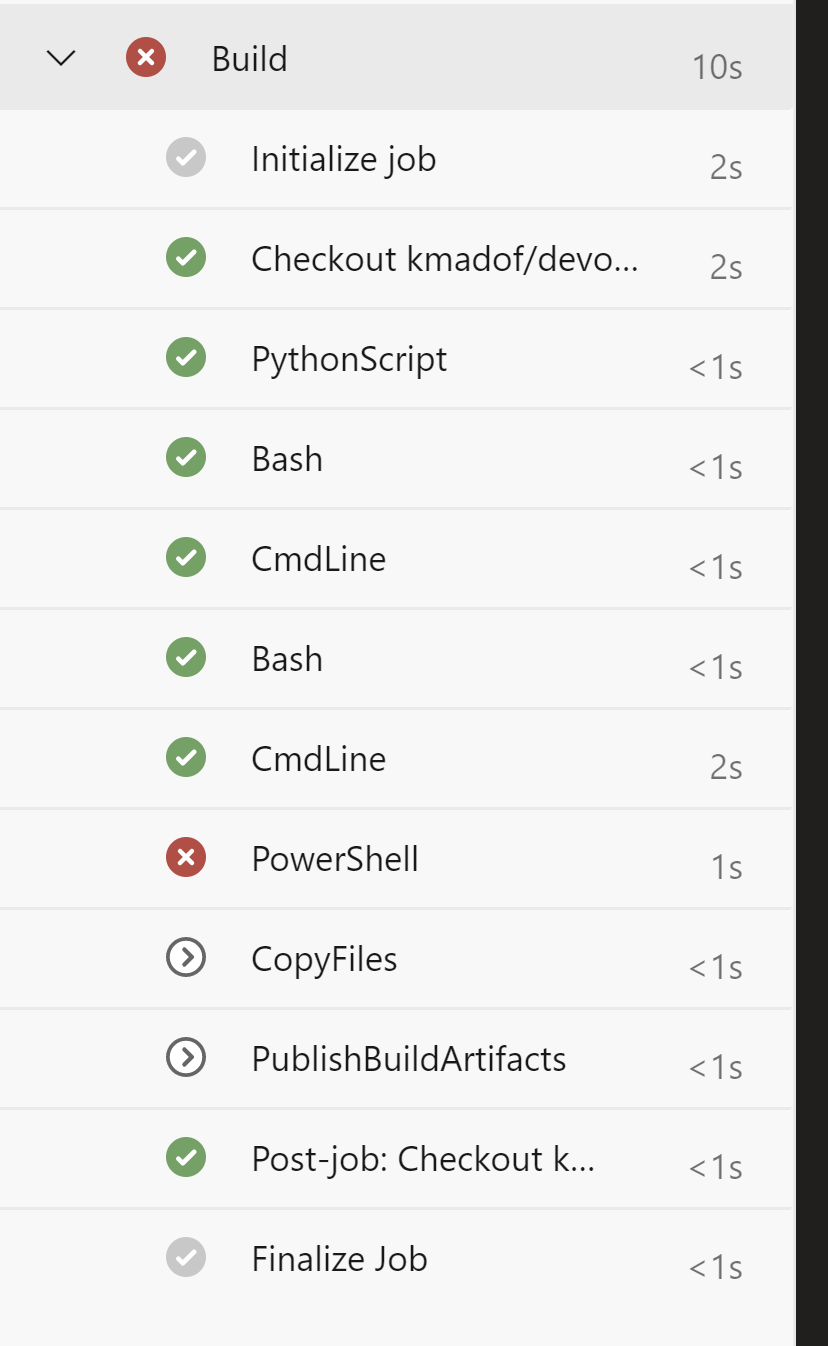
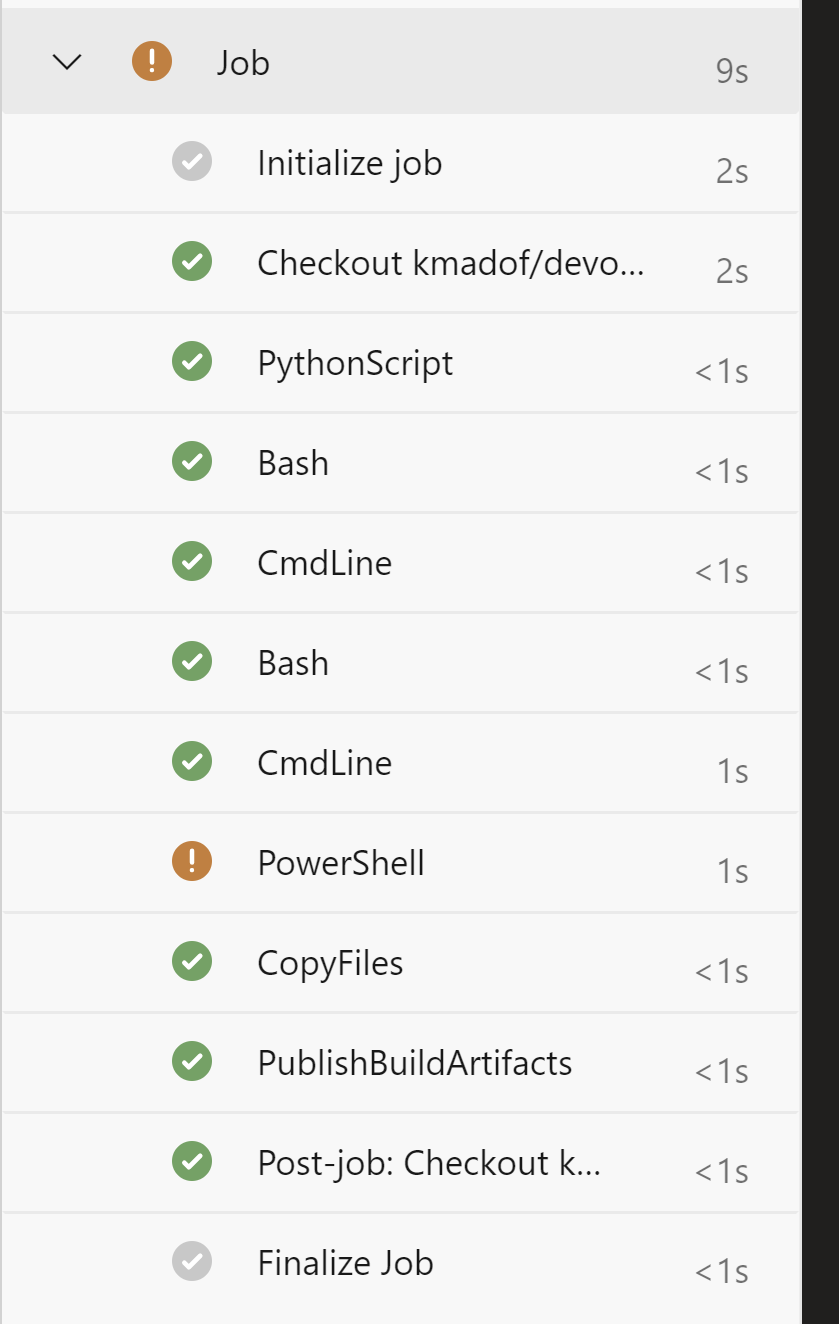
如果测试失败,请在测试步骤级别上添加continueOnError: true。将其添加到作业级别将导致下一个(依赖)作业将运行。请比较一下:
职务级别的
- continueOnError:
step级别的
- continueOnError:
页面原文内容由Stack Overflow提供。腾讯云小微IT领域专用引擎提供翻译支持
原文链接:
https://stackoverflow.com/questions/62952849
复制相关文章
相似问题
腾讯云开发者

Copyright © 2013 - 2026 Tencent Cloud. All Rights Reserved. 腾讯云 版权所有
深圳市腾讯计算机系统有限公司 ICP备案/许可证号:粤B2-20090059  粤公网安备44030502008569号
腾讯云计算(北京)有限责任公司 京ICP证150476号 | 京ICP备11018762号