
如何绘制树结构线
如何绘制树结构线
提问于 2020-07-18 17:49:12
我使用css网格来输出在图像中显示的元素的确切结构。唯一缺少的是你在下面的图片中看到的线条。最重要的是,代码是简洁、干净和枯燥的。我正在考虑使用伪元素,只是它无助于编写可读的代码。
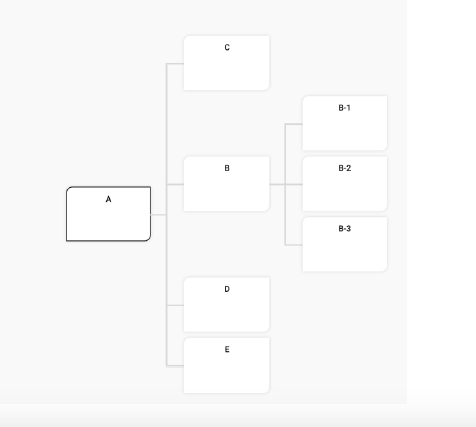
.three {
  display: grid;
  grid-template-rows: repeat(7, 100px);
  grid-template-columns: repeat(3, 1fr);
  grid-gap: 1em;

  grid-template-areas:

     ".  C  ."
     ".  .  B-1"
     "A  B  B-2"
     ".  .  B-3"
     ".  D  ."
     ".  E  .";
}

.A   { grid-area: A; }
.B   { grid-area: B; }
.C   { grid-area: C; }
.D   { grid-area: D; }
.E   { grid-area: E; }
.B-1 { grid-area: B-1; }
.B-2 { grid-area: B-2; }
.B-3 { grid-area: B-3; }

.unordered-list {
  background-color: lightgreen;
  list-style-type: none;
  display: flex;
  justify-content: center;
  align-items: center;
}<ul class="three">
<li class="unordered-list A">A</li>
<li class="unordered-list B">B</li>
<li class="unordered-list C">C</li>
<li class="unordered-list D">D</li>
<li class="unordered-list E">E</li>
<li class="unordered-list B-1">B-1</li>
<li class="unordered-list B-2">B-2</li>
<li class="unordered-list B-3">B-3</li>
</ul>
回答 2
Stack Overflow用户
回答已采纳
发布于 2020-07-18 19:37:42
这是我使用::before和::after的尝试
.three {
  display: grid;
  grid-template-rows: repeat(7, 100px);
  grid-template-columns: repeat(3, 1fr);
  grid-gap: 1em;
  width: 44rem;
  grid-template-areas: ".  C  ." ".  .  B-1" "A  B  B-2" ".  .  B-3" ".  D  ." ".  E  .";
}

li {
  position: relative;
}

.A {
  grid-area: A;
}

.B {
  grid-area: B;
}

.C {
  grid-area: C;
}

.D {
  grid-area: D;
}

.E {
  grid-area: E;
}

.B-1 {
  grid-area: B-1;
}

.B-2 {
  grid-area: B-2;
}

.B-3 {
  grid-area: B-3;
}

.A::after,
.B::after {
  content: "";
  position: absolute;
  right: 0;
  transform: translateX(100%);
  display: block;
  background: grey;
  width: 45px;
  height: 3px;
}

.B-1::before,
.B-3::before,
.C::before,
.D::before,
.E::before {
  content: "";
  position: absolute;
  left: 0;
  transform: translateX(-100%);
  display: block;
  background: grey;
  width: 20px;
  height: 3px;
}

.B::before,
.B-2::before {
  content: "";
  position: absolute;
  left: 0;
  transform: translateX(-23px);
  display: block;
  background: grey;
  width: 3px;
  height: 235px;
  border-top-left-radius: 5px;
  border-bottom-left-radius: 5px;
}

.B::before {
  height: 583px;
  transform: translate(-23px, 58px);
}

.unordered-list {
  background-color: lightgreen;
  list-style-type: none;
  display: flex;
  justify-content: center;
  align-items: center;
}

li {
  border-top-left-radius: 5px;
  border-bottom-right-radius: 5px;
  width: 200px;
}<ul class="three">
<li class="unordered-list A">A</li>
<li class="unordered-list B">B</li>
<li class="unordered-list C">C</li>
<li class="unordered-list D">D</li>
<li class="unordered-list E">E</li>
<li class="unordered-list B-1">B-1</li>
<li class="unordered-list B-2">B-2</li>
<li class="unordered-list B-3">B-3</li>
</ul>
它没有反应,但它完成了任务。如果有人能让它有反应的话,我很想看看。
Stack Overflow用户
发布于 2020-07-18 19:02:26
我试图解决您的问题,以向您展示您的方法,但注意到,您正在以full screen或expand snippet中的代码段查看或运行它,否则行将不适合
.three {
  display: grid;
  grid-template-rows: repeat(7, 100px);
  grid-template-columns: repeat(3, 1fr);
  grid-gap: 1em;
  grid-template-areas: ".  C  ." ".  .  B-1" "A  B  B-2" ".  .  B-3" ".  D  ." ".  E  .";
}

.A {
  grid-area: A;
}

.B {
  grid-area: B;
}

.C {
  grid-area: C;
}

.D {
  grid-area: D;
}

.E {
  grid-area: E;
}

.B-1 {
  grid-area: B-1;
}

.B-2 {
  grid-area: B-2;
}

.B-3 {
  grid-area: B-3;
}

.unordered-list {
  background-color: lightgreen;
  list-style-type: none;
  display: flex;
  justify-content: center;
  align-items: center;
  width: 300px;
  position: relative;
}

.A::before,
.B::before {
  content: '';
  position: absolute;
  left: 300px;
  width: 200px;
  height: 4px;
  background: #ccc;
}

.B-1::before,
.B-3::before,
.C::before,
.D::before,
.E::before {
  content: '';
  position: absolute;
  right: 300px;
  width: 80px;
  height: 4px;
  background: #ccc;
}

.row {
  background: #ccc;
  width: 4px;
}

.second {
  position: relative;
  top: 166px;
  right: 79.3px;
  height: 230px;
}

.first {
  position: relative;
  top: 50px;
  left: 356px;
  height: 580px;
}<ul class="three">
<li class="unordered-list A">A</li>
<span class="first row"></span>
<li class="unordered-list B">B</li>
<li class="unordered-list C">C</li>
<li class="unordered-list D">D</li>
<li class="unordered-list E">E</li>
<span class="second row"></span>
<li class="unordered-list B-1">B-1</li>
<li class="unordered-list B-2">B-2</li>
<li class="unordered-list B-3">B-3</li>
</ul>
页面原文内容由Stack Overflow提供。腾讯云小微IT领域专用引擎提供翻译支持
原文链接:
https://stackoverflow.com/questions/62971869
复制相关文章
相似问题
腾讯云开发者

Copyright © 2013 - 2026 Tencent Cloud. All Rights Reserved. 腾讯云 版权所有
深圳市腾讯计算机系统有限公司 ICP备案/许可证号:粤B2-20090059  粤公网安备44030502008569号
腾讯云计算(北京)有限责任公司 京ICP证150476号 | 京ICP备11018762号