
GetxControllers是否自动关闭obs流?
我正在使用下面的包https://pub.dev/packages/get。我是否需要关闭.obs中的onClose of a GetxController?我在文档里找不到任何关于这件事的东西。看着我的记忆,它似乎是自动销毁的。
回答 3
Stack Overflow用户
发布于 2020-12-02 23:42:00
根据我对GetX +颤振的理解到目前为止..。
不,您不应该在.obs的close()方法中删除GetxControllers。当控制器从内存中移除时,将自动处理控制器中的可观测数据。
当包含小部件的小部件从小部件堆栈中弹出/从小部件树中删除时,GetX会释放/移除GetxControllers (以及它们的可观测值)(默认情况下,可以重写)。
您可以在各种Get小部件的dispose()方法的覆盖中看到这一点。
下面是在弹出/删除dispose()小部件时运行的GetX代码片段:
  @override
  void dispose() {
    if (widget.dispose != null) widget.dispose(this);
    if (isCreator || widget.assignId) {
      if (widget.autoRemove && GetInstance().isRegistered<T>(tag: widget.tag)) {
        GetInstance().delete<T>(tag: widget.tag);
      }
    }
    subs.cancel();
    _observer.close();
    controller = null;
    isCreator = null;
    super.dispose();
}当您使用绑定或Get.to()时,您使用的是通过路由名称进行清理的GetPageRoute:
  @override
  void dispose() {
    if (Get.smartManagement != SmartManagement.onlyBuilder) {
      WidgetsBinding.instance.addPostFrameCallback((_) => GetInstance()
          .removeDependencyByRoute("${settings?.name ?? routeName}"));
    }
    super.dispose();
  }
测试应用程序
下面是一个测试应用程序,您可以将其复制/粘贴到Android / VSCode中,并运行以查看GETX生命周期事件的调试或运行窗口输出。
GetX将记录控制器在内存中和内存外的创建和处理。
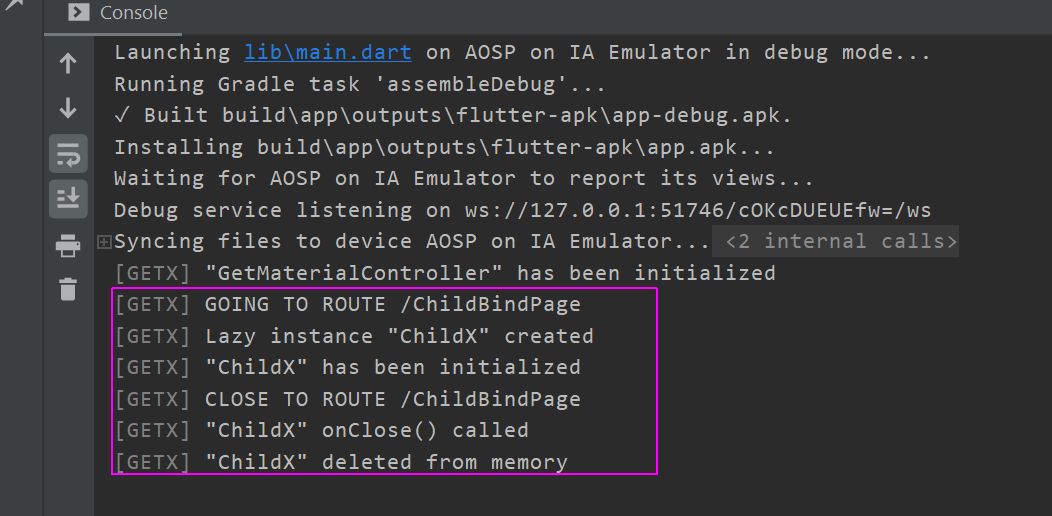
该应用程序有一个HomePage和3个ChildPages,通过3种方式使用Get控制器,所有这些都从内存中删除:
GetBuilder
- Get.put
- Bindings
/
- GetX
import 'package:flutter/material.dart';
import 'package:get/get.dart';

void main() {
  // MyCounterBinding().dependencies(); // usually where Bindings happen
  runApp(MyApp());
}

class MyApp extends StatelessWidget {
  @override
  Widget build(BuildContext context) {
    return GetMaterialApp(
      title: 'GetX Dispose Ex',
      home: HomePage(),
    );
  }
}

class HomePage extends StatelessWidget {
  @override
  Widget build(BuildContext context) {
    return Scaffold(
      appBar: AppBar(
        title: Text('GetX Dispose Test'),
      ),
      body: Center(
        child: Column(
          mainAxisAlignment: MainAxisAlignment.spaceEvenly,
          children: [
            RaisedButton(
              child: Text('GetX/Builder Child'),
              onPressed: () => Get.to(ChildPage()),
            ),
            RaisedButton(
              child: Text('Get.put Child'),
              onPressed: () => Get.to(ChildPutPage()),
            ),
            RaisedButton(
              child: Text('Binding Child'),
              onPressed: () => Get.to(ChildBindPage()),
            ),
          ],
        ),
      ),
    );
  }
}

/// GETX / GETBUILDER
/// Creates Controller within the Get widgets
class ChildPage extends StatelessWidget {
  @override
  Widget build(BuildContext context) {
    return Scaffold(
      appBar: AppBar(
        title: Text('GetX Dispose Test Counter'),
      ),
      body: Center(
        child: Column(
          mainAxisAlignment: MainAxisAlignment.spaceEvenly,
          children: [
            Text('This is the Child Page'),
            GetX<ChildX>(
              init: ChildX(),
              builder: (cx) => Text('Counter: ${cx.counter}', style: TextStyle(fontSize: 20),),
            ),
            GetBuilder<ChildX>(
              init: ChildX(),
              builder: (cx) => RaisedButton(
                child: Text('Increment'),
                onPressed: cx.inc,
              ),
            ),
          ],
        ),
      ),
    );
  }
}

/// GET.PUT
/// Creates Controller instance upon Build, usable anywhere within the widget build context
class ChildPutPage extends StatelessWidget {
  //final ChildX cx = Get.put(ChildX()); // wrong place to put
  // see https://github.com/jonataslaw/getx/issues/818#issuecomment-733652172

  @override
  Widget build(BuildContext context) {
    final ChildX cx = Get.put(ChildX());
    return Scaffold(
      appBar: AppBar(
        title: Text('GetX Dispose Test Counter'),
      ),
      body: Center(
        child: Column(
          mainAxisAlignment: MainAxisAlignment.spaceEvenly,
          children: [
            Text('This is the Child Page'),
            Obx(
              () => Text('Counter: ${cx.counter}', style: TextStyle(fontSize: 20),),
            ),
            RaisedButton(
              child: Text('Increment'),
              onPressed: cx.inc,
            )
          ],
        ),
      ),
    );
  }
}

class MyCounterBinding extends Bindings {
  @override
  void dependencies() {
    Get.lazyPut(() => ChildX(), fenix: true);
  }
}

/// GET BINDINGS
/// Normally the MyCounterBinding().dependencies() call is done in main(),
/// making it available throughout the entire app.
/// A lazyPut Controller /w [fenix:true] will be created/removed/recreated as needed or
/// as specified by SmartManagement settings.
/// But to keep the Bindings from polluting the other examples, it's done within this
/// widget's build context (you wouldn't normally do this.)
class ChildBindPage extends StatelessWidget {
  @override
  Widget build(BuildContext context) {
    MyCounterBinding().dependencies(); // just for illustration/example

    return Scaffold(
      appBar: AppBar(
        title: Text('GetX Dispose Test Counter'),
      ),
      body: Center(
        child: Column(
          mainAxisAlignment: MainAxisAlignment.spaceEvenly,
          children: [
            Text('This is the Child Page'),
            Obx(
                  () => Text('Counter: ${ChildX.i.counter}', style: TextStyle(fontSize: 20),),
            ),
            RaisedButton(
              child: Text('Increment'),
              onPressed: ChildX.i.inc,
            )
          ],
        ),
      ),
    );
  }
}


class ChildX extends GetxController {
  static ChildX get i => Get.find();
  RxInt counter = 0.obs;

  void inc() => counter.value++;
}
备注
Get.to对Navigator.push
当在子部件中使用Get.put()时,请确保使用Get.to()导航到该子部件,而不是使用Flutter的内置Navigator.push。
GetX在使用Get.to时将目标小部件包装在GetPageRoute中。当导航离开/弹出堆栈中的小部件时,此路由类将在此路由中释放控制器。如果您使用Navigator.push,则不会涉及到GetX,也不会得到这种自动清理。
Navigator.push
onPressed: () => Navigator.push(context, MaterialPageRoute(
                  builder: (context) => ChildPutPage())),
Get.to
onPressed: () => Get.to(ChildPutPage()),Stack Overflow用户
发布于 2020-11-04 14:17:19
根据onClose超级实现的代码,默认情况下,它目前什么也不做。
从评论中可以看出:
  /// Called before [onDelete] method. [onClose] might be used to
  /// dispose resources used by the controller. Like closing events,
  /// or streams before the controller is destroyed.
  /// Or dispose objects that can potentially create some memory leaks,
  /// like TextEditingControllers, AnimationControllers.
  /// Might be useful as well to persist some data on disk.
  void onClose() {}
由此,我认为您需要手动关闭YourController::onClose()重写函数中的流。
Stack Overflow用户
发布于 2020-11-05 14:50:25
在使用GetWorkers时,您似乎可以安全地使用obs。运行此代码,您将注意到,当您几次单击按钮时,每个页面开关只会打印一次。
void main(){
  runApp(GetMaterialApp(home: TestWidget(),));
}

class TestWidget extends StatelessWidget {
  @override
  Widget build(BuildContext context) {
    return Center(
      child: RaisedButton(
        child: Text('next'),
        onPressed: () => Get.to<SomeWidget>(SomeWidget()),
      ),
    );
  }
}

class SomeWidget extends StatelessWidget {
  RxBool isSubscribed = false.obs;

  SomeWidget() {
    ever(isSubscribed, (_) => print('test'));
  }

  @override
  Widget build(BuildContext context) {
    return Center(
      child: RaisedButton(
        child: Text('back'),
        onPressed: () {
          isSubscribed.value = !isSubscribed.value;
          Get.back();
        },
      ),
    );
  }
}https://stackoverflow.com/questions/62990128
复制相似问题
腾讯云开发者

Copyright © 2013 - 2026 Tencent Cloud. All Rights Reserved. 腾讯云 版权所有
深圳市腾讯计算机系统有限公司 ICP备案/许可证号:粤B2-20090059  粤公网安备44030502008569号
腾讯云计算(北京)有限责任公司 京ICP证150476号 | 京ICP备11018762号