
Javascript/Typescript -无法将所有内容映射到表中
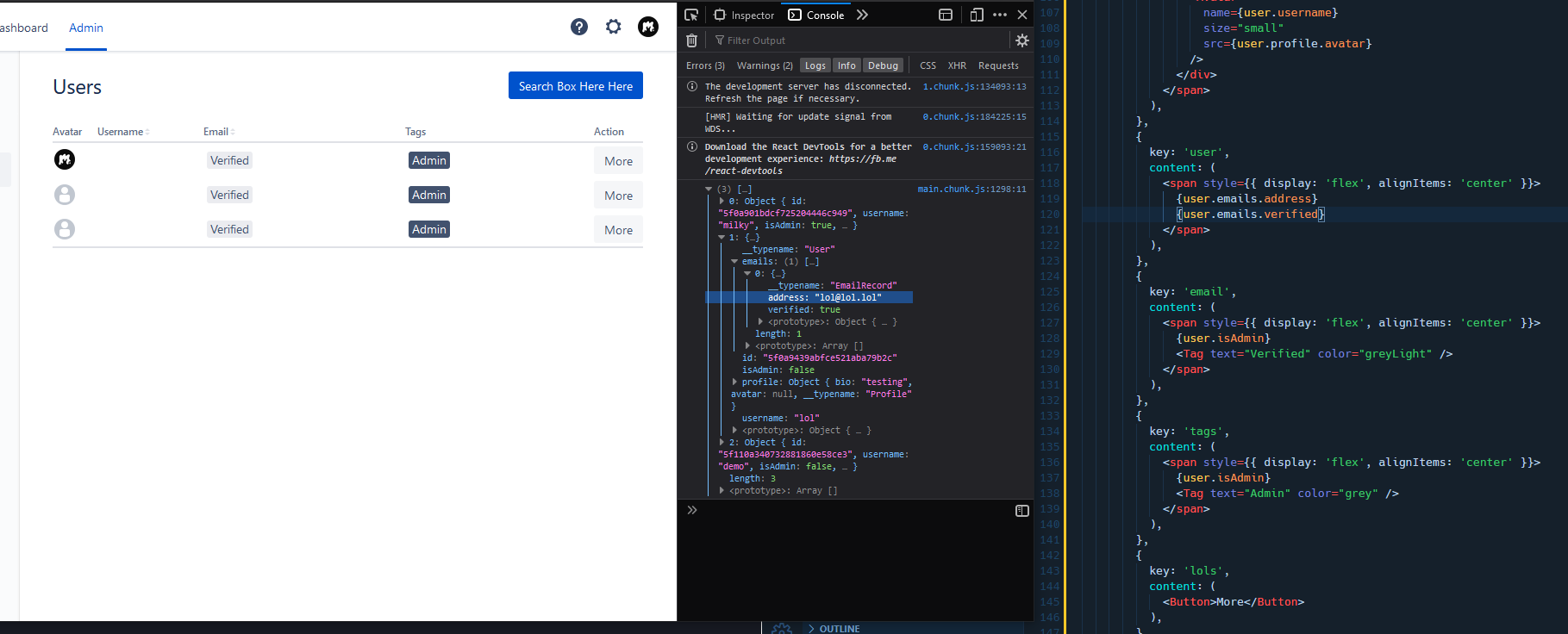
我发现最有趣的是,{users.username}同样适用于{users.profile.avatar}甚至{users.profile.bio},但并不是我最需要的:{users.emails.verified}和{users.emails.address}。
我猜这和数据的映射有关吧?也许我就是这么叫的?我也试过{users['emails']['address']} ..。但也不起作用。然而,它适用于{users['profile']['bio']},这让我感到有点头疼。任何帮助都是很棒的,我会认真学习如何去做这件事!
import React from 'react';
import { Redirect } from 'react-router-dom';

import Avatar from '@atlaskit/avatar';
import DropdownMenu, {
  DropdownItemGroup,
  DropdownItem,
} from '@atlaskit/dropdown-menu';
import Tag, { TagColor } from '@atlaskit/tag';
import DynamicTable from '@atlaskit/dynamic-table'
import PageHeader from '@atlaskit/page-header';

import gql from 'graphql-tag';
import { useQuery } from '@apollo/react-hooks';

import Button, { ButtonGroup } from '@atlaskit/button';

const GET_USERS = gql`
  query getUsers {
      getUsers {
        id
        username
        isAdmin
        emails {
          address
          verified
        }
        profile {
          bio
          avatar
        }
      }
      getUser {
        id
      }
    }
`;

const Users = () => {

  const actionsContent = (
    <ButtonGroup>
      <Button appearance="primary">Search Box Here Here</Button>
    </ButtonGroup>
  );

  const { loading, error, data } = useQuery(GET_USERS);

  if (loading) return <p>Loading...</p>;
  if (error) return <p>Error: {error.message}</p>;

  if (!data.getUser) {
    return <Redirect to="/login" />;
  }

  const createHead = (withWidth: boolean) => {
    return {
      cells: [
        {
          key: 'avatar',
          content: 'Avatar',
          isSortable: false,
          width: withWidth ? 2 : undefined,
        },
        {
          key: 'username',
          content: 'Username',
          isSortable: true,
          width: withWidth ? 18 : undefined,
        },
        {
          key: 'email',
          content: 'Email',
          shouldTruncate: true,
          isSortable: true,
        },
        {
          key: 'tags',
          content: 'Tags',
        },
        {
          key: 'action',
          content: 'Action',
          shouldTruncate: true,
          width: withWidth ? 2 : undefined,
        },
      ],
    };
  };

  const head = createHead(true);

  var users = data.getUsers;

  console.log(users)

  for(let i = 0, l = users.length; i < l; i++) {

    var rows = users.map((user: any) => ({
      cells: [
        {
          key: 'avatar',
          content: (
            <span style={{ display: 'flex', alignItems: 'center' }}>
              <div style={{ marginRight: 8 }}>
                <Avatar
                  name={user.username}
                  size="small"
                  src={user.profile.avatar}
                />
              </div>
            </span>
          ),
        },
        {
          key: 'user',
          content: (
            <span style={{ display: 'flex', alignItems: 'center' }}>
              {user.emails.address}
              {user.emails.verified}
            </span>
          ),
        },
        {
          key: 'email',
          content: (
            <span style={{ display: 'flex', alignItems: 'center' }}>
              {user.isAdmin}
              <Tag text="Verified" color="greyLight" />
            </span>
          ),
        },
        {
          key: 'tags',
          content: (
            <span style={{ display: 'flex', alignItems: 'center' }}>
              {user.isAdmin}
              <Tag text="Admin" color="grey" />
            </span>
          ),
        },
        {
          key: 'lols',
          content: (
            <Button>More</Button>
          ),
        },
      ],
    }))

  }
  return (
    <div>
      <PageHeader
        actions={actionsContent}
      >
        Users
      </PageHeader>

      <DynamicTable
        head={head}
        rows={rows}
        isLoading={false}
        defaultSortOrder="ASC"
        loadingSpinnerSize="large"
      />

    </div>
  );
}

export default Users;回答 1
Stack Overflow用户
发布于 2020-07-22 02:27:25
好吧,我想我可以把这个问题记下来!
正确定义类型的另一个原因是:
阿!刚刚注意到了图像中的控制台日志。电子邮件似乎是一个电子邮件对象的数组,而不是一个对象,因此,与{user.emails.verified}不同,您应该拥有{user.emails.verified},地址也是如此。此外,您可能需要检查电子邮件是否实际包含某物和/或它是否包含多个电子邮件对象- ibrahim mahrir。
因此,对于我的具体用例:{user.emails[0].address}是我要寻找的东西,也是返回布尔值的{String(user.emails[0].verified)}!
https://stackoverflow.com/questions/63025371
复制相似问题
腾讯云开发者

Copyright © 2013 - 2026 Tencent Cloud. All Rights Reserved. 腾讯云 版权所有
深圳市腾讯计算机系统有限公司 ICP备案/许可证号:粤B2-20090059  粤公网安备44030502008569号
腾讯云计算(北京)有限责任公司 京ICP证150476号 | 京ICP备11018762号