
用全圆角反应本地日历周期标记
用全圆角反应本地日历周期标记
提问于 2020-07-23 16:20:10
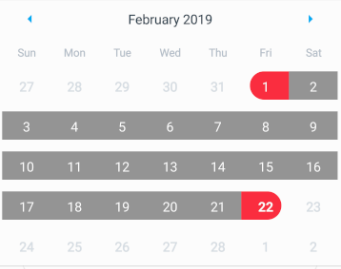
请参考下面的日历图像。

我使用了react本机日历npm库,现在我想像上面那样实现它。
请忽略点标记,只考虑期间标记的开始日期和结束日期。
然而,我只实现了半走投无路的开始和结束日期与期间标记。请参阅以下图片。
现在,我需要使用react-native-calendars完成开始和结束日期。任何人都请帮助我实现这一点。这个图书馆有可能吗?或者是否有任何与react native相关的库来实现这一点?
回答 1
Stack Overflow用户
回答已采纳
发布于 2020-07-25 10:07:19
终于找到了解决办法。但是必须修改节点模块,所以请记住添加这些更改来读取我。然后其他人也可以使用这些。
转到这个文件。node_modules/react-native-calendars/src/calendar/day/period/index.js
下面的评论行。
filters = (
....
)
添加下面的行。
        const customStyles = {
        dayStyles: {backgroundColor: '#BEB1D7',width: 20,height:
          26,position:'absolute'}
       }
       fillers = (
        <View style={[this.style.fillers, fillerStyle]}>
          {this.props.marking.endingDay ?<View style={customStyles.dayStyles}></View>
          : null}

          <View style={[this.style.leftFiller, leftFillerStyle]}/>
          <View style={[this.style.rightFiller, rightFillerStyle]}/>

          {this.props.marking.startingDay ?<View style={[customStyles.dayStyles,
           {marginLeft: 15}]}></View> : null}
        </View>
);注意,您可以编辑customStyles。
与node_modules相关的阶段现已完成。
现在移到您的日历组件,并使用它们的高级样式指南覆盖原始日历的样式。我做了如下所述。
calendarTheme = {
         'stylesheet.day.period': {
            wrapper: {
                alignItems: 'center',
                alignSelf: 'stretch',
                marginLeft: -2,
                borderRadius: 2,
                overflow: 'hidden'
            },
            leftFiller: {
                height: 26,
                flex: 1,
                marginLeft: 50
            }
        }
}页面原文内容由Stack Overflow提供。腾讯云小微IT领域专用引擎提供翻译支持
原文链接:
https://stackoverflow.com/questions/63058764
复制相关文章
相似问题
腾讯云开发者

Copyright © 2013 - 2026 Tencent Cloud. All Rights Reserved. 腾讯云 版权所有
深圳市腾讯计算机系统有限公司 ICP备案/许可证号:粤B2-20090059  粤公网安备44030502008569号
腾讯云计算(北京)有限责任公司 京ICP证150476号 | 京ICP备11018762号