
从SVGator导出的文件无法在React中编译
从SVGator导出的文件无法在React中编译
提问于 2020-07-25 22:20:23
这是我第一次发问。如果我不知道所有的礼节,请冷静点。我正在使用我在SVGator中内置的SVG动画。我正在加载它到我的反应应用程序作为一个加载页面。
SVG文件本身在浏览器中显示得很好,但是当我将它加载到我的React应用程序中时,我得到的是错误:
Failed to compile.

./src/assets/Loadingpage.svg (./node_modules/@svgr/webpack/lib?-svgo,+titleProp,+ref!./src/assets/Loadingpage.svg)

Error: Expected node, got `#eba7ha49d1l68_to {animation: eba7ha49d1l68_to__to 3000ms linear infinite normal forwards}@keyframes eba7ha49d1l68_to__to { 0% {transform: translate(0px,0px);animation-timing-function: cubic-bezier(0.420000,0,1,1)} 16.666667% {transform: translate(0px,-50px)} 33.333333% {transform: translate(0px,-100px)} 100% {transform: translate(0px,-100px)} }#eba7ha49d1l68 {animation: eba7ha49d1l68_c_o 3000ms linear infinite normal forwards}@keyframes eba7ha49d1l68_c_o { 0% {opacity: 0;animation-timing-function: cubic-bezier(0.420000,0,1,1)} 23.333333% {opacity: 1} 33.333333% {opacity: 0} 100% {opacity: 0} }#eba7ha49d1l69_to {animation: eba7ha49d1l69_to__to 3000ms linear infinite normal forwards}@keyframes eba7ha49d1l69_to__to { 0% {transform: translate(0px,0px)} 40% {transform: translate(0px,0px);animation-timing-function: cubic-bezier(0.420000,0,1,1)} 56.666667% {transform: translate(0px,-50.003000px)} 73.333333% {transform: translate(0px,-100.003000px)} 100% {transform: translate(0px,-100.003000px)} }#eba7ha49d1l69 {animation: eba7ha49d1l69_c_o 3000ms linear infinite normal forwards}@keyframes eba7ha49d1l69_c_o { 0% {opacity: 0} 40% {opacity: 0;animation-timing-function: cubic-bezier(0.420000,0,1,1)} 63.333333% {opacity: 1} 73.333333% {opacity: 0} 100% {opacity: 0} }`
它指向了位于文件顶部的这个CDATA:
    <style>
      <![CDATA[#eba7ha49d1l68_to {
        animation: eba7ha49d1l68_to__to 3000ms linear infinite normal forwards
      }

      @keyframes eba7ha49d1l68_to__to {
        0% {
          transform: translate(0px, 0px);
          animation-timing-function: cubic-bezier(0.420000, 0, 1, 1)
        }
        16.666667% {
          transform: translate(0px, -50px)
        }
        33.333333% {
          transform: translate(0px, -100px)
        }
        100% {
          transform: translate(0px, -100px)
        }
      }

      #eba7ha49d1l68 {
        animation: eba7ha49d1l68_c_o 3000ms linear infinite normal forwards
      }

      @keyframes eba7ha49d1l68_c_o {
        0% {
          opacity: 0;
          animation-timing-function: cubic-bezier(0.420000, 0, 1, 1)
        }
        23.333333% {
          opacity: 1
        }
        33.333333% {
          opacity: 0
        }
        100% {
          opacity: 0
        }
      }

      #eba7ha49d1l69_to {
        animation: eba7ha49d1l69_to__to 3000ms linear infinite normal forwards
      }

      @keyframes eba7ha49d1l69_to__to {
        0% {
          transform: translate(0px, 0px)
        }
        40% {
          transform: translate(0px, 0px);
          animation-timing-function: cubic-bezier(0.420000, 0, 1, 1)
        }
        56.666667% {
          transform: translate(0px, -50.003000px)
        }
        73.333333% {
          transform: translate(0px, -100.003000px)
        }
        100% {
          transform: translate(0px, -100.003000px)
        }
      }

      #eba7ha49d1l69 {
        animation: eba7ha49d1l69_c_o 3000ms linear infinite normal forwards
      }

      @keyframes eba7ha49d1l69_c_o {
        0% {
          opacity: 0
        }
        40% {
          opacity: 0;
          animation-timing-function: cubic-bezier(0.420000, 0, 1, 1)
        }
        63.333333% {
          opacity: 1
        }
        73.333333% {
          opacity: 0
        }
        100% {
          opacity: 0
        }
      }

      ]]>
</style>当我将其注释掉时,它似乎修复了我整个文档中剩下的<rect>和<path>标记,我的应用程序会编译得很好。当我点击SVG作为加载页面在我的应用程序,它显示很好,但动画不工作。
我对SVG和CDATA非常陌生,对我来说是100%的新鲜事。任何帮助都将不胜感激。谢谢!
编辑:我仍然不知道为什么,但删除包装<]标签,并保持CSS样式修复我的问题。
回答 1
Stack Overflow用户
回答已采纳
发布于 2020-07-26 18:53:18
我也是新来的,但我找到了一个简单的解决方案,我希望这对你有用,这对我仍然有效。
- 下载SVG文件:"svgator":
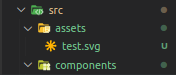
- 将SVG文件放在您最想要的响应应用程序中,在我的例子中是在资产文件夹:
中。
- 导入组件中的SVG文件,在我的示例中是App.js文件:

- My "App.js“文件,声明为类组件,在呈现方法之后的返回语句中,您可以将"object”标记作为数据参数SVG组件:
。
return (
  <div className={styles.App}>
    <object data={Test} />
  </div>
)
在这种情况下,您不需要从任何地方删除任何东西,很简单,但希望这样做对您有用。
页面原文内容由Stack Overflow提供。腾讯云小微IT领域专用引擎提供翻译支持
原文链接:
https://stackoverflow.com/questions/63094130
复制相关文章
相似问题
腾讯云开发者

Copyright © 2013 - 2026 Tencent Cloud. All Rights Reserved. 腾讯云 版权所有
深圳市腾讯计算机系统有限公司 ICP备案/许可证号:粤B2-20090059  粤公网安备44030502008569号
腾讯云计算(北京)有限责任公司 京ICP证150476号 | 京ICP备11018762号