
怎样才能正确地将枚举与管理结合起来?
我有一个rails应用程序,用户有一个性别,这是一个枚举,0代表女性,1代表男性。
我在user_dashboard.rb中有以下代码:
require "administrate/base_dashboard"

class UserDashboard < Administrate::BaseDashboard
    ATTRIBUTE_TYPES = {
        posts: Field::HasMany,
        id: Field::Number.with_options(searchable: false),
        email: Field::String.with_options(searchable: true),
        password: Field::String.with_options(searchable: false),
        password_confirmation: Field::String.with_options(searchable: false),
        encrypted_password: Field::String.with_options(searchable: false),
        reset_password_token: Field::String.with_options(searchable: false),
        reset_password_sent_at: Field::DateTime.with_options(searchable: false),
        remember_created_at: Field::DateTime.with_options(searchable: false),
        first_name: Field::String.with_options(searchable: false),
        last_name: Field::String.with_options(searchable: false),
        gender: Field::Text.with_options(searchable: false),
        type: Field::String.with_options(searchable: false),
        created_at: Field::DateTime.with_options(searchable: false),
        updated_at: Field::DateTime.with_options(searchable: false),
        phone: Field::String.with_options(searchable: false),
    }.freeze

    COLLECTION_ATTRIBUTES = %i[
        posts
        email
        phone
        type
    ].freeze

    SHOW_PAGE_ATTRIBUTES = %i[
        posts
        id
        email
        phone
        first_name
        last_name
        gender
        type
        created_at
        updated_at
    ].freeze

    FORM_ATTRIBUTES = %i[
        posts
        email
        phone
        first_name
        last_name
        gender
        password
        password_confirmation
        type
    ].freeze

    COLLECTION_FILTERS = {}.freeze
endnew_admin_user_path的观点是:
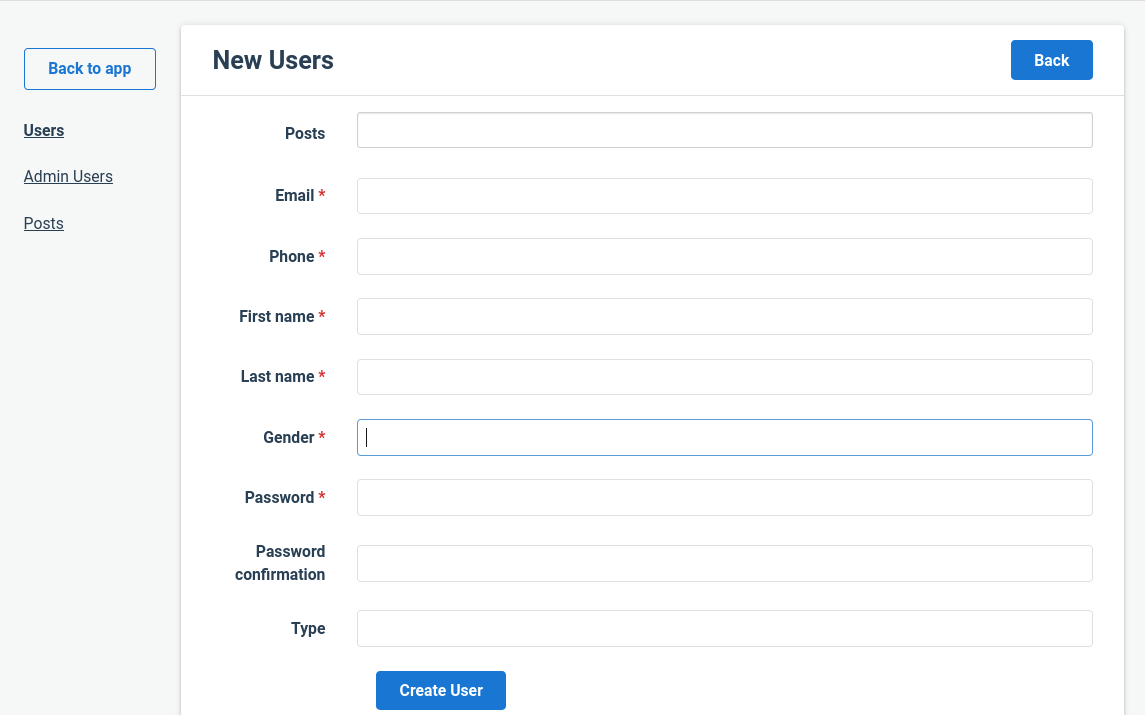
只有管理员才能创建用户,但是他们必须用手打印出“男性”或“女性”这样的性别。是否有一种方法来集成一个选择菜单或单选按钮来管理创业板?
回答 2
Stack Overflow用户
发布于 2020-07-27 18:43:24
一种选择是在您的ATTRIBUTE_TYPES中这样做:
ATTRIBUTE_TYPES = {
  ...
  gender: Field::Select.with_options(collection: ["female", "male"]),
}您也可以尝试AdministrateFieldEnum创业板。https://github.com/valiot/administrate-field-enum
Stack Overflow用户
发布于 2020-09-22 19:07:42
假设gender是应用程序/Person.rb模型的enum字段:
class Person < ApplicationRecord
  enum gender: { female: 0, male: 1 }
  # . . .
end您的20200922125209_create_persons.rb迁移有:
class CreatePersons < ActiveRecord::Migration[6.0]
  def change
    create_table :persons do |t|
      t.integer :gender
# . . .在app/dashboards/person_dashboard.rb中添加以下内容:
  ATTRIBUTE_TYPES = {
    # . . .
    gender: Field::Select.with_options(searchable: false, collection: ->(field) { field.resource.class.send(field.attribute.to_s.pluralize).keys }),
    # . . .
}然后,只需将gender字段添加到COLLECTION_ATTRIBUTES,SHOW_PAGE_ATTRIBUTES数组中即可。
管理员的魔力将处理其余部分,在显示和索引视图中显示“女性”或“男性”,并在编辑形式中显示“选择下拉”。
https://stackoverflow.com/questions/63120944
复制相似问题
腾讯云开发者

Copyright © 2013 - 2026 Tencent Cloud. All Rights Reserved. 腾讯云 版权所有
深圳市腾讯计算机系统有限公司 ICP备案/许可证号:粤B2-20090059  粤公网安备44030502008569号
腾讯云计算(北京)有限责任公司 京ICP证150476号 | 京ICP备11018762号