
paint()的QStyledItemDelegate子类实现
paint()的QStyledItemDelegate子类实现
提问于 2020-07-27 15:24:15
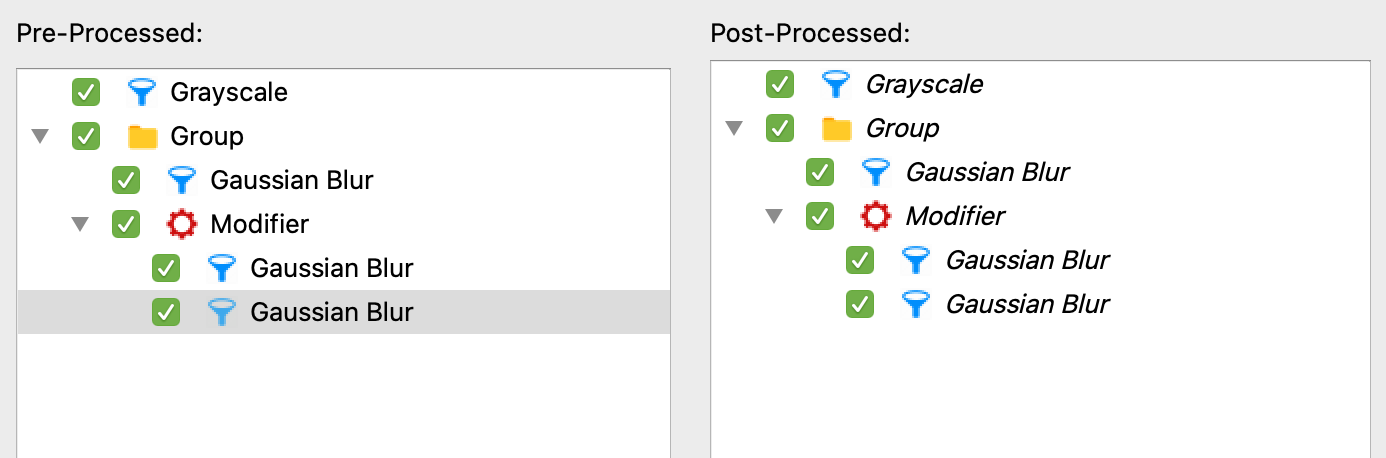
我在两个QTreeViews中显示了一个QTreeViews。第一个TreeView使用标准QStyledItemDelegate,不作任何更改,并显示带有复选框、图标和显示文本的项目。第二个视图应该显示相同的树,尽管QStyledItemDelegate的自定义实现应该执行以下操作:
- 以斜体显示某些项目的显示文本
- 显示某些项目的显示文本为红色
- 删除每个项目
- 的复选框,只选择那些不是斜体
<代码>F29的项目
无论项目是否以斜体显示/不可单击,以及它们是否以红色显示,都将保存在自定义DataRole中,并使用index.data(custom_role)进行访问。
我的问题是:我无法以红色显示文本,也不知道如何删除复选框,也不知道如何使项目可选。
我现在拥有的是:
class PostProcessedDelegate(QtWidgets.QStyledItemDelegate):

    def __init__(self):
        super().__init__()

    def paint(self, painter, option, index):
        custom_option = QtWidgets.QStyleOptionViewItem(option)
        custom_painter = painter

        if not index.data(Item.IS_PROCESSED):
            custom_option.font.setItalic(True)
            #ALSO MAKE ITEM NON-SELECTABLE HERE

        if index.data(Item.HAS_PROCESSING_ERROR):
            custom_painter.setPen(QtGui.QColor(255,0,0)) #THIS DOESNT HAVE ANY EFFECT

        #REMOVE CHECKBOX BEFORE PAINTING
        super().paint(custom_painter, custom_option, index)
这个屏幕截图显示左边的第一个TreeView (没有任何更改)和右边的第二个,实际上只有一些必需的更改。
回答 1
Stack Overflow用户
回答已采纳
发布于 2020-07-27 16:15:21
不必重写QStyleOptionViewItem方法,而是修改initStyleOption中的selectionCommand,对于选择,必须重写QTreeView的selectionCommand方法:
from enum import IntEnum, auto
import random
import sys

from PyQt5 import QtCore, QtGui, QtWidgets


class Item(IntEnum):
    IS_PROCESSED = QtCore.Qt.UserRole
    HAS_PROCESSING_ERROR = auto()


def create_icon():
    color = QtGui.QColor(*random.sample(range(255), 3))
    pixmap = QtGui.QPixmap(128, 128)
    pixmap.fill(color)
    return QtGui.QIcon(pixmap)


class StyledItemDelegate(QtWidgets.QStyledItemDelegate):
    def initStyleOption(self, option, index):
        super().initStyleOption(option, index)
        if not index.data(Item.IS_PROCESSED):
            option.font.setItalic(True)

        if index.data(Item.HAS_PROCESSING_ERROR):
            option.palette.setBrush(QtGui.QPalette.Text, QtGui.QColor(255, 0, 0))

        option.features &= ~QtWidgets.QStyleOptionViewItem.HasCheckIndicator


class TreeView(QtWidgets.QTreeView):
    def __init__(self, parent=None):
        super().__init__(parent)
        delegate = StyledItemDelegate(self)
        self.setItemDelegate(delegate)

    def selectionCommand(self, index, event):
        if not index.data(Item.IS_PROCESSED):
            return QtCore.QItemSelectionModel.NoUpdate
        return super().selectionCommand(index, event)


class Widget(QtWidgets.QWidget):
    def __init__(self, parent=None):
        super().__init__(parent)

        model = QtGui.QStandardItemModel(self)

        left_view = QtWidgets.QTreeView()
        right_view = TreeView()

        lay = QtWidgets.QHBoxLayout(self)
        lay.addWidget(left_view)
        lay.addWidget(right_view)

        left_view.setModel(model)
        right_view.setModel(model)

        root_item = QtGui.QStandardItem("Root")
        model.appendRow(root_item)

        self.populate(root_item, 3)
        left_view.expandAll()
        right_view.expandAll()

    def populate(self, root_item, level):
        for i in range(random.randint(2, 4)):
            it = QtGui.QStandardItem("item {}".format(i))
            it.setIcon(create_icon())
            it.setCheckable(True)
            it.setData(random.choice([True, False]), Item.IS_PROCESSED)
            it.setData(random.choice([True, False]), Item.HAS_PROCESSING_ERROR)
            root_item.appendRow(it)
            next_level = level - 1
            if next_level > 0:
                self.populate(it, next_level)


if __name__ == "__main__":
    app = QtWidgets.QApplication(sys.argv)

    w = Widget()
    w.show()

sys.exit(app.exec_())页面原文内容由Stack Overflow提供。腾讯云小微IT领域专用引擎提供翻译支持
原文链接:
https://stackoverflow.com/questions/63118449
复制相关文章
相似问题
腾讯云开发者

Copyright © 2013 - 2026 Tencent Cloud. All Rights Reserved. 腾讯云 版权所有
深圳市腾讯计算机系统有限公司 ICP备案/许可证号:粤B2-20090059  粤公网安备44030502008569号
腾讯云计算(北京)有限责任公司 京ICP证150476号 | 京ICP备11018762号