
文本的ListView SubItem OwnerDraw Bold部分
为了结束所有者绘制C#控件的冒险,我的最后一个问题是ListView。我有一个ListView,它将始终处于细节视图模式,包含两个列&名称和值。对于Name列,我将始终使用DefaultDraw,对于Value列,我希望对每个匹配的搜索项进行粗体显示。
到目前为止,我的TreeView question和关于所有者绘图的ComboBox question帮助形成了代码。我不需要任何背景或边图,所以这比我看到的其他问题简单,但我有问题,我注意到到目前为止。
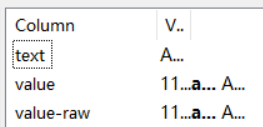
当我收缩一个列并期望得到一个...时,如果我呈现了多个字符串部分(因为来自搜索项的匹配),那么每个字符串都有它自己的...,这取决于它何时大于该列的宽度。如果不存在搜索项,并且我将e.SubItem.Text呈现为一个普通字符串,则它的行为与预期相同。
在下面的系列中,Address 1是一个完整的字符串。另外两个项目的字符串为110 M、aple和Avenue。
对于...,是否有办法使整个字符串充当一个单独的实体?在我的简短测试中,我还没有发现任何其他问题,但是如果需要的话,我很乐意接受一些建议。
在调整大小之前
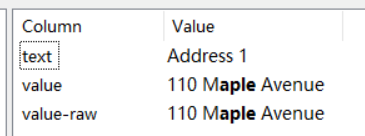
... 第一次调整大小地址1显示
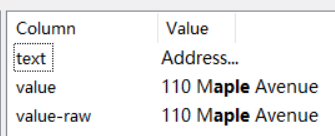
... 第二次调整大道展示
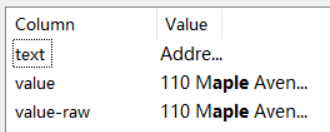
... 第三次调整- 110 M显示
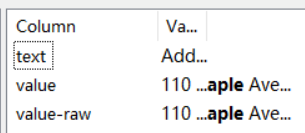
最终调整大小--每个“字符串”都显示...
代码
    TextFormatFlags subItemFlags = TextFormatFlags.Left | TextFormatFlags.Bottom | TextFormatFlags.EndEllipsis | TextFormatFlags.NoPadding;

    private void InitializeListView()
    {
        listView.OwnerDraw = true;
        listView.DrawColumnHeader += listView_DrawColumnHeader;
        listView.DrawSubItem += listView_DrawSubItem;
        listView.Font = new Font( "Microsoft YaHei UI", 10F, FontStyle.Regular, GraphicsUnit.Point, 0 );
    }

    private void listView_DrawColumnHeader( object sender, DrawListViewColumnHeaderEventArgs e ) => e.DrawDefault = true;
    private void listView_DrawSubItem( object sender, DrawListViewSubItemEventArgs e )
    {
        if ( e.ColumnIndex == 0)
        {
            e.DrawDefault = true;
        }
        else
        {
            var textPadding = 2;

            using ( var boldFont = new Font( listView.Font, FontStyle.Bold ) )
            {
                var stringParts = BuildDrawingString( e.SubItem.Text, e.Graphics, e.Bounds.Size, fieldSearch.Text, listView.Font, boldFont, subItemFlags ).ToArray();
                var color = listView.ForeColor;
                var point = new Point( e.SubItem.Bounds.X + textPadding, e.SubItem.Bounds.Y );

                foreach ( var part in stringParts )
                {
                    var font = part.Selected ? boldFont : listView.Font;
                    DrawText( part.Text, e.Graphics, e.SubItem.Bounds.Size, font, point, color, e.SubItem.BackColor, subItemFlags );
                    point.Offset( part.Width, 0 );
                }
            }
        }
    }
    private void DrawText( string text, Graphics graphics, Size size, Font font, Point offset, Color foreColor, Color backColor, TextFormatFlags formatFlags )
    {
        var rect = new Rectangle( offset, size );
        TextRenderer.DrawText( graphics, text, font, rect, foreColor, backColor, formatFlags );
    }

    private IEnumerable<(string Text, bool Selected, int Width)> BuildDrawingString( string textToRender, Graphics graphics, Size proposedSize, string pattern, Font normalFont, Font boldFont, TextFormatFlags formatFlags )
    {
        int measureText( string t, bool s ) => TextRenderer.MeasureText( graphics, t, s ? boldFont : normalFont, proposedSize, formatFlags ).Width;

        if ( pattern.Length == 0 )
        {
            yield return (textToRender, false, measureText( textToRender, false ));
        }
        else
        {
            var matches = Regex.Split( textToRender, $"(?i){pattern}" );
            var currentCharacter = 0;
            var patternLength = pattern.Length;

            for ( int i = 0; i < matches.Length; i++ )
            {
                if ( matches[ i ].Length >= 0 )
                {
                    yield return (
                        matches[ i ],
                        false,
                        measureText( matches[ i ], false )
                    );

                    currentCharacter += matches[ i ].Length;
                }

                if ( i < matches.Length - 1 )
                {
                    var matchText = textToRender.Substring( currentCharacter, patternLength );
                    yield return (
                        matchText,
                        true,
                        measureText( matchText, true )
                    );

                    currentCharacter += patternLength;
                }
            }
        }
}回答 1
Stack Overflow用户
发布于 2020-08-03 01:55:34
因此,在考虑了这一点之后,我意识到每个文本部分(粗体和非粗体)都是根据“整个子项”Bounds.Size来度量的。相反,我不得不继续减少TextRenderer.MeasureText允许的大小,这样它就知道什么时候应该放入...,然后在使用...呈现任何项时立即停止处理附加字符串。因此,我的BuildDrawingsString必须解释这一点,而且它还必须为每个部分返回一个AllowedWidth,这样每次对TextRenderer.DrawText的实际调用都会使用正确的Size。
    private void listView_DrawSubItem( object sender, DrawListViewSubItemEventArgs e )
    {
        if ( e.ColumnIndex == 0)
        {
            e.DrawDefault = true;
        }
        else
        {
            var textPadding = 2;

            using ( var boldFont = new Font( listView.Font, FontStyle.Bold ) )
            {
                var stringParts = BuildDrawingString( e.SubItem.Text, e.Graphics, e.SubItem.Bounds.Size, fieldSearch.Text, listView.Font, boldFont, subItemFlags, true );
                var color = listView.ForeColor;
                var point = new Point( e.SubItem.Bounds.X + textPadding, e.SubItem.Bounds.Y );

                foreach ( var part in stringParts )
                {
                    var font = part.Selected ? boldFont : listView.Font;
                    // System.Diagnostics.Trace.WriteLine( e.SubItem.Bounds.Size + ", " + part.Width );
                    DrawText( part.Text, e.Graphics, new Size( part.AllowedWidth, e.SubItem.Bounds.Size.Height ), font, point, color, e.SubItem.BackColor, subItemFlags );
                    point.Offset( part.Width, 0 );
                }
            }
        }
    }

    private IEnumerable<(string Text, bool Selected, int Width, int AllowedWidth)> BuildDrawingString( string textToRender, Graphics graphics, Size proposedSize, string pattern, Font normalFont, Font boldFont, TextFormatFlags formatFlags, bool isListView )
    {
        var totalWidth = 0;
        (int width, int allowedWidth, bool isTruncated) measureText( string t, bool s )
        {
            var size = new Size( proposedSize.Width - totalWidth, proposedSize.Height );
            var width = TextRenderer.MeasureText( graphics, t, s ? boldFont : normalFont, size, formatFlags ).Width;
            var truncated = isListView && TextRenderer.MeasureText( graphics, t, s ? boldFont : normalFont, size, formatFlags & ~TextFormatFlags.EndEllipsis ).Width != width;

            return ( width, size.Width, truncated );
        }

        if ( pattern.Length == 0 )
        {
            yield return ( textToRender, false, measureText( textToRender, false ).width, proposedSize.Width );
        }
        else
        {
            var matches = Regex.Split( textToRender, $"(?i){pattern}" );
            var currentCharacter = 0;
            var patternLength = pattern.Length;

            for ( int i = 0; i < matches.Length; i++ )
            {
                if ( matches[ i ].Length >= 0 )
                {
                    var measureInfo = measureText( matches[ i ], false );
                    totalWidth += measureInfo.width;

                    yield return (
                        matches[ i ],
                        false,
                        measureInfo.width,
                        measureInfo.allowedWidth
                    );

                    currentCharacter += matches[ i ].Length;

                    if ( measureInfo.isTruncated )
                    {
                        yield break;
                    }
                }

                if ( i < matches.Length - 1 )
                {
                    var matchText = textToRender.Substring( currentCharacter, patternLength );
                    var measureInfo = measureText( matchText, true );
                    totalWidth += measureInfo.width;

                    yield return (
                        matchText,
                        true,
                        measureInfo.width,
                        measureInfo.allowedWidth
                    );

                    currentCharacter += patternLength;

                    if ( measureInfo.isTruncated )
                    {
                        yield break;
                    }
                }
            }
        }
}https://stackoverflow.com/questions/63146058
复制相似问题
腾讯云开发者

Copyright © 2013 - 2026 Tencent Cloud. All Rights Reserved. 腾讯云 版权所有
深圳市腾讯计算机系统有限公司 ICP备案/许可证号:粤B2-20090059  粤公网安备44030502008569号
腾讯云计算(北京)有限责任公司 京ICP证150476号 | 京ICP备11018762号