
使TabView背景透明
使TabView背景透明
提问于 2020-07-30 17:30:32
默认情况下,SwiftUI中的视图具有透明的背景。这通常意味着他们有一个白色的背景,因为这是你的应用程序的默认背景颜色。但是,这也意味着您可以使用ZStack来更改整个应用程序的背景色,并且该颜色将显示在所有视图中,除非您显式地设置它们自己的背景色:
struct Main: View {
    var body: some View {
        ZStack {
            Color.orange.edgesIgnoringSafeArea(.all)

            // Sub-view inlined
            VStack {
                Text("Hello World")
                Button("Press Me", action: { print("Pressed") })
            }
        }
    }
}

我遇到的问题是,对于一个TabView来说,这不是真的。
struct Main: View {
    var body: some View {
        ZStack {
            Color.orange.edgesIgnoringSafeArea(.all)

            // Sub-view inlined
            TabView {
                VStack {
                    Text("Hello World")
                    Button("Press Me", action: { print("Pressed") })
                }.tabItem {
                    Text("First Page")
                }
            }
        }
    }
}TabView阻止背景色:
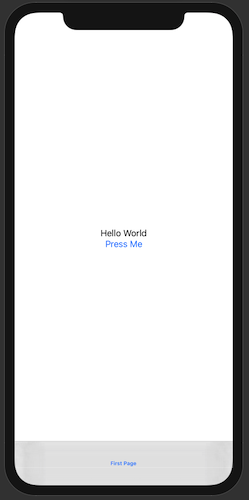
我可以更改子视图的背景色,但如果使其透明,则背景再次为白色,而不是在ZStack中显示底层颜色。我还尝试过其他一些使TabView透明的方法,例如将其背景设置为Color.clear,但没有效果。
TL;博士
是否有可能使TabView透明而不是白色?
回答 1
Stack Overflow用户
回答已采纳
发布于 2020-07-30 19:00:45
每个选项卡的宿主视图都有系统背景颜色(这是不透明的)。
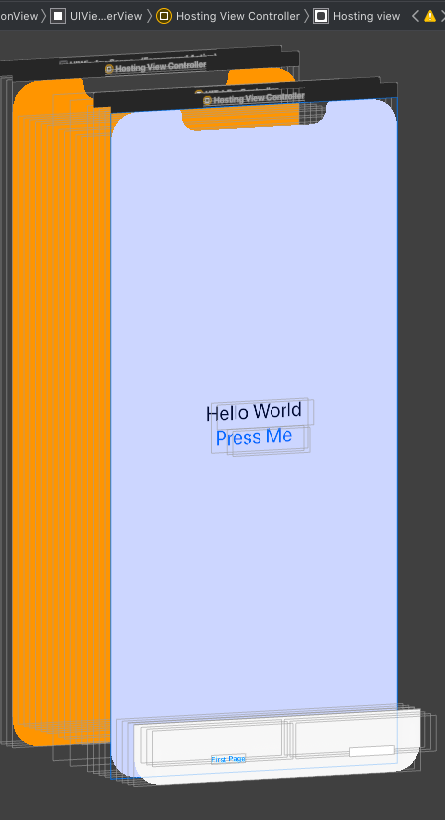
这是可能的解决办法。用Xcode 12 / iOS 14测试
struct BackgroundHelper: UIViewRepresentable {
    func makeUIView(context: Context) -> UIView {
        let view = UIView()
        DispatchQueue.main.async {
            // find first superview with color and make it transparent
            var parent = view.superview
            repeat {
                if parent?.backgroundColor != nil {
                    parent?.backgroundColor = UIColor.clear
                    break
                }
                parent = parent?.superview
            } while (parent != nil)
        }
        return view
    }

    func updateUIView(_ uiView: UIView, context: Context) {}
}

struct ContentView: View {
    var body: some View {
        ZStack {
            Color.orange.edgesIgnoringSafeArea(.all)

            // Sub-view inlined
            TabView {
                VStack {
                    Text("Hello World")
                    Button("Press Me", action: { print("Pressed") })
                }
                .background(BackgroundHelper())  // add to each tab if needed
                .tabItem {
                    Text("First Page")
                }
                Text("Second")
                    .background(BackgroundHelper())  // add to each tab if needed
                    .tabItem {
                        Text("Second Page")
                    }
            }
        }
    }
}页面原文内容由Stack Overflow提供。腾讯云小微IT领域专用引擎提供翻译支持
原文链接:
https://stackoverflow.com/questions/63178381
复制相关文章
相似问题
腾讯云开发者

Copyright © 2013 - 2026 Tencent Cloud. All Rights Reserved. 腾讯云 版权所有
深圳市腾讯计算机系统有限公司 ICP备案/许可证号:粤B2-20090059  粤公网安备44030502008569号
腾讯云计算(北京)有限责任公司 京ICP证150476号 | 京ICP备11018762号