
使用元素时不能对卡组件(元素)进行中心设置
使用元素时不能对卡组件(元素)进行中心设置
提问于 2020-07-31 05:15:37
1.使用技术(产品)
HTML5,Vue,元素
2.问题描述
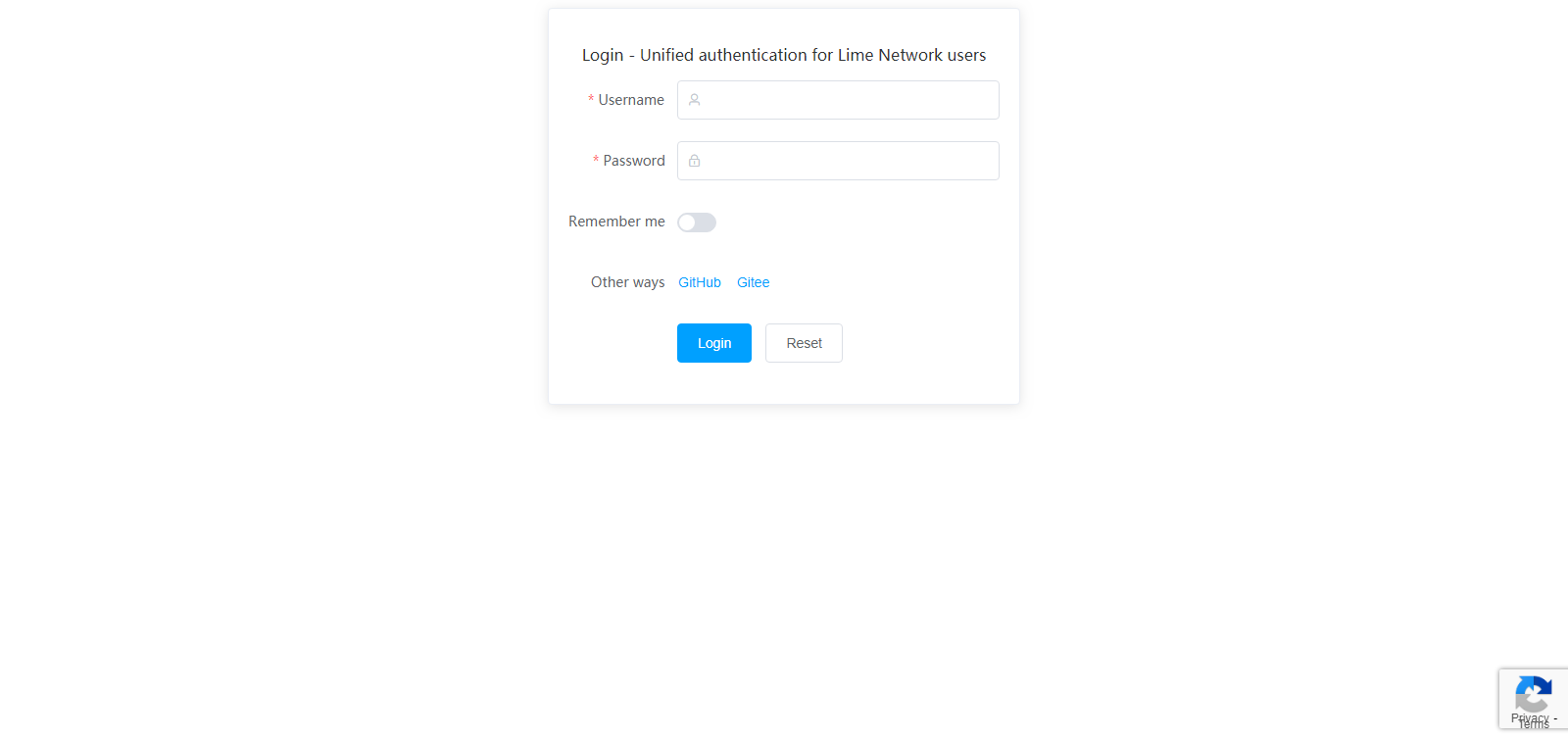
如图所示,主卡不能居中。
3.预期结果(有待解决的问题)
使<div id="app"><el-card class="box-card" style="width:480px;margin:auto;">垂直中心
4.参考资料
5.尝试过(失败)的解决方案
(1)
#app{
display:flex;
justify-content: center;
align-items: center;
}
(2)
#app{
position:relative;
.box-card{
    position: absolute;
    top: 0;
    left: 0;
    right:0;
    bottom: 0;
    margin: auto;
    }
}6.代码(前端)
<!DOCTYPE html>
<html xmlns="http://www.w3.org/1999/xhtml">

    <head>
        <meta http-equiv="Content-Type" content="text/html; charset=UTF-8" />
        <title>Login - Unified authentication for Lime Network users</title>
        <script src="https://cdn.jsdelivr.net/npm/vue/dist/vue.js"></script>
        <script src="https://cdn.staticfile.org/element-ui/2.13.2/index.js"></script>
        <script src="https://cdn.staticfile.org/element-ui/2.13.2/locale/en.min.js"></script>
        <link rel="stylesheet" href="https://cdn.staticfile.org/element-ui/2.13.2/theme-chalk/index.css">
    </head>

    <body>
        <div id="app">
            <el-card class="box-card" style="width:480px;margin:auto;">
                <p style="text-align:center">Login - Unified authentication for Lime Network users</p>
                <el-form ref="form" :model="form" status-icon :rules="rules" label-position="left" label-width="auto">
                    <el-form-item label="Username" prop="username">
                        <el-input v-model="form.username" prefix-icon="el-icon-user"></el-input>
                    </el-form-item>
                    <el-form-item label="Password" prop="password">
                        <el-input v-model="form.password" prefix-icon="el-icon-lock" show-password></el-input>
                    </el-form-item>
                    <el-form-item label="Remember me">
                        <el-switch v-model="form.remember"></el-switch>
                    </el-form-item>
                    <el-form-item label="Other ways">
                        <el-button type="text" @click="oauth_github()">GitHub</el-button>
                        <el-button type="text" @click="oauth_gitee()">Gitee</el-button>
                    </el-form-item>
                    <el-form-item>
                        <el-button type="primary" @click="submitForm('form')">Login</el-button>
                        <el-button @click="resetForm('form')">Reset</el-button>
                    </el-form-item>
                </el-form>
            </el-card>
        </div>
        <script>
        Script part omitted
        </script>
    </body>

</html>回答 1
Stack Overflow用户
回答已采纳
发布于 2020-08-01 13:19:35
这个问题已经解决了
body {
        margin: 0px;
    }
    #app {
        position: relative;
        width: 100%;
        height: 100vh;
        display:flex;
        justify-content: center;
        align-items: center;
}页面原文内容由Stack Overflow提供。腾讯云小微IT领域专用引擎提供翻译支持
原文链接:
https://stackoverflow.com/questions/63186148
复制相关文章
相似问题
腾讯云开发者

Copyright © 2013 - 2026 Tencent Cloud. All Rights Reserved. 腾讯云 版权所有
深圳市腾讯计算机系统有限公司 ICP备案/许可证号:粤B2-20090059  粤公网安备44030502008569号
腾讯云计算(北京)有限责任公司 京ICP证150476号 | 京ICP备11018762号