
统一中的径向菜单问题
统一中的径向菜单问题
提问于 2020-07-31 01:03:12
我已经制作了一个径向菜单预制件,它可以自动调整按钮之间的间距。我已经在我的单位预制板中包含了这个径向菜单,这样玩家就可以从每个单位的可用移动选项中选择。
该菜单看起来非常适合直接面向对象,但尽管菜单是子对象,但它不会旋转以匹配其父对象。按钮确实旋转到正确的方向,但径向菜单本身默认为它原来的设置:将按钮放置在一个180弧度,起始于-90度。
public void SetMenu()
{

    float angle = -180 / (childButtons.Count - 1) * Mathf.Deg2Rad; //180 is the total degree range our buttons will fill. Negative to put the buttons beneath our ship. Count -1 because we want the distance of the gaps between buttons.

    for (int i = 0; i < childButtons.Count; i++) //For each button...
    {

        float xpos = Mathf.Cos(angle * i) * buttonDistance; //Make coordinates along an angle increment depending on the total number of buttons to...
        float zpos = Mathf.Sin(angle * i) * buttonDistance;

        childButtons[i].transform.position = new Vector3(transform.position.x + xpos, transform.position.y, transform.position.z + zpos); //Place the button
    }
}
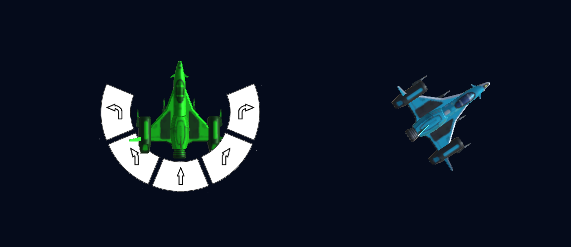
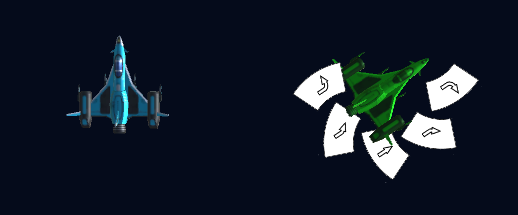
任何帮助都将不胜感激!
回答 2
Stack Overflow用户
发布于 2020-07-31 03:15:10
轮作父母对儿童旋转的影响。如果你想维持它原来的旋转,那么你应该将它们与父母相反地旋转。
但要解决这个问题,还有更简单、更明确的方法。
做一个空的对象,使它成为船的子对象,按钮的父对象。把它从母船倒转过来。使用此方法时,不需要使用极坐标转换重新定位子按钮.
(空对象的局部位置应为(0,0,0))
Stack Overflow用户
发布于 2020-07-31 14:50:24
通过调整localPosition而不是设置全局来解决问题。早期的localPosition调整尝试似乎失败了,因为规模差异很大,UI元素不使用z轴。buttonDistance需要是20X,这是在localPosition中产生相同结果的原始设置,现在一切都是正确的。
新代码是:
public void SetMenu()
{

    float angle = -180 / (childButtons.Count - 1) * Mathf.Deg2Rad; //-180 is the total degree range our buttons will fill. -1 because we want the distance of the gaps between buttons.

    for (int i = 0; i < childButtons.Count; i++) //For each button...
    {
        float xpos = Mathf.Cos(angle * i) * buttonDistance; //Make coordinates along an angle increment depending on the total number of buttons to...
        float ypos = Mathf.Sin(angle * i) * buttonDistance;

        childButtons[i].transform.localPosition = new Vector3(transform.localPosition.x + xpos, transform.localPosition.y + ypos, transform.localPosition.z); //Place the button
    }

}页面原文内容由Stack Overflow提供。腾讯云小微IT领域专用引擎提供翻译支持
原文链接:
https://stackoverflow.com/questions/63184358
复制相关文章
相似问题
腾讯云开发者

Copyright © 2013 - 2026 Tencent Cloud. All Rights Reserved. 腾讯云 版权所有
深圳市腾讯计算机系统有限公司 ICP备案/许可证号:粤B2-20090059  粤公网安备44030502008569号
腾讯云计算(北京)有限责任公司 京ICP证150476号 | 京ICP备11018762号