
过滤IMPORTHTML数据
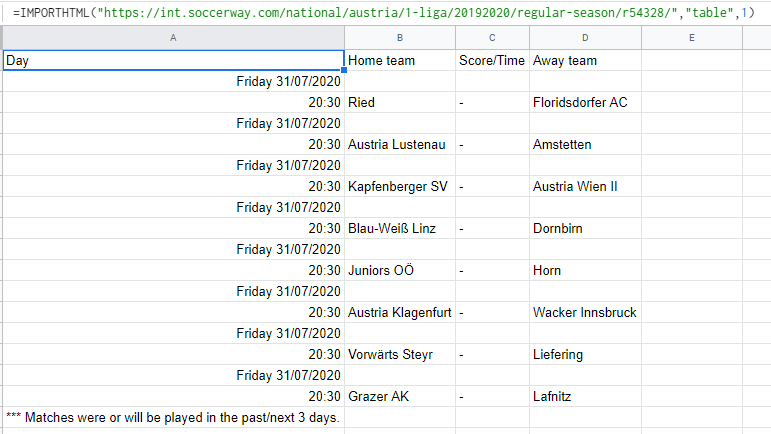
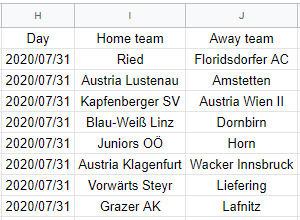
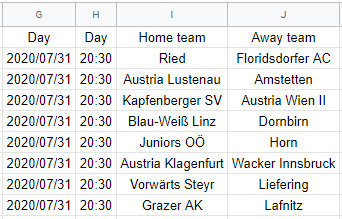
当我导入数据时,它以这种格式出现(图1),带有空格。我想知道是否有任何方法来调整这些空白消失,这两个模型(图2和图3)是否有任何方法来达到它们对我来说很重要。
记住所有的日期都有/,而所有的时间都有:
我试着从QUERY中过滤,但是当我试图将日期消失而只保留时间时,我尝试通过REGEXMATCH使用/和:将日期和时间分离开来,但也没有成功。
我也通过IMPORTXML尝试过,但是一些数据最终无法在站点的某些页面上正确导入,因为IMPORTHTML不会发生这些错误。我使用的XML's是:
"//tr[@class='no-date-repetition-new' and ..//td[@class='team team-a']] | //tr[@class='no-date-repetition-new live-now' and ..//td[@class='team team-a']]"
"//td[@class='team team-a']/a | //td[@class='team team-a strong']/a"
当前的公式如下:
=IMPORTHTML("https://int.soccerway.com/national/austria/1-liga/20192020/regular-season/r54328/","table",1)
IMPORTHTML原文:
预期格式:
回答 2
Stack Overflow用户
发布于 2020-07-31 20:05:59
所需的不是过滤,而是重构导入的数据。
无论如何,我认为获得最终结果的更容易的解决方案是使用多个IMPORTXML公式。
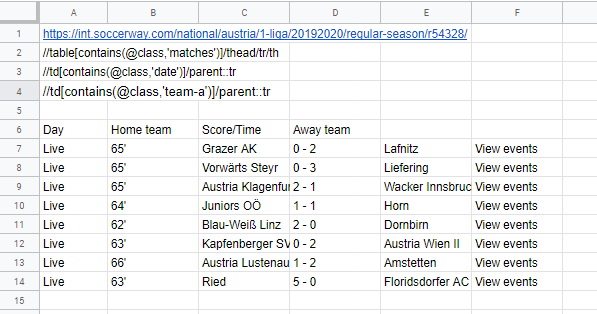
URL
A1:https://int.soccerway.com/national/austria/1-liga/20192020/regular-season/r54328/
标头
A2://table[contains(@class,'matches')]/thead/tr/th
天
A3://td[contains(@class,'date')]/parent::tr
球队和得分
A4://td[contains(@class,'team-a')]/parent::tr
A6:=transpose(IMPORTXML($A$1,A2))
A7:=IMPORTXML($A$1,A3)
B7:=IMPORTXML(A1,A4)
您可能希望用静态值替换A6上的公式,以便正确地放置它们。
Stack Overflow用户
发布于 2020-07-31 20:50:17
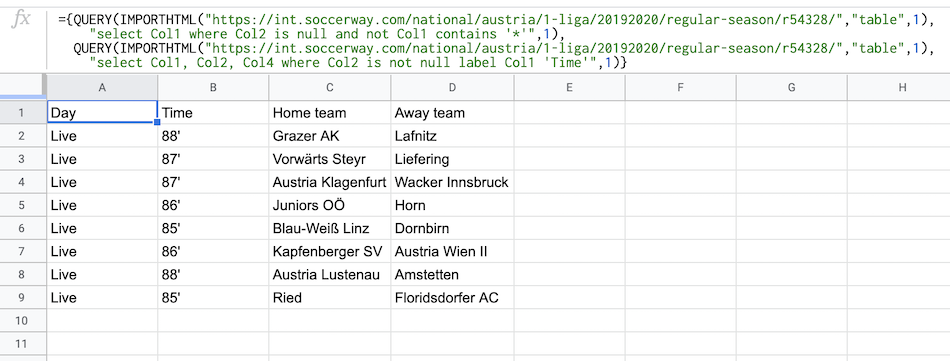
您可以在一个公式中将两个查询(一个相邻)连接在一起,以获得结果。
={QUERY(IMPORTHTML("https://int.soccerway.com/national/austria/1-liga/20192020/regular-season/r54328/","table",1),
    "select Col1 where Col2 is null and not Col1 contains '*'",1),
QUERY(IMPORTHTML("https://int.soccerway.com/national/austria/1-liga/20192020/regular-season/r54328/","table",1),
    "select Col1, Col2, Col3, Col4 where Col2 is not null label Col1 'Time'",1)}
公式的工作原理:
正如您注意到的那样,
- 在这两个查询中的数据部分是相同的。实际上不同的是“我们从查询中要求什么”,在第一个使用
"select Col1 where Col2 is null and not Col1 contains '*'" - In的
- ,第二个
"select Col1, Col2, Col3, Col4 where Col2 is not null label Col1 'Time'" - We通过将它们连接在一起创建一个数组,就像在
={1stQUERY,2ndQUERY}
中一样。
https://stackoverflow.com/questions/63195003
复制相似问题
腾讯云开发者

Copyright © 2013 - 2026 Tencent Cloud. All Rights Reserved. 腾讯云 版权所有
深圳市腾讯计算机系统有限公司 ICP备案/许可证号:粤B2-20090059  粤公网安备44030502008569号
腾讯云计算(北京)有限责任公司 京ICP证150476号 | 京ICP备11018762号