
在Ubuntu上下载MACOS VMWARE和运行Xcode时遇到的问题
我使用QEMU-system下载了macOS。您可以在这里找到完整的教程::https://www.youtube.com/watch?v=p-pJ3qCse20 https://github.com/foxlet/macOS-Simple-KVM
下面是我在Ubuntu上下载macOS并在macOS上运行Xcode时遇到的问题
回答 1
Stack Overflow用户
发布于 2020-08-02 16:51:21
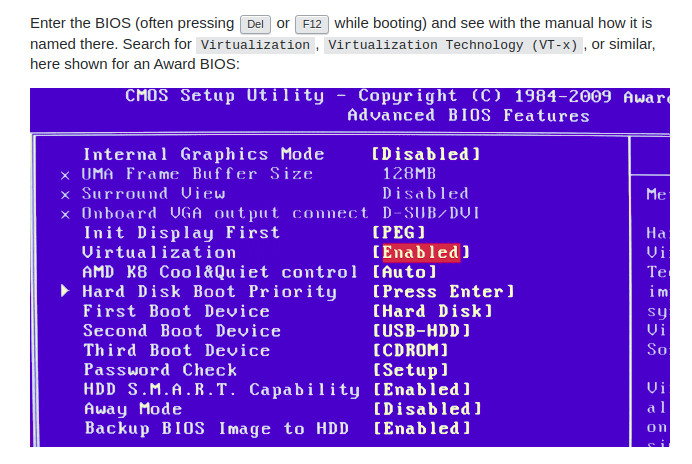
问题1:在终端中运行./basic.sh时 qemu-system-x86_64: failed to initialize KVM: No such file or directory
解决方案:来自bios的 enable virtualization或您可以在终端中运行sudo chown [username] /dev/kvm
请注意,安装Xcode后,您应该安装bundle、ruby、cocoapods
问题2: Could not find proper version of cocoapods (1.9.1) in any of the sources
解决方案您使用的cocoapods不可合并,请卸载cocoapods并重新安装cocoapods版本= 1.9.1
问题3:在运行pod install时获取错误
[!] Unable to find a specification for `PureLayout (= 3.1.5)`
You have either:
 * out-of-date source repos which you can update with `pod repo update` or with `pod install --repo-update`.
 * mistyped the name or version.
* not added the source repo that hosts the Podspec to your Podfile.我试着运行pod repo update或使用pod install --repo-update,但是我也遇到了这个错误
Updating local specs repositories
  $ /.cocoapods/repos/cocoapods fetch origin --progress
  remote: Enumerating objects: 41, done.
  remote: Counting objects: 100% (41/41), done.
  remote: Compressing objects: 100% (26/26), done.
  remote: Total 27 (delta 18), reused 0 (delta 0), pack-reused 0
  From https://github.com/cocoapods/specs
     5c7f45f07ad8..bed8af45c97e  master     -> origin/master
  $ /usr/bin/git -C /Users/nisrine/.cocoapods/repos/cocoapods rev-parse --abbrev-ref HEAD
  fatal: ambiguous argument 'HEAD': unknown revision or path not in the working tree.
  HEAD
  Use '--' to separate paths from revisions, like this:
  'git <command> [<revision>...] -- [<file>...]'
[!] CocoaPods was not able to update the `cocoapods` repo. If this is an unexpected issue and persists you can inspect it running `pod repo update --verbose`运行pod repo update --verbose也不起作用,并给出了此错误
/.cocoapods/repos/cocoapods rev-parse --abbrev-ref HEAD
  fatal: ambiguous argument 'HEAD': unknown revision or path not in the working tree.
HEAD解决方案:打开vi Gemfile.lock并将git配置添加到文件中
现在运行bundle exec pod install会很好
问题4: CocoaPods could not find compatible versions for pod "Firebase/Performance"
解决方案:运行pod install --repo-update并再次运行bundle exec pod install解决了错误
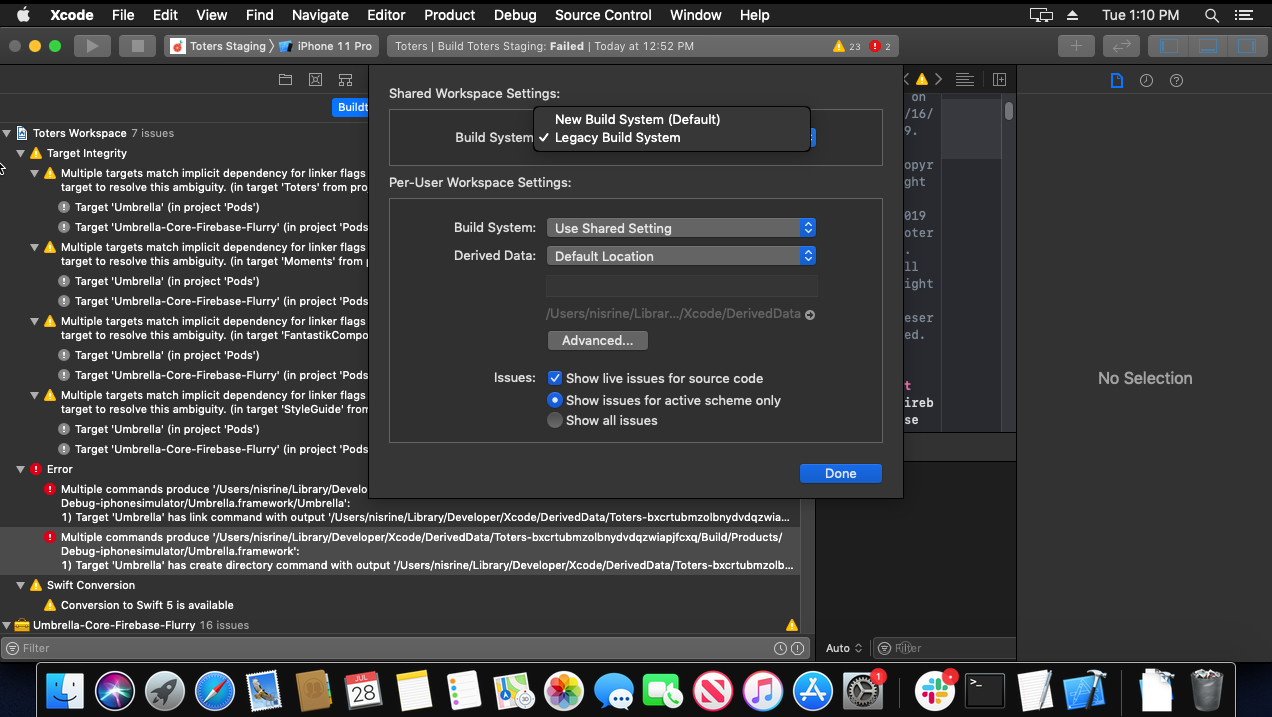
/build/products/debug-iphonesimulator/umbrella.framework/umbrella问题5:由于运行后产生多个命令,模拟器没有运行
解决方案:转到文件>项目/工作区设置,然后将构建系统更改为遗留构建系统。
https://stackoverflow.com/questions/63218650
复制相似问题
腾讯云开发者

Copyright © 2013 - 2026 Tencent Cloud. All Rights Reserved. 腾讯云 版权所有
深圳市腾讯计算机系统有限公司 ICP备案/许可证号:粤B2-20090059  粤公网安备44030502008569号
腾讯云计算(北京)有限责任公司 京ICP证150476号 | 京ICP备11018762号