
在窗体验证后按一下按钮运行JS函数
我有两个JS函数;一旦单击表单上的按钮,第一个function1将信息发送给服务器到python。第二个函数,function2转到下一个页面层(不是下一个HTML页面,而是一个HTML页面上的多页表单)。
目前,我正在我的按钮上使用onClick函数:onClick="function1();"和JQuery。如果这三个条目中有一个是空的,表单将检查并告诉用户填写空字段。
如何让function2等待function1成功执行,所有有效的表单条目和python脚本都没有错误( python返回'',204,这样页面一旦运行就不会发生更改,所以对这个问题并不重要)。
下面是我的JS函数脚本,如有任何建议将不胜感激。
<script>
  form = document.getElementById("formID");

  function function1() {
    form.action = "/runPythonFunc";
    form.submit();
    // JQuery validates the form to make sure all entries are filled
    // How do I make function2 wait now until all the entries have been filled by the user?
    function2('page2')
  }
</script>


<script language="JavaScript">
  var currentLayer = 'page1';

  function function2(lyr) {
    hideLayer(currentLayer);
    document.getElementById(lyr)
      .style.visibility = 'visible';
    currentLayer = lyr;
  }

  function hideLayer(lyr) {
    document.getElementById(lyr).
    style.visibility = 'hidden';
  }

  function showValues(form) {
    var values = '';
    var len = form.length - 1;
    //Leave off Submit Button
    for (i = 0; i < len; i++) {
      if (form[i].id.indexOf("C") != -1 ||
        form[i].id.indexOf("B") != -1)
        //Skip Continue and Back Buttons
        continue;
      values += form[i].id;
      values += ': ';
      values += form[i].value;
      values += '\n';
    }
    alert(values);
  }
</script>
更新:
我一直在尝试使用AJAX,并且有几种我一直在使用的不同方法,但这两种方法都没有起作用。每种方法的具体细节在下面的代码中作为注释提到:
第一条路
<script>
   function function1() {

    $.ajax({
      url: '/runPythonFunc',
      type: 'POST',
      data: {
        email: $('#User-Email').val(),
        entryTwo: $('#EntryTwo').val(),
        entryThree: $('#EntryThree').val()
      },
      success: function2('page2') { // getting error in this line "Syntax error: unexpected token '{'"
        return '', 204;
      }
    });
  }
  // Getting the error:     Uncaught ReferenceError: metaSQL is not define at HTMLInputElement.onclick
</script>上面的第一种方法是在开发工具中提供这些错误(为了澄清,metaSQL is my function1, and form 1‘是表单第2页条目的ID (我们在这个问题中没有处理)。
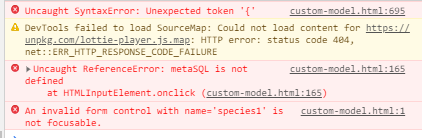
第二条路
<script>
  function function1() {

    return $.ajax({
      url: '/runPythonFunc',
      type: 'POST',
      data: {
        email: $('#User-Email').val(),
        entryTwo: $('#EntryTwo').val(),
        entryThree: $('#EntryThree').val()
      }
    });
  }

  function1().then(response => function2('page2'));  // not sure what to replace 'response ' with
  // Getting the error:     Uncaught ReferenceError: metaSQL is not define at HTMLInputElement.onclick
  // Also the error: Uncaught ReferenceError: $ is not defined, and Mixed Content: The page was loaded over HTTPS, but requested an insecure script 'http://ajax.googleapis.com/ajax/libs/jquery/1.5/jquery.min.js'. This request has been blocked; the content must be served over HTTPS.
</script>
在上述两个选项之间是否有一种理想的方法,或者在我的例子中使用AJAX的方式完全不同?
其他代码、HTML表单:
<form id="wf-form-Email-Form" name="wf-form-Email-Form" data-name="Email Form" method="post" action="">

  <!-- PAGE 1 -->
  <div id="page1" class="page" style="visibility:visible;">

    <!-- USER EMAIL -->

    <label for="Algorithm-Name-3" class="custom-question algorithm-name">Enter your email<br></label><input type="text" class="text-field enter-name w-input" maxlength="256" name="User-Email" data-name="User Email" placeholder="Email address"
      id="User-Email" required="">

    <!-- ALGORITHM NAME -->

    <label for="Algorithm-Name-3" class="custom-question algorithm-name">What will you name your algorithm?<br></label><input type="text" class="text-field enter-name w-input" maxlength="256" name="Algorithm-Name" data-name="Algorithm Name"
      placeholder="Be as creative as you like!" id="Algorithm-Name" required="">

    <!-- ALGORITHM DESCRIPTION -->

    <label for="Algorithm-Desc-3" class="custom-question algorithm-desc">Briefly describe what your algorithm does?<br></label><input type="text" class="text-field enter-name w-input" maxlength="256" name="Algorithm-Description"
      data-name="Algorithm Description" placeholder="You can still be creative!" id="Algorithm-Desc" required="">


    <br><br>

<!-- NOTE: metaSQL IS FUNCTION1 -->
    <p><input type="submit" class="submit-button-2 w-button" id="C1" value="Add Animal" onClick="metaSQL();"></p>

  </div>

  <!-- PAGE 2 (1st ANIMAL) -->

  <div id="page2" class="page">

    <p style="font-family: Poppins,sans-serif; color: #fff;">1st Animal</p>

    <!-- 1ST ANIMAL NAME -->

    <label for="Enter-species" class="custom-question enter-species" id="one_name">What animal are you looking for?</label>
    <row>
      <p> <input type="text" class="text-field w-input" maxlength="256" name="species1" placeholder="Enter name of animal" id="Enter-species" required="">
        <input type="button" class="submit-button-2 w-button" id="S1" value="Search" onClick="animalSQL()">
        <div class="hidden-load" id="hidden-load">
          <lottie-player src="https://assets1.lottiefiles.com/packages/lf20_xs6VVO.json" background="transparent" speed="0.7" style="width: 80px; height: 80px;" loop autoplay></lottie-player>
        </div>
      </p>
    </row>

    <!-- NOTE: showLayer IS FUNCTION2 -->
    <p><input type="button" class="submit-button-2 w-button" id="B1" value="Go Back" onClick="showLayer('page1')">
      <input type="button" class="submit-button-2 w-button add-another-animal" id="C2" value="Add another animal" onClick="animalSQL(); showLayer('page3')">
      <input type="button" class="submit-button-2 w-button finish_and_submit" id="F1" value="Finish & Submit" onClick="submitButton(), showLayer('page22')">
    </p>

  </div>
  .
  .
  .
</form>
干杯
根据@Alwaysa学习者的要求提供更多信息(devtool屏幕快照),以及下面的python代码(使用Flask框架)。为了避免混淆,meta2sql与‘
@app.route('/runPythonFunc', methods=['GET', 'POST'])
def runPythonFunc():
    #function does work
return '', 204回答 2
Stack Overflow用户
发布于 2020-08-05 01:20:26
一步一步地走.使用id page1删除除div之外的所有内容,并单击按钮运行ajax (也从按钮中删除onClick="metaSQL(); )。然后发布从console.log(数据)获得的结果。
<script>
    $(document).ready(function () {
        $("#C1").click(function () {
            $.ajax({
                url: '/runPythonFunc',
                type: 'POST',
                data: {
                    email: $('#User-Email').val(),
                    entryTwo: $('#Algorithm-Name').val(),
                    entryThree: $('#Algorithm-Desc').val()
                },
                success: function (data, status, jqXHR) {
                    console.log(data);
                }
            });
        });
    });
</script>


<div id="page1" class="page" style="visibility:visible;">
    <!-- USER EMAIL -->
    <label for="Algorithm-Name-3" class="custom-question algorithm-name">Enter your email<br></label><input type="text" class="text-field enter-name w-input" maxlength="256" name="User-Email" data-name="User Email" placeholder="Email address"                                                                                                               id="User-Email" required="">
    <!-- ALGORITHM NAME -->
    <label for="Algorithm-Name-3" class="custom-question algorithm-name">What will you name your algorithm?<br></label><input type="text" class="text-field enter-name w-input" maxlength="256" name="Algorithm-Name" data-name="Algorithm Name"                                                                                                                                   placeholder="Be as creative as you like!" id="Algorithm-Name" required="">
    <!-- ALGORITHM DESCRIPTION -->
    <label for="Algorithm-Desc-3" class="custom-question algorithm-desc">Briefly describe what your algorithm does?<br></label><input type="text" class="text-field enter-name w-input" maxlength="256" name="Algorithm-Description"                                                                                                                                           data-name="Algorithm Description" placeholder="You can still be creative!" id="Algorithm-Desc" required="">
    <br><br>
    <p><input type="submit" class="submit-button-2 w-button" id="C1" value="Add Animal" onClick="metaSQL();"></p>
</div>Stack Overflow用户
发布于 2020-08-05 01:45:14
试试看
async function function1() {
    form.action = "/runPythonFunc";
    await form.submit();
    function2('page2');
}https://stackoverflow.com/questions/63254472
复制相似问题
腾讯云开发者

Copyright © 2013 - 2026 Tencent Cloud. All Rights Reserved. 腾讯云 版权所有
深圳市腾讯计算机系统有限公司 ICP备案/许可证号:粤B2-20090059  粤公网安备44030502008569号
腾讯云计算(北京)有限责任公司 京ICP证150476号 | 京ICP备11018762号