
React.js,Express.js和可怕的CORS
很抱歉,我又发了一个关于CORS的问题,但我就是想不出这个问题。

我有一个使用Express.js服务器(运行在http://localhost:9001上)将图像上传到Google存储桶的React应用程序。我一直得到一个CORS错误,即使图像上传成功,这是阻止我获得图像的URL返回。我真的不明白我怎么能得到一个CORS错误,即使图像被上传,但这是正在发生的。
我在Google存储桶上配置了CORS,如下所示:
[
    {
      "origin": ["http://localhost:3000"],
      "responseHeader": "*",
      "method": ["POST"],
      "maxAgeSeconds": 3600
    }
]
当我检查CORS错误时,我看到以下内容:
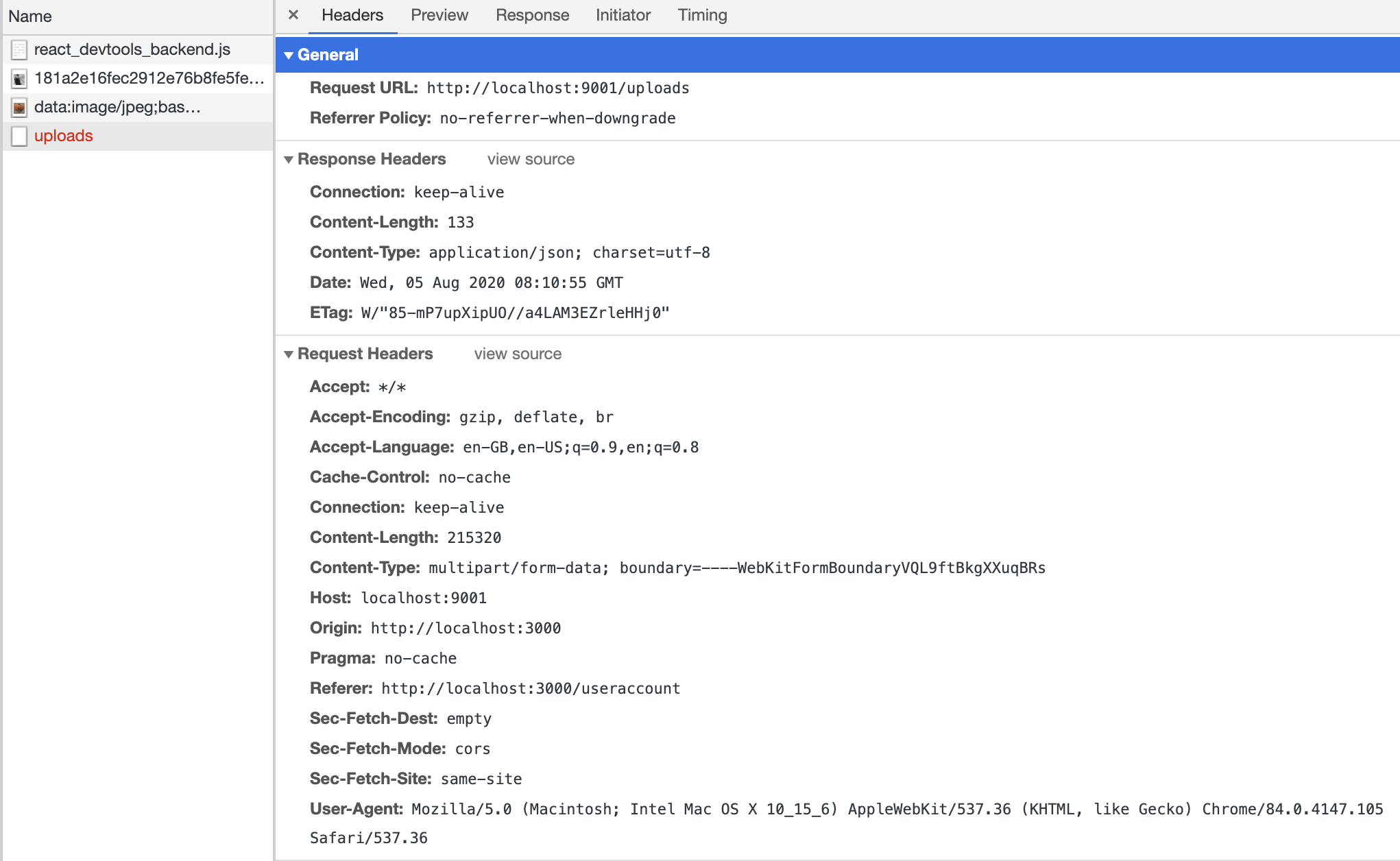
原点是http://localhost:3000,所以这是正确配置的,我使用POST上传图像,所以也应该允许。
我编写的上传图像的函数如下:
function postImage(file) {
    const formData = new FormData();
    formData.append('file', file);

    fetch(`${window.location.protocol}//${window.location.hostname}:9001/uploads`, {
        method: 'POST',
        mode: 'cors',
        cache: 'no-cache',
        // headers: {
        //     'Content-Type': 'multipart/form-data'
        // },
        body: formData
    })
        // .then((response) => response.json())
        .then((response) => console.log('This is your data:', response.data))

        .catch(error => {
            console.error('There has been a problem uploading your image', error);
        });
}我已经注释掉了标题,因为它们不断地弹出一个Multipart: Boundary not found错误,我看到其他人也有问题,而删除headers设置并没有引起任何其他问题。
我在Express服务器上有一个帮助函数,它将图像上传到Google存储桶中:
const uploadImage = (file) => new Promise((resolve, reject) => {
    const { originalname, buffer } = file

    const blob = bucket.file(originalname.replace(/ /g, "_"))
    const filetype = blob.name.split('.').pop()
    const filename = `${uuidv4()}.${filetype}`
    const blobStream = blob.createWriteStream({
        resumable: false
    })
    blobStream.on('finish', () => {
        const publicUrl = format(
            `https://storage.googleapis.com/${bucket.name}/${filename}`
        )
        resolve(publicUrl)
    })
        .on('error', () => {
            reject(`Unable to upload image, something went wrong`)
        })
        .end(buffer)
})
以下是我的Express服务器上的功能:
import { typeDefs } from './graphql-schema'
import { ApolloServer } from 'apollo-server-express'
import express from 'express'
import neo4j from 'neo4j-driver'
import { makeAugmentedSchema } from 'neo4j-graphql-js'
import dotenv from 'dotenv'
import { initializeDatabase } from './initialize'
const bodyParser = require('body-parser')
const multer = require('multer')
const uploadImage = require('./helpers/helpers')

dotenv.config()

const app = express()

    const schema = makeAugmentedSchema({
      typeDefs,
      config: {
        query: {
          exclude: ['RatingCount'],
        },
        mutation: {
          exclude: ['RatingCount'],
        },
      },
    })

    const driver = neo4j.driver(
      process.env.NEO4J_URI,
      neo4j.auth.basic(
        process.env.NEO4J_USER,
        process.env.NEO4J_PASSWORD
      ),
      {
        encrypted: process.env.NEO4J_ENCRYPTED ? 'ENCRYPTION_ON' : 'ENCRYPTION_OFF',
      }
    )

    const init = async (driver) => {
      await initializeDatabase(driver)
    }

    init(driver)

    const server = new ApolloServer({
      context: { driver, neo4jDatabase: process.env.NEO4J_DATABASE },
      schema: schema,
      introspection: true,
      playground: true,
    })

    // Specify host, port and path for GraphQL endpoint
    const port = process.env.GRAPHQL_SERVER_PORT || 4001
    const path = process.env.GRAPHQL_SERVER_PATH || '/graphql'
    const host = process.env.GRAPHQL_SERVER_HOST || '0.0.0.0'


    // Code for uploading files to Google Cloud
    app.use((req, res, next, err) => {
      console.error(err.stack)
      res.header("Access-Control-Allow-Origin", "*");
      res.type('multipart/form-data')
      res.status(500).json({
        error: err,
        message: 'Internal server error!',
      })
      next()
    })

    const multerMid = multer({
      storage: multer.memoryStorage(),
      limits: {
        // no larger than 5mb.
        fileSize: 5 * 1024 * 1024,
      },
    })

    app.disable('x-powered-by')
    app.use(multerMid.single('file'))
    app.use(bodyParser.json())
    app.use(bodyParser.urlencoded({ extended: false }))

    app.post('/uploads', async (req, res, next) => {
      try {
        const myFile = req.file
        const imageUrl = await uploadImage(myFile)
        res
          .status(200)
          .json({
            message: "Upload was successful",
            data: imageUrl
          })
      } catch (error) {
        next(error)
      }
    })

    server.applyMiddleware({ app, path })

    app.listen({ host, port, path }, () => {
      console.log(`GraphQL server ready at http://${host}:${port}${path}`)
    })

    app.listen(9001, () => {
      console.log('Node.js -> GCP server now listening for requests!')
    })
我尝试了很多不同的方法来实现这个目标:
- 我尝试将http://localhost:9001添加到CORS配置中,以及其他URL
- 我试过用
"*"打开所有的起源 - 我已经阅读了所有的文档
[here][3] - 我已经试过跟踪Google有这里的所有故障排除文档
- 我已经清除了浏览器缓存,因为这会导致CORS错误持续存在--请参阅另一篇文章这里
- 我已经试着整夜等待我的Google配置生效,因为我听说这个配置可能需要一些时间来传播
尽管所有这些,我仍然得到CORS错误,但我的上传仍然有效。我只需要清除错误,这样我就可以得到返回的图像URL。
回答 1
Stack Overflow用户
发布于 2020-08-05 08:57:45
您将cors添加到Google存储桶中,但忘记添加它来表示服务器POST功能。或者在您的快递服务器上使用它作为全局服务器。
在你的特快专递功能上试试这个:
res.header("Access-Control-Allow-Origin", "http://example.com");或
res.header("Access-Control-Allow-Origin", "*");甚至更好:
    /* Headers */
app.use((req, res, next) => {
    res.header("Access-Control-Allow-Origin", "*"); // update to match the domain you will make the request from
    res.header("Access-Control-Allow-Headers", "Origin, X-Requested-With, Content-Type, Accept");
    next();
});https://stackoverflow.com/questions/63261409
复制相似问题
腾讯云开发者

Copyright © 2013 - 2026 Tencent Cloud. All Rights Reserved. 腾讯云 版权所有
深圳市腾讯计算机系统有限公司 ICP备案/许可证号:粤B2-20090059  粤公网安备44030502008569号
腾讯云计算(北京)有限责任公司 京ICP证150476号 | 京ICP备11018762号