
如何创建与Svelte Routify的线路链接
我正在学习如何使用Routify连接一些路线和链接。我需要帮助。
在Routify文档上写着:
“链接可以通过一系列不同的方式来处理。这可能是最简单的方法”。
via:https://routify.dev/guide/navigation
然后给出了这个例子:
<script>
  import {isActive, url} from '@sveltech/routify'

  const links =
  [
    ['./index', 'Home'], //add index if you don't want siblings to be considered children
    ['./blog', 'Blog'],
    ['./about', 'About'],
    ['./contact', 'Contact']
  ]
</script>

<style>
  .active {font-weight: bold}
</style>

<ul>
  {#each links as [path, name]}
    <!-- Svelte magic. If isActive is true, the "active" class is applied. -->
    <li class:active={$isActive(path)}>
      <a href={$url(path)}>
        {name}
      </a>
    </li>
  {/each}
</ul>
不幸的是,它并没有给出任何指示如何连接到您的应用程序(如果是这样的话,它太复杂,我无法弄清楚)。
我正在使用Routify模板,并将上面的代码复制到以下目录中:
pages/_components/Navigation.svelte
然后,我尝试将其导入页面/index.svelte,如下所示:
pages/index.svelte
 <script>

  import Navigation from './_components/Navigation.svelte';

</script>

<div>
  <Navigation/>


</div>
链接出现在页面的顶部。当我单击它们时,端点遵循以下模式:
http://localhost:5000/index/home

http://localhost:5000/index/blog

http://localhost:5000/index/about

http://localhost:5000/index/contact在我的/pages目录中,有与代码中列出的页面相匹配的页面,如:
/pages/Home.svelte
当我单击链接时,我的浏览器停留在同一个页面上,并且不嵌入与链接关联的页面。此外,我的浏览器开发工具说:
Uncaught Error: Route could not be found for "/index/home".
    at urlToRoute (urlToRoute.js:15)
    at updatePage (navigator.js:13)
    at pushstate (navigator.js:60)
    at History.history.<computed> [as pushState] (navigator.js:51)
我需要做什么才能看到相应的页面,为什么它们的中间目录名为"index"?我如何去掉网址中的“索引”这个词?
更新
好的,我在所有页面上都列出了导航,而且半工作。
我将我的导航代码(如下)导入到中
守则如下:
pages/_layout.svelte
<script>
    import Navigation from './_components/Navigation.svelte';
</script>

<!--TABS-->

<Navigation/>
pages/_components/Navigation.svelte
<script>
  import {isActive, url} from '@sveltech/routify'

  const links =
  [
    ['./index', 'Home'], //add index if you don't want siblings to be considered children
    ['./form', 'Form']
  ]
</script>

<style>
  .active {font-weight: bold}
</style>

<ul>
  {#each links as [path, name]}
    <!-- Svelte magic. If isActive is true, the "active" class is applied. -->
    <li class:active={$isActive(path)}>
      <a href={$url(path)}>
        {name}
      </a>
    </li>
  {/each}
</ul>
会出现导航链接,但现在的问题是所选页面的内容没有出现。
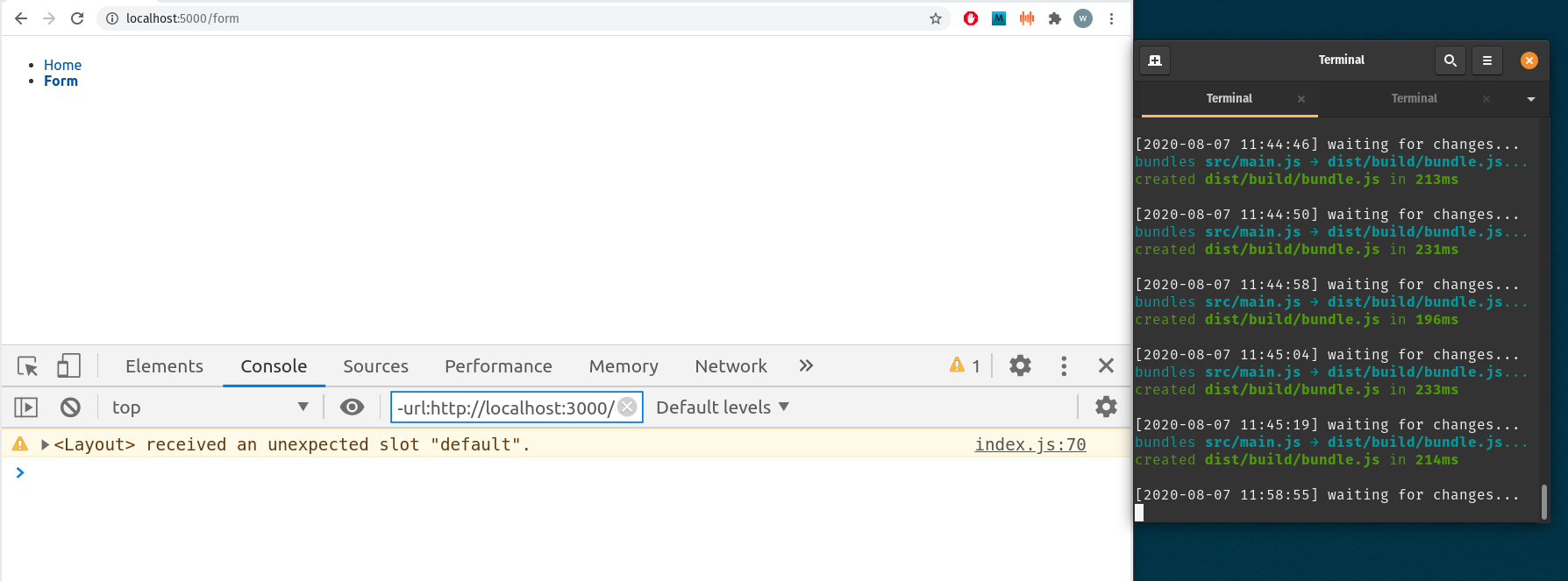
在下面的图像中,表单端点正在呈现。表单组件具有工作的HTML,但是HTML不会出现在页面上。
我还收到了一个警告,我的开发人员工具上写着:“收到了一个意想不到的插槽”默认值“。
回答 1
Stack Overflow用户
发布于 2020-08-07 05:23:02
您不应该将导航组件导入index.svelte文件,而是导入同一个目录中的_layout.svelte文件。
它们显示了电视节目应用程序中的设置,尽管它们没有像您正在尝试的那样显示在Nav文件中导入的上述代码,但是如果在_layout文件中导入带有上述代码的组件,它将工作,因为url助手解析相对于使用它的页面/布局的路径。
将其导入索引文件将创建相对于索引文件的路径,这就是为什么在所有路由中都看到索引的原因。
更新:
响应需要呈现每个页面的内容。这是使用_layout文件中的一个槽来完成的,在您的示例中,如下所示:
<Navigation/>

<main>
  <slot />
</main>https://stackoverflow.com/questions/63294035
复制相似问题
腾讯云开发者

Copyright © 2013 - 2026 Tencent Cloud. All Rights Reserved. 腾讯云 版权所有
深圳市腾讯计算机系统有限公司 ICP备案/许可证号:粤B2-20090059  粤公网安备44030502008569号
腾讯云计算(北京)有限责任公司 京ICP证150476号 | 京ICP备11018762号