
vue元素ui树中基于文件夹选择的文件过滤
vue元素ui树中基于文件夹选择的文件过滤
提问于 2020-08-09 20:13:06
我使用元素ui树视图显示文件夹。每个文件夹或它们的子文件夹都有一些文件。我必须根据文件夹选择列出这些文件。我可以过滤掉正常名单上的那些。但是,我不能使用element树视图来完成这个任务。请建议我如何为树节点这样做。以下是示例数据:
   data: [{
      id: 1,
      label: 'Level one 1',
      type: 'folder',
      children: [{
        id: 4,
        label: 'Level two 1-1',
        type: 'folder',
        children: [
          { id: 9, label: 'Level three 1-1-1', type: 'file'},
          { id: 10, label: 'Level three 1-1-2', type: 'file' }]
      }]
    }, {
      id: 2,
      label: 'Level one 2',
      type: 'folder',
      children: [
        { id: 5, label: 'Level two 2-1', type: 'file'},
        { id: 6, label: 'Level two 2-2', type: 'file'}]
    }, {
      id: 3,
      label: 'Level one 3',
      type: 'folder',
      children: [
        { id: 7, label: 'Level two 3-1', type: 'file'},
        { id: 8, label: 'Level two 3-2', type: 'file'}]
    }]
这里是我的树的代码片段:
<el-row style="background: #f2f2f2">
                  <el-col :span="6">
                   <div class="folder-content">
                     <el-tree
                         node-key="id"
                         :data="data"
                         accordion
                         @node-click="nodeclicked"
                         ref="tree"
                         style="background: #f2f2f2"
                         highlight-current
                         >
                         <span class="custom-tree-node" slot-scope="{ node, data }">
                             <span class="icon-folder" v-if="data.type === 'folder'">
                              <i class="el-icon-folder" aria-hidden="true"></i>
                              <span class="icon-folder_text" >{{ data.name }}</span>
                             </span>
                         </span>
                     </el-tree>
                   </div>
                 </el-col>
                 <el-col :span="12"><div class="entry-content">
                  <ul>
                      <li aria-expanded="false" v-for="(file,index) in files" :key="index">
                           <span class="folder__list"><input type="checkbox" :id= "file" :value="file">
                           <i class="el-icon-document" aria-hidden="true"></i>
                          <span class="folder__name">{{file.name}}</span></span>
                     </li>
                 </ul>
                   </div></el-col>
                 <el-col :span="6"><div class="preview_content"></div></el-col>
               </el-row>
如何在遍历第一个文件夹及其树中的子节点时列出这些文件?请给我建议一下。我想在下面展示如下:
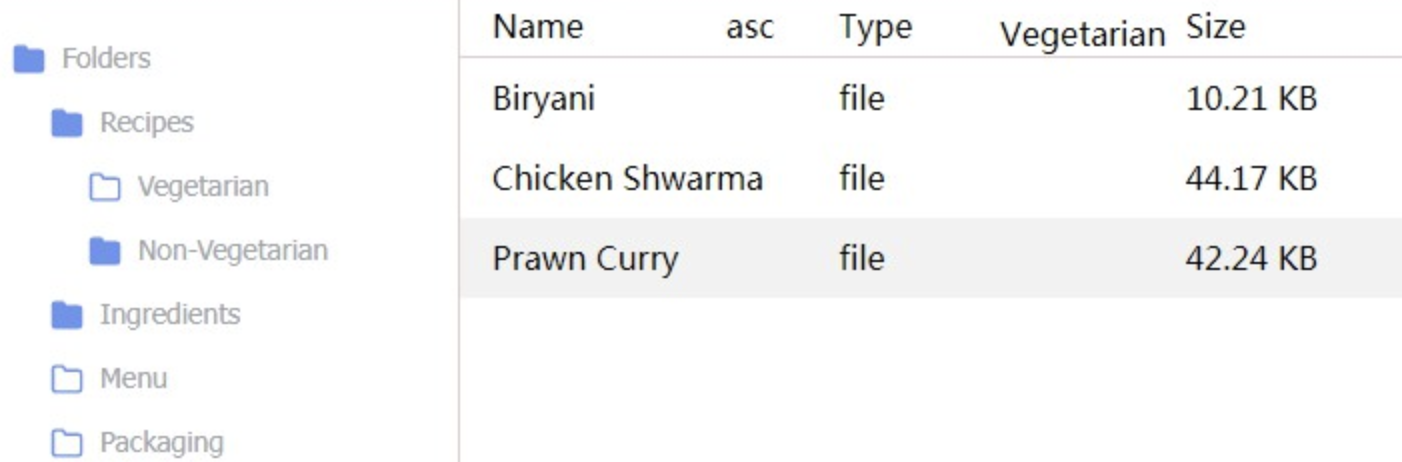
如果我选择第一个文件夹或者是孩子。然后,在“文件浏览”这样的列表中与此显示相关联的文件
回答 2
Stack Overflow用户
发布于 2020-08-10 12:13:01
当您从树中获得node时,您可以访问子节点(方法提供的节点不包含任何子数据),但是如果您希望在另一个容器中而不是在树中显示文件,您可能会自己在数据中使用javascript进行搜索。
var Main = {
    methods: {
      nodeclicked(node) {
        console.log(this.$refs.tree.getNode(node.id).data.children)
      }
    },
    data() {
      return {
        data: [{
          id: 1,
          label: 'Level one 1',
          type: 'folder',
          children: [{
            id: 4,
            label: 'Level two 1-1',
            type: 'folder',
            children: [
              { id: 9, label: 'Level three 1-1-1', type: 'file'},
              { id: 10, label: 'Level three 1-1-2', type: 'file' }]
          }]
        }, {
          id: 2,
          label: 'Level one 2',
          type: 'folder',
          children: [
            { id: 5, label: 'Level two 2-1', type: 'file'},
            { id: 6, label: 'Level two 2-2', type: 'file'}]
        }, {
          id: 3,
          label: 'Level one 3',
          type: 'folder',
          children: [
            { id: 7, label: 'Level two 3-1', type: 'file'},
            { id: 8, label: 'Level two 3-2', type: 'file'}]
        }],
        defaultProps: {
          children: 'children',
          label: 'label'
        }
      }
    }
  };
var Ctor = Vue.extend(Main)
new Ctor().$mount('#app')@import url("//unpkg.com/element-ui@2.13.2/lib/theme-chalk/index.css");<script src="//unpkg.com/vue/dist/vue.js"></script>
<script src="//unpkg.com/element-ui@2.13.2/lib/index.js"></script>
<div id="app">
<el-tree
node-key="id"
:data="data"
:props="defaultProps"
accordion
@node-click="nodeclicked"
ref="tree">
<span class="custom-tree-node" slot-scope="{ node, data }">
<span class="icon-folder">
<i v-if="data.type === 'folder'" class="el-icon-folder"></i>
<i v-else-if="data.type === 'file'" class="el-icon-document"></i>
<span class="icon-folder_text">{{ data.label }}</span>
</span>
</span>
</el-tree>
</div>
Stack Overflow用户
发布于 2020-08-10 02:42:03
var Main = {
  data() {
    return {
      data: [{
          id: 1,
          name: 'folder 1',
          type: 'folder',
          children: [{
            id: 4,
            name: 'subFiles 1-1',
            type: 'folder',
            children: []
          }, {
            id: 11,
            name: 'files 1-1',
            type: 'file'
          }, {
            id: 12,
            name: 'files 1-2',
            type: 'file'
          }]
        },
        {
          id: 2,
          name: 'folder 2',
          type: 'folder',
          children: []
        },
        {
          id: 3,
          name: 'folder 3',
          type: 'folder',
          children: []
        }
      ]
    };
  },
  methods: {
    handleNodeClick() {}
  }
}
var Ctor = Vue.extend(Main)
new Ctor().$mount('#app')@import url("//unpkg.com/element-ui@2.13.0/lib/theme-chalk/index.css");<script src="https://cdnjs.cloudflare.com/ajax/libs/vue/2.5.17/vue.min.js"></script>
<script src="//unpkg.com/element-ui@2.13.0/lib/index.js"></script>
<div id="app">
<el-tree :data="data" accordion @node-click="handleNodeClick">
<span class="custom-tree-node" slot-scope="{ node, data }">
<span class="icon-folder">
<i v-if="data.type === 'folder'" class="el-icon-folder" aria-hidden="true"></i>
<i v-else-if="data.type === 'file'" class="el-icon-document" aria-hidden="true"></i>
<span class="icon-folder_text">{{ data.name }}</span>
</span>
</span>
</el-tree>
</div>
ElementUI指定了data的数据结构,因此子树节点在children属性中被统一推送,然后使用type属性来区分它是folder还是file。
页面原文内容由Stack Overflow提供。腾讯云小微IT领域专用引擎提供翻译支持
原文链接:
https://stackoverflow.com/questions/63330877
复制相关文章
相似问题
腾讯云开发者

Copyright © 2013 - 2026 Tencent Cloud. All Rights Reserved. 腾讯云 版权所有
深圳市腾讯计算机系统有限公司 ICP备案/许可证号:粤B2-20090059  粤公网安备44030502008569号
腾讯云计算(北京)有限责任公司 京ICP证150476号 | 京ICP备11018762号