
树莓Pi 4的Azure IoT中央器件模板
树莓Pi 4的Azure IoT中央器件模板
提问于 2020-08-10 09:02:23
回答 1
Stack Overflow用户
回答已采纳
发布于 2020-08-10 09:41:43
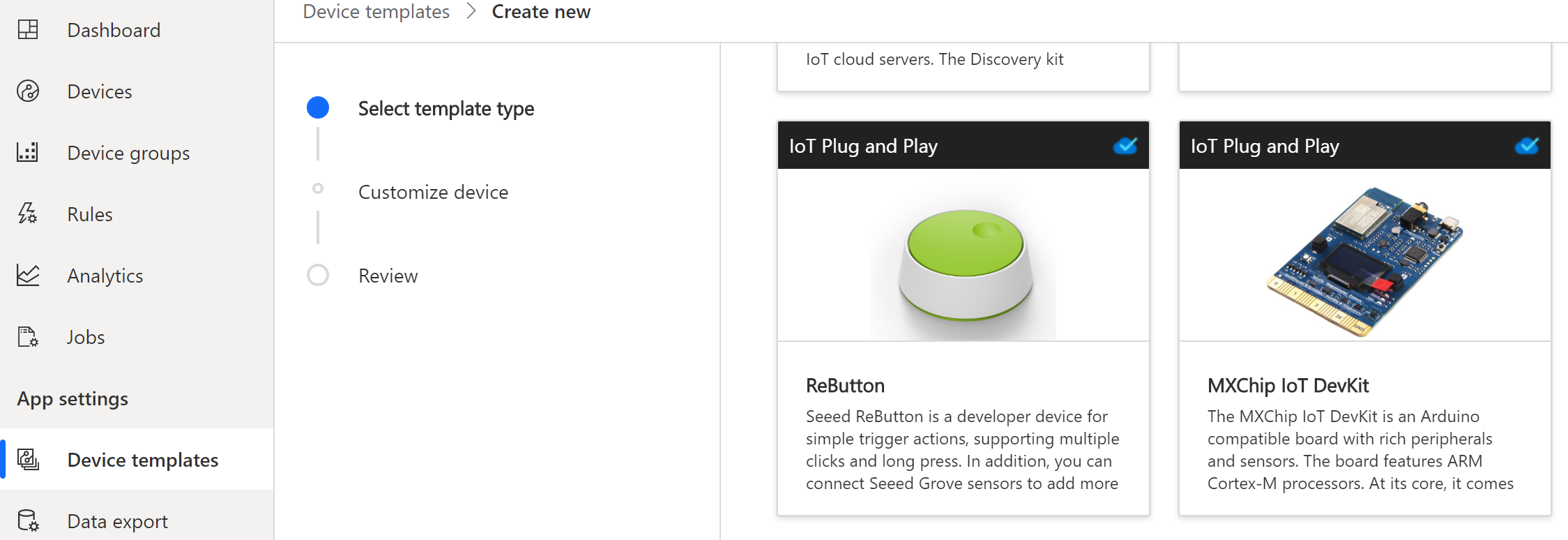
这是故意的。设备模板描述设备的功能。例如,MXChip将发送温度、湿度和运动事件(以及其他事情),这将在设备模板中描述。您在屏幕截图中发布的ReButton将具有按钮按下功能(支持单/双/三重/长点击)。
这就引出了没有Raspberry模板的原因,这个设备本身没有开箱即用的功能将它连接到IoT Central。我可能会决定给它添加一个温度传感器,所以我将构建一个模板来描述这个功能。但是您可能会决定在其中添加一个按钮和一个LED,因此您将构建一个描述这些功能的模板。
正如您在评论中指出的那样,如果您想要一个起点,您将从最基本和几乎为空的能力模型开始,但是您不能没有任何接口的能力模型,因此您可以添加微软提供的DeviceInformation接口。您将需要编写代码,您的Raspberry将运行实际填写这些字段!
{
  "@id": "urn:matthijsvdveer:RaspberryPi4_41:1",
  "@type": "CapabilityModel",
  "implements": [
    {
      "@id": "urn:matthijsvdveer:RaspberryPi4_41:2x_rlqmb2:1",
      "@type": "InterfaceInstance",
      "name": "DeviceInformation_z1",
      "schema": {
        "@id": "urn:azureiot:DeviceManagement:DeviceInformation:1",
        "@type": "Interface",
        "displayName": {
          "en": "Device information"
        },
        "contents": [
          {
            "@id": "urn:azureiot:DeviceManagement:DeviceInformation:manufacturer:1",
            "@type": "Property",
            "comment": "Company name of the device manufacturer. This could be the same as the name of the original equipment manufacturer (OEM). Ex. Contoso.",
            "displayName": {
              "en": "Manufacturer"
            },
            "name": "manufacturer",
            "schema": "string"
          },
          {
            "@id": "urn:azureiot:DeviceManagement:DeviceInformation:model:1",
            "@type": "Property",
            "comment": "Device model name or ID. Ex. Surface Book 2.",
            "displayName": {
              "en": "Device model"
            },
            "name": "model",
            "schema": "string"
          },
          {
            "@id": "urn:azureiot:DeviceManagement:DeviceInformation:swVersion:1",
            "@type": "Property",
            "comment": "Version of the software on your device. This could be the version of your firmware. Ex. 1.3.45",
            "displayName": {
              "en": "Software version"
            },
            "name": "swVersion",
            "schema": "string"
          },
          {
            "@id": "urn:azureiot:DeviceManagement:DeviceInformation:osName:1",
            "@type": "Property",
            "comment": "Name of the operating system on the device. Ex. Windows 10 IoT Core.",
            "displayName": {
              "en": "Operating system name"
            },
            "name": "osName",
            "schema": "string"
          },
          {
            "@id": "urn:azureiot:DeviceManagement:DeviceInformation:processorArchitecture:1",
            "@type": "Property",
            "comment": "Architecture of the processor on the device. Ex. x64 or ARM.",
            "displayName": {
              "en": "Processor architecture"
            },
            "name": "processorArchitecture",
            "schema": "string"
          },
          {
            "@id": "urn:azureiot:DeviceManagement:DeviceInformation:processorManufacturer:1",
            "@type": "Property",
            "comment": "Name of the manufacturer of the processor on the device. Ex. Intel.",
            "displayName": {
              "en": "Processor manufacturer"
            },
            "name": "processorManufacturer",
            "schema": "string"
          },
          {
            "@id": "urn:azureiot:DeviceManagement:DeviceInformation:totalStorage:1",
            "@type": "Property",
            "comment": "Total available storage on the device in kilobytes. Ex. 2048000 kilobytes.",
            "displayName": {
              "en": "Total storage"
            },
            "name": "totalStorage",
            "displayUnit": {
              "en": "kilobytes"
            },
            "schema": "long"
          },
          {
            "@id": "urn:azureiot:DeviceManagement:DeviceInformation:totalMemory:1",
            "@type": "Property",
            "comment": "Total available memory on the device in kilobytes. Ex. 256000 kilobytes.",
            "displayName": {
              "en": "Total memory"
            },
            "name": "totalMemory",
            "displayUnit": {
              "en": "kilobytes"
            },
            "schema": "long"
          }
        ]
      }
    }
  ],
  "displayName": {
    "en": "Raspberry Pi 4"
  },
  "@context": [
    "http://azureiot.com/v1/contexts/IoTModel.json"
  ]
}我的建议是在IoT Central中创建自己的,虽然以上是一个不错的起点,但在IoT Central中创建自己的接口只需一分钟,然后您就可以添加自己的接口了。
希望这能解释一点!如果你需要澄清的话请告诉我。
页面原文内容由Stack Overflow提供。腾讯云小微IT领域专用引擎提供翻译支持
原文链接:
https://stackoverflow.com/questions/63337144
复制相关文章
相似问题
腾讯云开发者

Copyright © 2013 - 2026 Tencent Cloud. All Rights Reserved. 腾讯云 版权所有
深圳市腾讯计算机系统有限公司 ICP备案/许可证号:粤B2-20090059  粤公网安备44030502008569号
腾讯云计算(北京)有限责任公司 京ICP证150476号 | 京ICP备11018762号