
Packer - Powershell传递变量
Packer - Powershell传递变量
提问于 2020-08-11 14:45:25
目前,我们正在部署图像与封隔器(在一个建设管道,位于Azure DevOps),在我们的AWS领域成功。现在,我们想更进一步,我们正在尝试为未来的Ansible维护配置几个用户。因此,我们编写了一个脚本并将其作为内联Powershell脚本进行了尝试,但这两个选项似乎都没有选择在Azure DevOps中的变量组中设置的变量,所有其他变量都被成功地使用了。我的代码如下:
{
"variables": {
    "build_version": "{{isotime \"2006.01.02.150405\"}}",
    "aws_access_key": "$(aws_access_key)",
    "aws_secret_key": "$(aws_secret_key)",
    "region": "$(region)",
    "vpc_id": "$(vpc_id)",
    "subnet_id": "$(subnet_id)",
    "security_group_id": "$(security_group_id)",
    "VagrantUserpassword": "$(VagrantUserPassword)"
},
"builders": [
    {
        "type": "amazon-ebs",
        "access_key": "{{user `aws_access_key`}}",
        "secret_key": "{{user `aws_secret_key`}}",
        "region": "{{user `region`}}",
        "vpc_id": "{{user `vpc_id`}}",
        "subnet_id": "{{user `subnet_id`}}",
        "security_group_id": "{{user `security_group_id`}}",
        "source_ami_filter": {
            "filters": {
                "name": "Windows_Server-2016-English-Full-Base-*",
                "root-device-type": "ebs",
                "virtualization-type": "hvm"
            },
            "most_recent": true,
            "owners": [
                "801119661308"
            ]
        },
        "ami_name": "WIN2016-CUSTOM-{{user `build_version`}}",
        "instance_type": "t3.xlarge",
        "user_data_file": "userdata.ps1",
        "associate_public_ip_address": true,
        "communicator": "winrm",
        "winrm_username": "Administrator",
        "winrm_timeout": "15m",
        "winrm_use_ssl": true,
        "winrm_insecure": true,
        "ssh_interface": "private_ip"
    }
],
"provisioners": [
        {
            "type": "powershell",
            "environment_vars": ["VagrantUserPassword={{user `VagrantUserPassword`}}"],
            "inline": [
                "Install-WindowsFeature web-server,web-webserver,web-http-logging,web-stat-compression,web-dyn-compression,web-asp-net,web-mgmt-console,web-asp-net45",
                "New-LocalUser -UserName 'Vagrant' -Description 'User is responsible for Ansible connection.' -Password '$(VagrantUserPassword)'"
            ]
        },
        {
            "type": "powershell",
            "environment_vars": ["VagrantUserPassword={{user `VagrantUserPassword`}}"],
            "scripts": [
                "scripts/DisableUAC.ps1",
                "scripts/iiscompression.ps1",
                "scripts/ChocoPackages.ps1",
                "scripts/PrepareAnsibleUser.ps1"
            ]
        },

        {
            "type": "windows-restart",
            "restart_check_command": "powershell -command \"& {Write-Output 'Machine restarted.'}\""
        },
        {
            "type": "powershell",
            "inline": [
                "C:\\ProgramData\\Amazon\\EC2-Windows\\Launch\\Scripts\\InitializeInstance.ps1 -Schedule",
                "C:\\ProgramData\\Amazon\\EC2-Windows\\Launch\\Scripts\\SysprepInstance.ps1 -NoShutdown"
            ]
        }
    ]
}
"VagrantUserpassword":"$(VagrantUserPassword)“是不起作用的东西,我们尝试了多种选项,但它们似乎都不起作用。
有什么想法吗?
致以亲切的问候,
瑞克。
回答 1
Stack Overflow用户
发布于 2020-08-14 09:21:58
根据我的测试,管道变量确实无法传递到powershell环境变量。
解决方案:
您可以尝试使用替换令牌任务将管道值传递给Json文件。
以下是几个步骤:
1.在Json文件中设置值。
{
  "variables": {
....
  "VagrantUserpassword": "#{VagrantUserPassword}#"
},- 在脚本任务之前使用替换令牌任务。
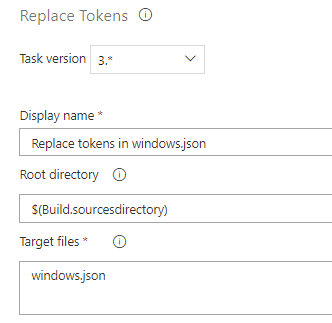
- 在管道变量中设置值。

则可以成功地设置该值。

另一方面,我还在示例文件中发现了一些问题。
- "environment_vars":“VagrantUserPassword={{用户
VagrantUserPassword}”,需要将VagrantUserPassword替换为VagrantUserpassword(“VagrantUserPassword={{用户VagrantUserpassword}”)。
注意:这是区分大小写的。
- 您需要使用
$Env:VagrantUserPassword替换$(VagrantUserPassword)
例如:
  "inline": [
    "Write-Host \"Automatically generated aws password is: $Env:VagrantUserPassword\"",
    "Write-Host \"Automatically generated aws password is: $Env:VAR5\""


]页面原文内容由Stack Overflow提供。腾讯云小微IT领域专用引擎提供翻译支持
原文链接:
https://stackoverflow.com/questions/63360643
复制相关文章
相似问题
腾讯云开发者

Copyright © 2013 - 2026 Tencent Cloud. All Rights Reserved. 腾讯云 版权所有
深圳市腾讯计算机系统有限公司 ICP备案/许可证号:粤B2-20090059  粤公网安备44030502008569号
腾讯云计算(北京)有限责任公司 京ICP证150476号 | 京ICP备11018762号