
HTML web组件不使用阴影DOM样式
我已经创建了一个普通的web组件或HTML元素。它只显示两个链接。
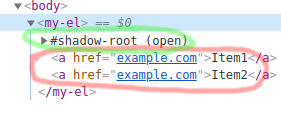
为了封装这个东西,我使用了影子DOM。然而,它似乎没有被封装。在DOM树中,它位于#影子根内部,这是很好的。
为什么web组件使用全局样式而不是我在模板中为web组件提供的样式?
文本是红色的,我希望它是绿色的。
class MyEl extends HTMLElement {
  constructor() {
    super();
    this.shadow = this.attachShadow({ mode: "open" });
  }

  connectedCallback() {
    const template = `
      <style>
        a {
          color: green;
        }
      </style>
      <slot></slot>`;
    this.shadow.innerHTML = template;
  }
}

window.customElements.define("my-el", MyEl);a {
color: red
} <my-el>
<a href="example.com">Item1</a>
<a href="example.com">Item2</a>
</my-el>
回答 3
Stack Overflow用户
发布于 2020-08-17 08:12:31
虽然这个问题已经有了一个可接受的答案,但对于大多数用例来说,将一个时隙的子级迁移到shadowRoot并不是可取的。
您可能要做的是使用::slotted()选择器。
请记住,通过::slotted()选择器应用于槽子级的样式只能充当“默认”样式,并且仍然可以通过在轻型DOM中使用样式来覆盖。
例如,检查此编辑版本的代码段:
正如您所看到的,这次my-el尝试同时应用颜色和文本装饰样式来将(<a>)子节点锚定在任何一个插槽中。
然而,在光线中,我们有一个a.special选择器,它覆盖了颜色,所以<a class="special">将是红色的,而不是绿色的。
class MyEl extends HTMLElement {
  constructor() {
    super();
    this.shadow = this.attachShadow({ mode: "open" });
  }

  connectedCallback() {
    const template = `
      <style>
        ::slotted(a) {
          color: green;
          text-decoration: none;
        }
      </style>
      <slot></slot>`;
    this.shadow.innerHTML = template;
  }
}

window.customElements.define("my-el", MyEl);a.special {
color: red
} <my-el>
<a href="example.com">Item1</a>
<a class="special" href="example.com">Item2</a>
</my-el>
Stack Overflow用户
发布于 2020-08-15 16:44:25
详细的详细解释见:::slotted CSS selector for nested children in shadowDOM slot
TL;DR
您的链接以lightDOM格式,因此由其DOM (在代码中为文档DOM)样式。
将节点从lightDOM移动到shadowDOM是一种“解决方案”;但是这样就不用插槽了。
FYI,您的代码可以压缩为:
class MyEl extends HTMLElement {
  constructor() {
    super().attachShadow({ mode: "open" })
           .innerHTML = `<style>a{color:green}</style><slot></slot>`;

  }
}

window.customElements.define("my-el", MyEl);更多与时隙相关的答案可以通过StackOverflow搜索:Custom Elements SLOTs找到。
Stack Overflow用户
发布于 2020-08-15 12:57:41
观察这一行,您必须将元素移动/复制到阴影中,例如:
this.shadow.innerHTML = this.innerHTML + template;我添加这个是为了演示只将内联样式应用于影子dom元素。因此,SD中复制的链接使用的是您的样式:)
所以红色将是GLOBAL,绿色将是SHADOW元素
class MyEl extends HTMLElement {
  constructor() {
    super();
  }

  connectedCallback() {
    this.shadow = this.attachShadow({ mode: "open" });
    const template = `
      <style>
        a {
          color: green;
        }
      </style>
      <slot></slot>`;
    this.shadow.innerHTML = this.innerHTML + template;
  }
}

window.customElements.define("my-el", MyEl);a {
color: red
}<my-el>
<a href="example.com">Item1</a>
<a href="example.com">Item2</a>
</my-el>
https://stackoverflow.com/questions/63426032
复制相似问题
腾讯云开发者

Copyright © 2013 - 2026 Tencent Cloud. All Rights Reserved. 腾讯云 版权所有
深圳市腾讯计算机系统有限公司 ICP备案/许可证号:粤B2-20090059  粤公网安备44030502008569号
腾讯云计算(北京)有限责任公司 京ICP证150476号 | 京ICP备11018762号