
为什么我的Shopify应用程序是用Next.js (React)构建的,加载速度这么慢?
我遵循了本教程:https://shopify.dev/tutorials/build-a-shopify-app-with-node-and-react
从一开始,我的应用程序加载非常慢,包括在更改选项卡时,包括通过ngrok加载、在本地主机上运行或部署在应用程序引擎上时。
是什么导致了这一切?
P.S.:我是新的反应,Next.js和Shopify应用程序开发,所以答案可能是相当基本的。
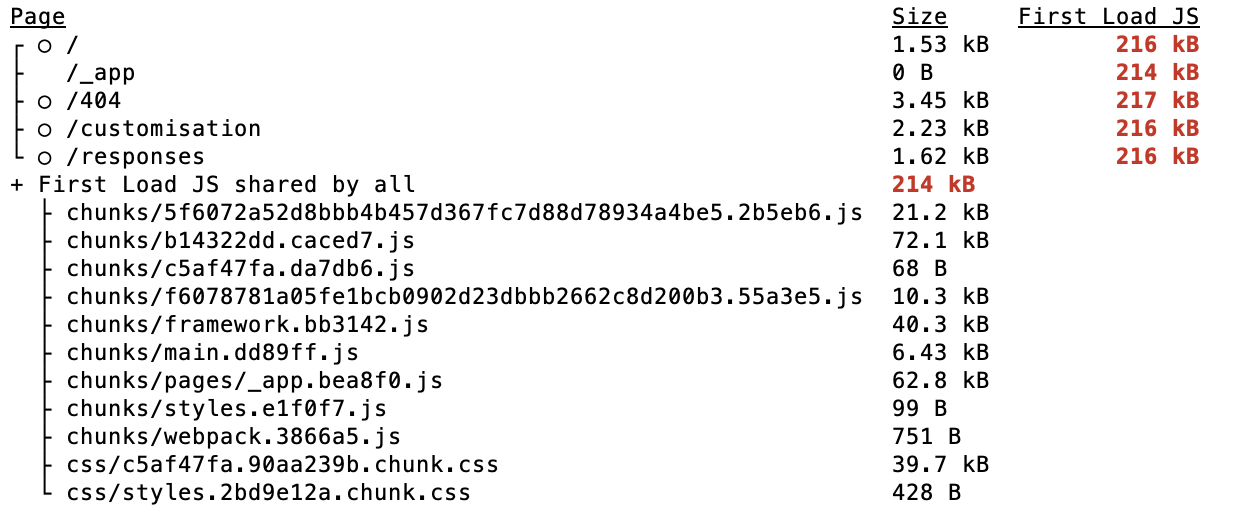
P.P.S.:基于红色,构建输出似乎表明“所有人共享的第一次加载JS”太大了。我不知道如何研究这个问题,如何缩小这些块的大小,虽然仅仅214 it就不能解释这么慢的加载时间,对吗?
构建
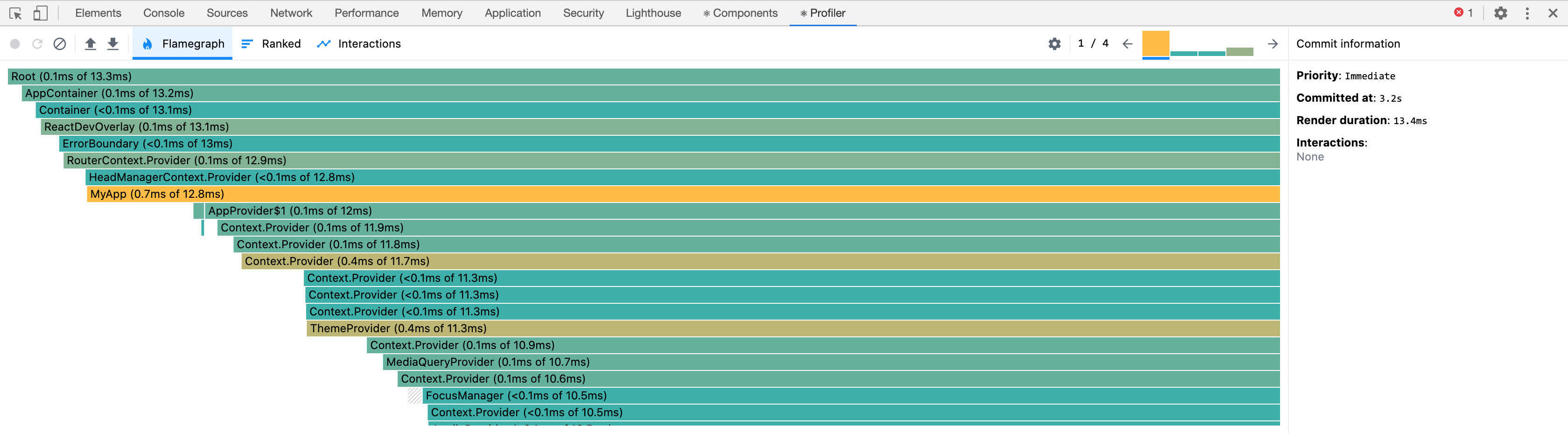
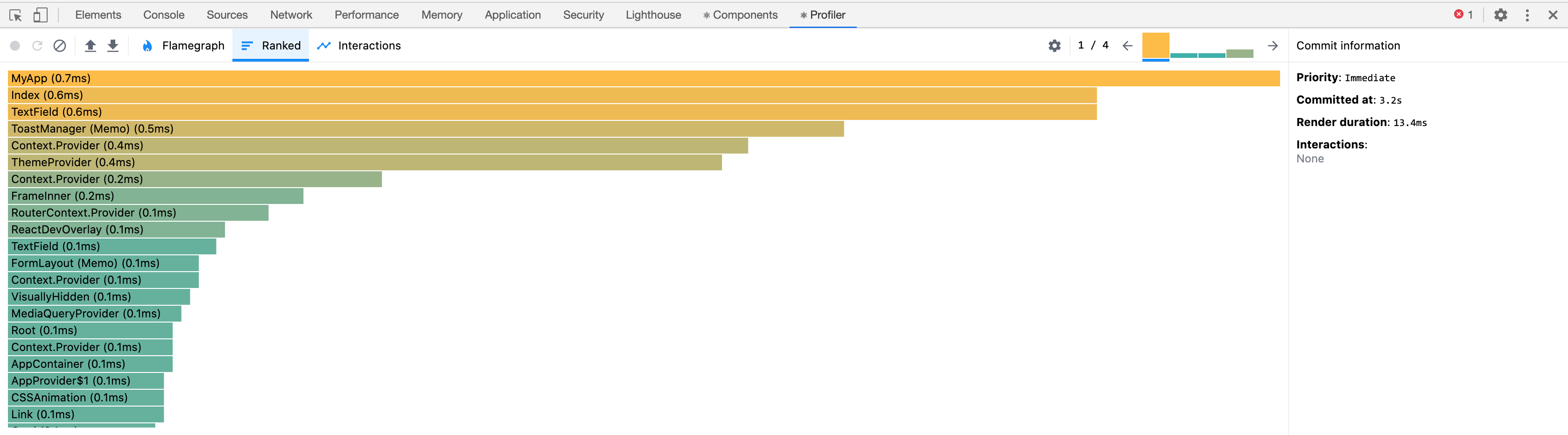
React开发工具Profiler
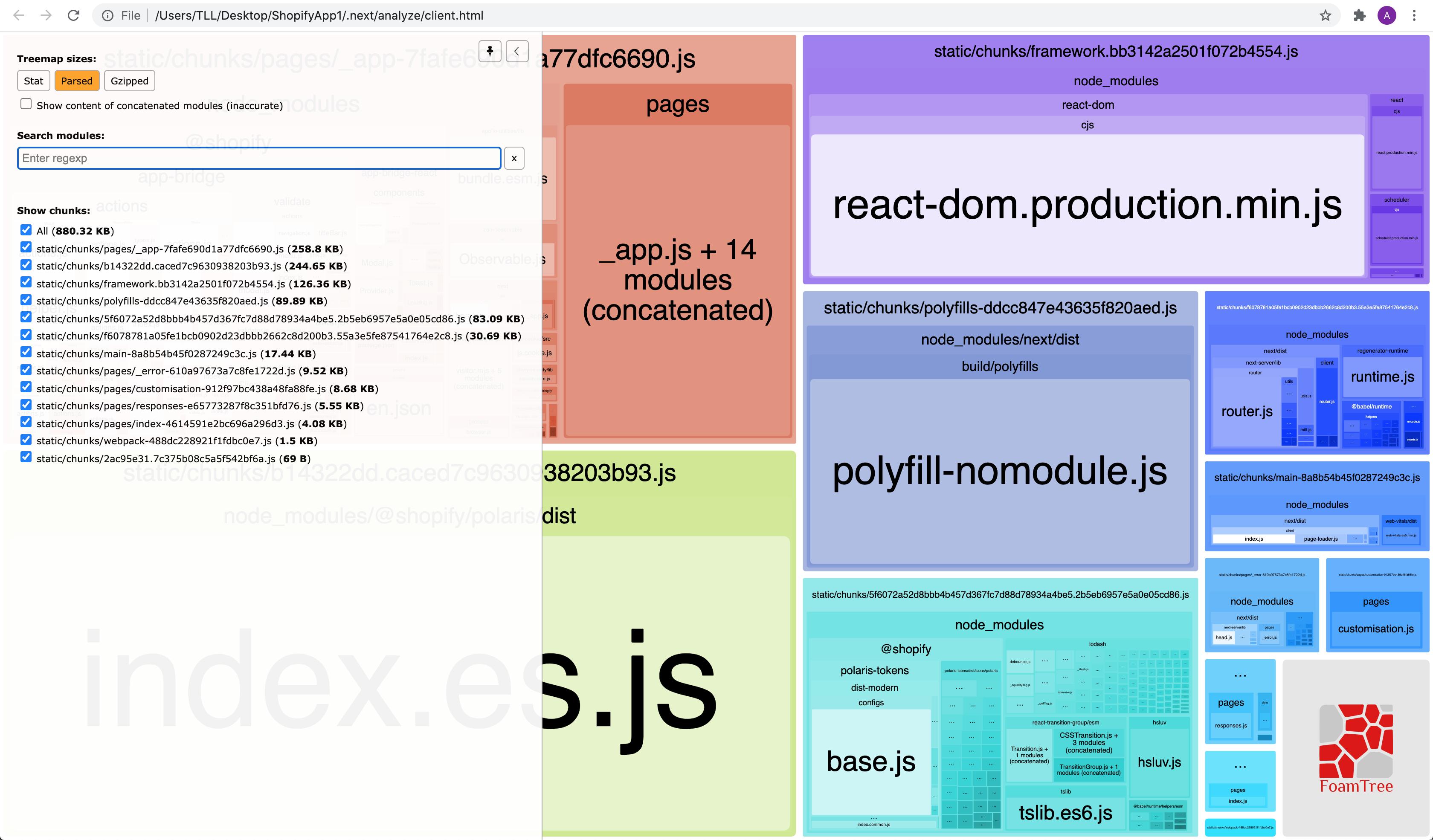
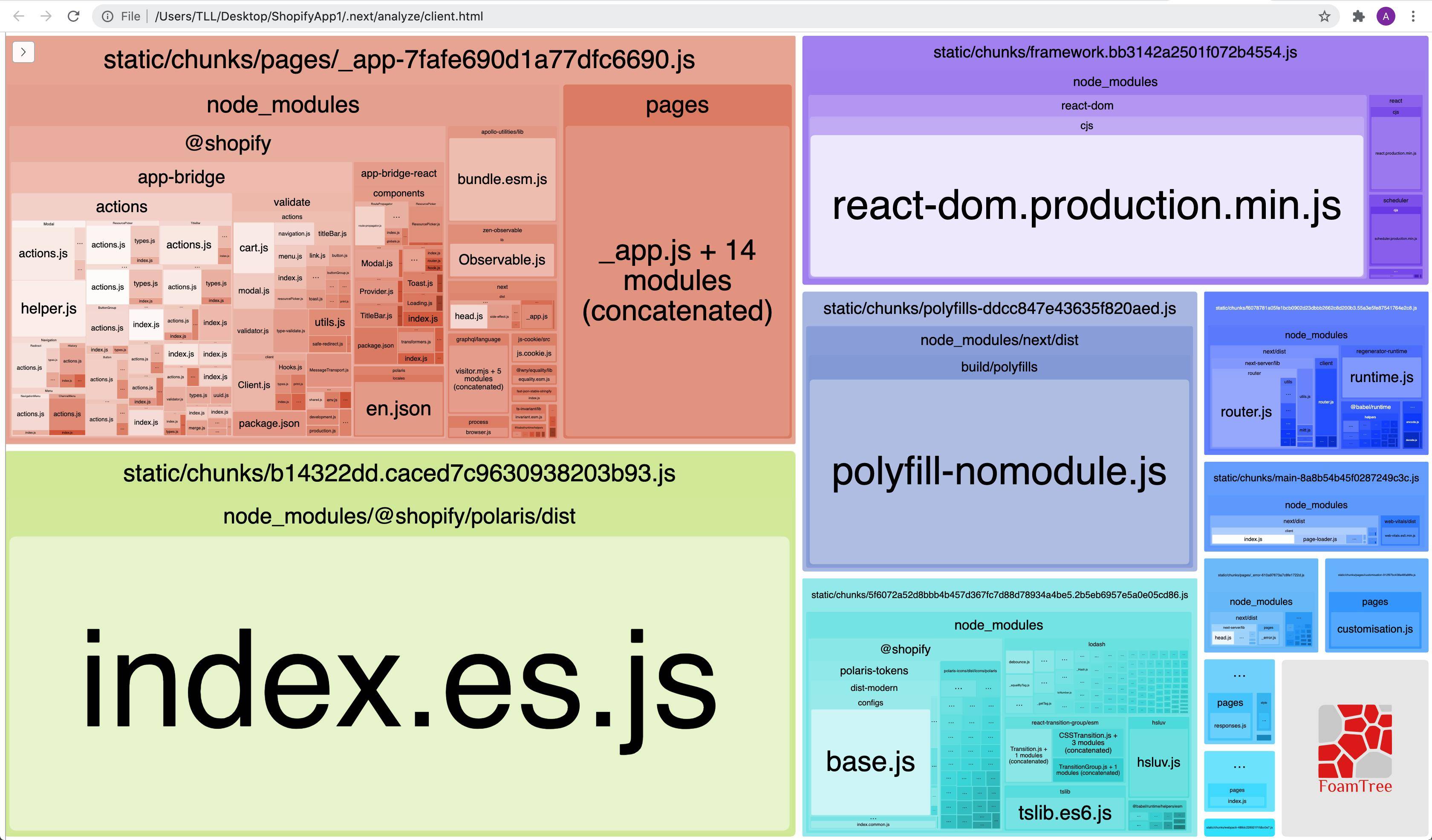
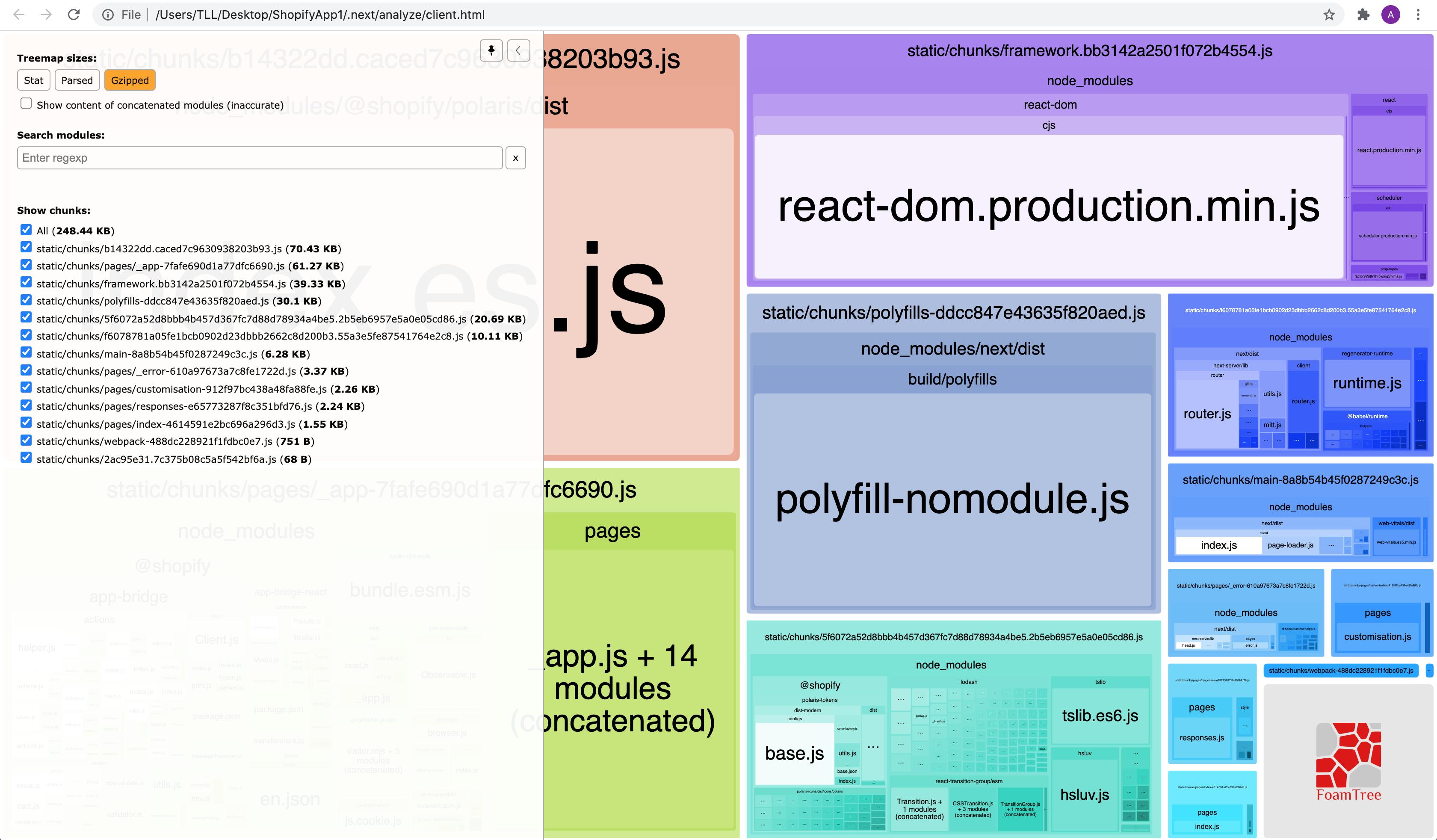
@next/bundle分析器输出:
解析
盖兹
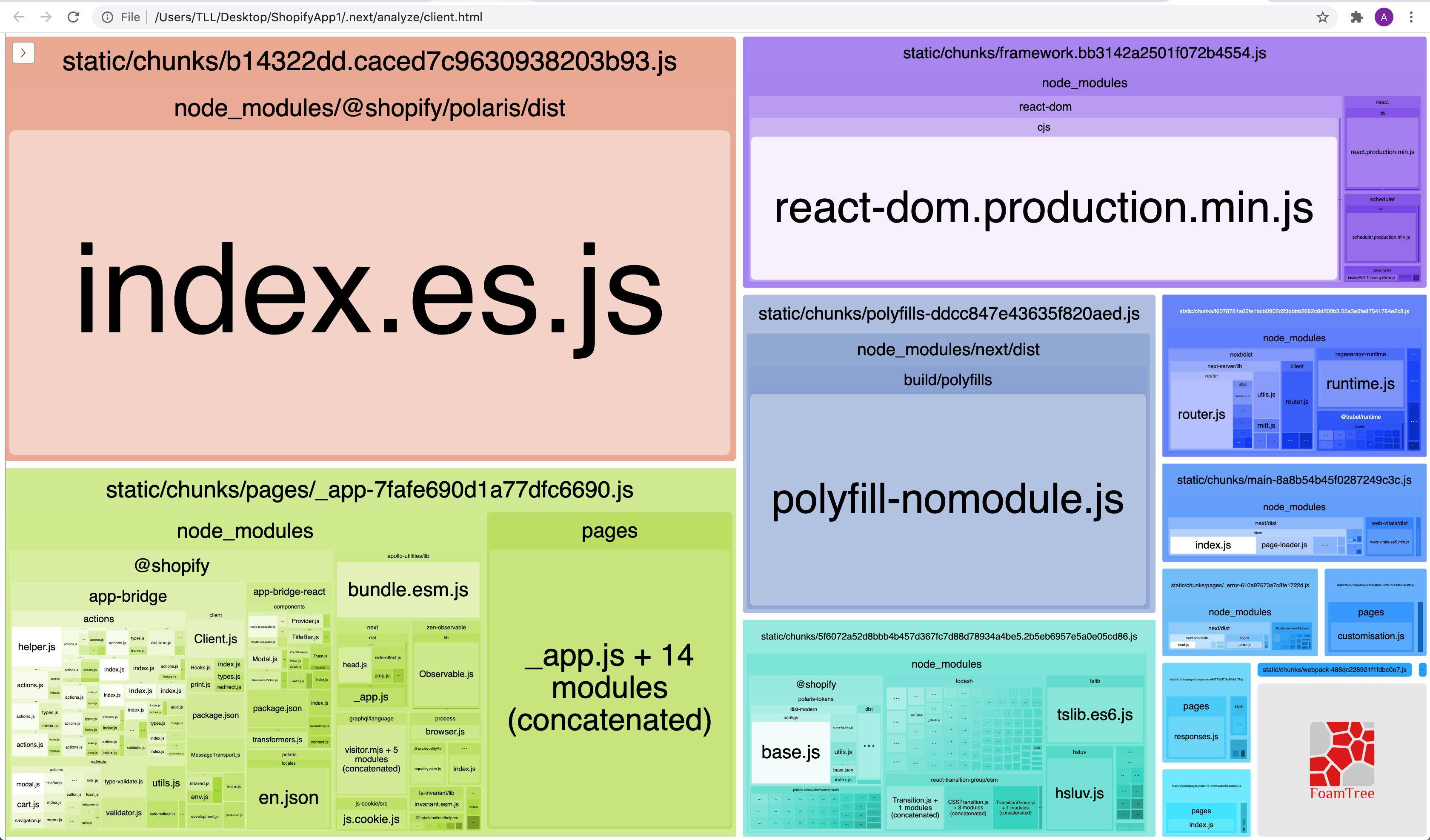
package.json
 {
      "name": "ShopifyApp1",
      "version": "1.0.0",
      "description": "",
      "main": "index.js",
      "scripts": {
        "test": "echo \"Error: no test specified\" && exit 1",
        "dev": "node server.js NODE_ENV=dev",
        "build": "next build",
        "deploy": "next build && gcloud app deploy --version=deploy",
        "start": "NODE_ENV=production node server.js",
        "analyze": "cross-env ANALYZE=true npm run build"
      },
      "keywords": [],
      "author": "",
      "license": "ISC",
      "dependencies": {
        "@google-cloud/storage": "^5.2.0",
        "@next/bundle-analyzer": "^9.5.2",
        "@sendgrid/mail": "^7.2.3",
        "@shopify/app-bridge-react": "^1.26.2",
        "@shopify/koa-shopify-auth": "^3.1.65",
        "@shopify/koa-shopify-graphql-proxy": "^4.0.1",
        "@shopify/koa-shopify-webhooks": "^2.4.3",
        "@shopify/polaris": "^5.1.0",
        "@zeit/next-css": "^1.0.1",
        "apollo-boost": "^0.4.9",
        "cors": "^2.8.5",
        "cross-env": "^7.0.2",
        "dotenv": "^8.2.0",
        "email-validator": "^2.0.4",
        "extract-domain": "^2.2.1",
        "firebase-admin": "^9.0.0",
        "graphql": "^15.3.0",
        "helmet": "^4.0.0",
        "isomorphic-fetch": "^2.2.1",
        "js-cookie": "^2.2.1",
        "koa": "^2.13.0",
        "koa-body": "^4.2.0",
        "koa-bodyparser": "^4.3.0",
        "koa-helmet": "^5.2.0",
        "koa-router": "^9.1.0",
        "koa-session": "^6.0.0",
        "next": "^9.5.1",
        "react": "^16.13.1",
        "react-apollo": "^3.1.5",
        "react-dom": "^16.13.1",
        "react-infinite-scroll-component": "^5.0.5",
        "sanitize-html": "^1.27.2",
        "scheduler": "^0.19.1",
        "store-js": "^2.0.4",
        "tldts": "^5.6.46"
      },
      "devDependencies": {
        "webpack-bundle-analyzer": "^3.8.0",
        "webpack-bundle-size-analyzer": "^3.1.0"
      },
      "browser": {
        "@google-cloud/storage": false,
        "@sendgrid/mail": false,
        "@shopify/koa-shopify-auth": false,
        "@shopify/koa-shopify-graphql-proxy": false,
        "@shopify/koa-shopify-webhooks": false,
        "cors": false,
        "email-validator": false,
        "extract-domain": false,
        "firebase-admin": false,
        "graphql": false,
        "helmet": false,
        "isomorphic-fetch": false,
        "koa": false,
        "koa-body": false,
        "koa-bodyparser": false,
        "koa-helmet": false,
        "koa-router": false,
        "koa-session": false,
        "sanitize-html": false,
        "tldts": false
      }
    }
Chrome开发工具网络标签
编辑:
npm run dev
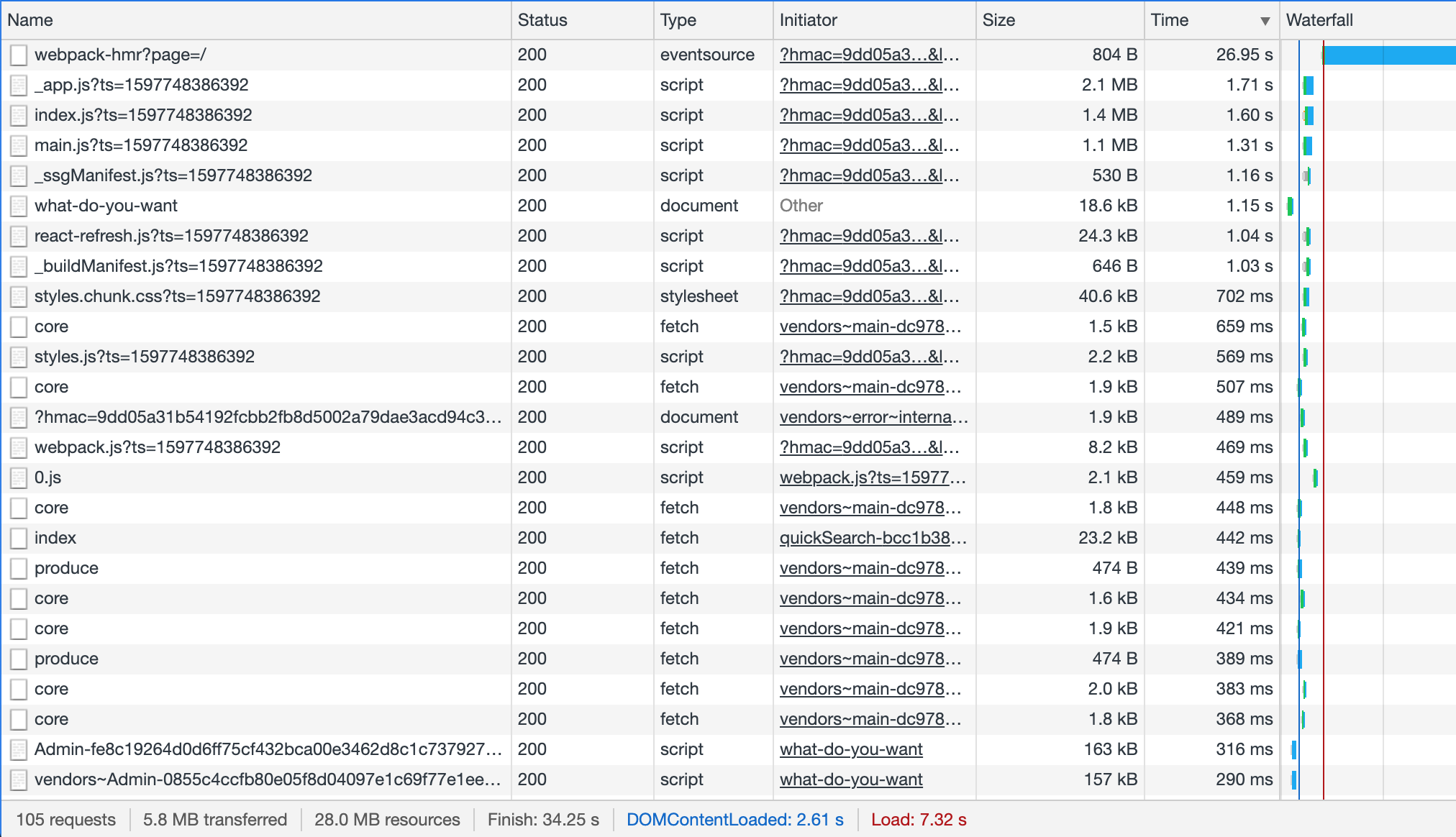
由于某种原因,"webpack-hmr“线负载时间不断增加。
npm run build && npm run start
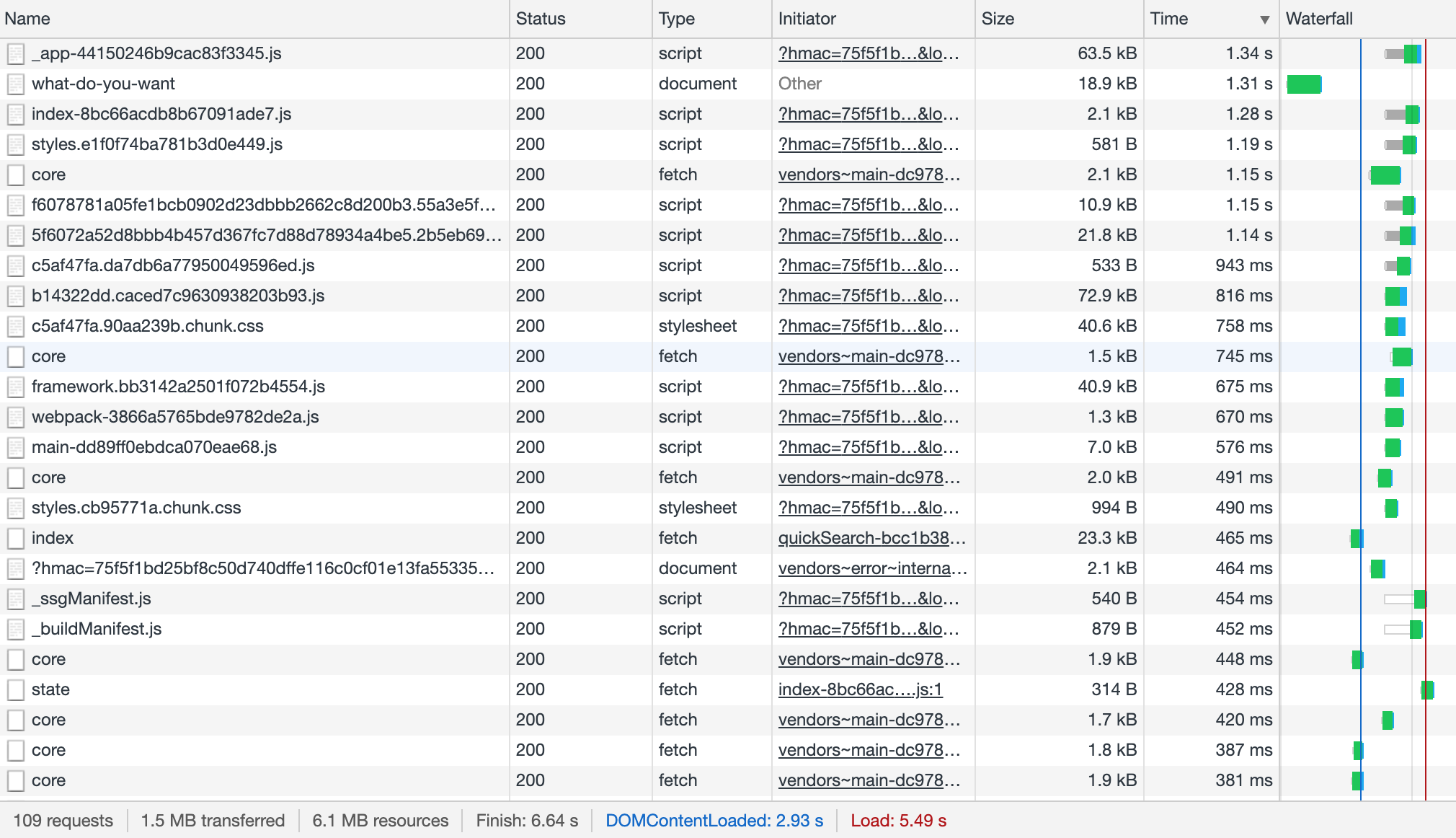
next.config.js
require("dotenv").config({path:"live.env"});
const withCSS = require('@zeit/next-css');
const webpack = require('webpack');
const BundleAnalyzerPlugin = require('webpack-bundle-analyzer').BundleAnalyzerPlugin;
const withBundleAnalyzer = require('@next/bundle-analyzer')({enabled: process.env.ANALYZE === 'true'})
const apiKey =  JSON.stringify(process.env.SHOPIFY_API_KEY);
module.exports =  withBundleAnalyzer(
  withCSS({
    distDir: 'build',
    webpack: (config) => {
      const env = { API_KEY: apiKey };
      config.plugins.push(new webpack.DefinePlugin(env));
      config.plugins.push(new webpack.DefinePlugin(new BundleAnalyzerPlugin()));
      config.resolve = {
        alias: {
          'react-dom$': 'react-dom/profiling',
          'scheduler/tracing': 'scheduler/tracing-profiling'
        },
        ...config.resolve
      };
      return config;
    }
  })
);
_app.js
import App from 'next/app';
import Head from 'next/head';
import { AppProvider } from '@shopify/polaris';
import { Provider } from '@shopify/app-bridge-react';
import '@shopify/polaris/dist/styles.css'
import translations from '@shopify/polaris/locales/en.json';
import Cookies from 'js-cookie';
import ApolloClient from 'apollo-boost';
import { ApolloProvider } from 'react-apollo';

const client = new ApolloClient({
  fetchOptions: {
    credentials: 'include'
  },
});

class MyApp extends App {
  render() {
    const { Component, pageProps } = this.props;
    const config = { apiKey: API_KEY, shopOrigin: Cookies.get("shopOrigin"), forceRedirect: true };
    return (
      <React.Fragment>
        <Head>
          <title>...</title>
          <meta charSet="utf-8" />
        </Head>
        <Provider config={config}>
          <AppProvider i18n={translations}>
            <ApolloProvider client={client}>
              <Component {...pageProps} />
            </ApolloProvider>
          </AppProvider>
        </Provider>
      </React.Fragment>
    );
  }
}

export default MyApp;
Index.js (客户)
import {
  Button,
  Card,
  Form,
  FormLayout,
  Layout,
  Page,
  Stack,
  TextField,
  DisplayText,
  Toast,
  Frame
} from '@shopify/polaris';

class Index extends React.Component  {

  state = {
    emails: '',
    domain: '' ,
    alias: '',
    err: '',
    message: '',
    active: false,
    loadingDomainResponse: false,
    loadingEmailResponse: false
  };

  componentDidMount() {
    fetch(`/state`, {
      method: 'GET'
    }).then(response => response.json())
    .then(result => {
      if (result.err) {
        this.setState({
          err: result.err,
          message: result.err,
          active: true
        })
      }
      else {
        this.setState({
          emails: result.emails,
          domain: result.domain,
          alias: result.alias
        })
      }
    });
  };


  render() {

    const { emails, domain, alias, err, message, active, loadingEmailResponse, loadingDomainResponse} = this.state;


    const toastMarkup = active ? (
      <Toast content={message} error={err} onDismiss={this.handleToast}/>
    ) : null;


    return (
      <Frame>
         <Page>
          {toastMarkup}
          <Layout>
            <Layout.AnnotatedSection
              title="..."
              description="..."
            >
              <Card sectioned>
                <Form onSubmit={this.handleSubmitEmails}>
                  <FormLayout>
                    <TextField
                      value={emails}
                      onChange={this.handleChange('emails')}
                      label="..."
                      type="emails"
                      maxlength="200"
                    />
                    <Stack distribution="trailing">
                      <Button primary submit loading={loadingEmailResponse}>
                        Save
                      </Button>
                    </Stack>
                  </FormLayout>
                </Form>
              </Card>
            </Layout.AnnotatedSection>
            <Layout.AnnotatedSection
              title="..."
              description="..."
            >
              <Card sectioned>
                <DisplayText size="small"> {domain} </DisplayText>
                <br/>
                <Form onSubmit={this.handleSubmitDomain}>
                  <FormLayout>
                    <TextField
                      value={alias}
                      onChange={this.handleChange('alias')}
                      label="..."
                      type="text"
                      maxlength="50"
                    />
                    <Stack distribution="trailing">
                      <Button primary submit loading={loadingDomainResponse}>
                        Save
                      </Button>
                    </Stack>
                  </FormLayout>
                </Form>
              </Card>
            </Layout.AnnotatedSection>
          </Layout>
       </Page>
      </Frame>
    );
  }

  handleToast = () => {
    this.setState({
      err: false,
      message: false,
      active: false
    })
  };

  handleSubmitEmails = () => {
    this.setState({loadingEmailResponse:true});
    fetch(`/emails`, {
      method: 'POST',
      headers: {
        'Content-Type': 'application/json'
      },
      body: JSON.stringify({
        emails: this.state.emails
      })
    }).then(response => response.json())
    .then(result => {
      console.log("JSON: "+JSON.stringify(result));
      if (result.err) {
        this.setState({
          err: result.err,
          message: result.err,
          active: true
        })
      }
      else {
        this.setState({message: "...", active: true});
      }
      this.setState({loadingEmailResponse:false});
    });
  };

  handleSubmitDomain = () => {
    this.setState({loadingDomainResponse:true});
    fetch(`/domain`, {
      method: 'POST',
      headers: {
        'Content-Type': 'application/json'
      },
      body:
        JSON.stringify({
          alias: this.state.alias
        })
      }).then(response => response.json())
      .then(result => {
        console.log("JSON: "+JSON.stringify(result));
        if (result.err) {
          this.setState({
            err: result.err,
            message: result.err,
            active: true
          })
        }
        else {
          this.setState({message: "...", active: true});
        }
        this.setState({loadingDomainResponse:false});
      });
  };


  handleChange = (field) => {
    return (value) => this.setState({ [field]: value });
  };
}

export default Index;
server.js
const dev = process.env.NODE_ENV !== 'production';
const app = next({ dev });
app.prepare().then(() => {
    const server = new Koa();
    const router = new Router();
    server.use(bodyParser());
    server.use(session({ secure: true, sameSite: 'none' }, server));
    server.keys = [SHOPIFY_API_SECRET_KEY];
    router.get('/state',  async (ctx) => {
        let domain = ctx.session.shop;
        let alias;
        const snap = await global.db.collection("...").doc(ctx.session.shop).get();
            if (snap.data().alias) {
                alias = snap.data().alias;
            }
            let emails = snap.data().emails;
            let emailString = "";
            if (!emails) {
                ctx.response.body = {err: "..."};
            }
            else if(emails.length < 4) {
                for (email of emails) {
                    emailString += (","+email);
                }
                theEmailString = emailString.substring(1);
                let response = {
                    domain: domain,
                    alias: alias,
                    emails: theEmailString
                }
                ctx.response.body = response;
            }
            else {
                ctx.response.body = {err: "..."};
            }
    });
});
编辑
我已经提供了一个初步的答案,但我正在寻找一个更好的可能。
此外,似乎可以让Shopify应用程序桥导航链接使用next.js路由器而不是触发整个页面重新加载:
https://shopify.dev/tools/app-bridge/actions/navigation
如果有人分享如何为next.js提供足够的细节,那将比我的答案更好。
回答 3
Stack Overflow用户
发布于 2020-08-22 14:37:02

在我的问题中,我共享了使用npm测量的负载时间,但是这里还有一些关于prod模式下负载时间的信息。
在prod模式下运行应用程序(npm run build和npm run start)后,删除到Shopify管理UI中的嵌入显示,该应用程序在prod模式下总共需要大约2秒的时间才能加载,这看起来仍然非常慢(Shopify UI添加了大约3秒)。
Shopify应用程序新娘导航链接将在点击时完成完整的页面重新加载,而不是像Next.js链接那样更改页面。
将应用程序导航链接替换为下一个链接。
尽管如此,第一次加载的1.86秒仍然非常慢,并且可以找到更好的解决方案。
Stack Overflow用户
发布于 2020-08-15 16:48:14
根据开发工具瀑布,索引上的初始负载仅需18.5 of的数据,就需要2秒的时间。这是令人震惊的慢和之前,你的其他资源被达到甚至。我的第一个想法是网络/服务器滞后。您是在本地托管还是在某种web服务器上托管?
我会尽可能地删除它,甚至尝试加载一个只有一个头的简单index.html文件。如果这需要几秒钟的时间来加载,那么您可能需要升级或迁移到更好的主机。如果你是本地托管,这可能只是一个问题,你的互联网有一个低的上传速度。许多互联网计划有快速的下载,但缓慢的上传,你不会总是得到你的ISP承诺。
Stack Overflow用户
发布于 2020-08-16 13:11:55
尝试通过删除任何不必要的代码来优化代码。尝试使用更多的动态导入,以便您获得一个快速的初始生物板负载和沉重的代码,如图表,图形和图片和视频加载在稍后的时间在客户端。从"next/ dynamic“导入动态,这将给客户端一个快速的第一次绘制视图,就像youtube所做的那样。
https://nextjs.org/docs/advanced-features/dynamic-import尝试使用function (小型应用程序的优化表单控件),并尝试使用函数组件而不是类组件。使用Next,您可以在getStatiProps、getServerSideProps、getStaticPaths中执行大多数数据库调用。对于周期性缓存的抓取,使用SWR钩子。
https://stackoverflow.com/questions/63425980
复制相似问题
腾讯云开发者

Copyright © 2013 - 2026 Tencent Cloud. All Rights Reserved. 腾讯云 版权所有
深圳市腾讯计算机系统有限公司 ICP备案/许可证号:粤B2-20090059  粤公网安备44030502008569号
腾讯云计算(北京)有限责任公司 京ICP证150476号 | 京ICP备11018762号