
右对齐.bottomBar ToolbarItem in SwiftUI for iOS 14
右对齐.bottomBar ToolbarItem in SwiftUI for iOS 14
提问于 2020-08-16 20:52:10
我想在我的.bottomBar中的.toolbar中添加一个“撰写”按钮。
添加一个Spacer()几乎是中心对齐项:
struct HomeView: View {
    var body: some View {
        NavigationView {
            Text("Hello, World!")
                .navigationTitle("Hello, World!")
                .toolbar {
                    ToolbarItem(placement: .bottomBar) {
                        HStack {
                            Spacer()
                            Button(action: { print("Pressed") }) {
                                Image(systemName: "plus.circle.fill")
                                    .imageScale(.large)
                                    .font(.title)
                            }
                        }
                    }
                }
        }
    }
}
这产生了以下情况:
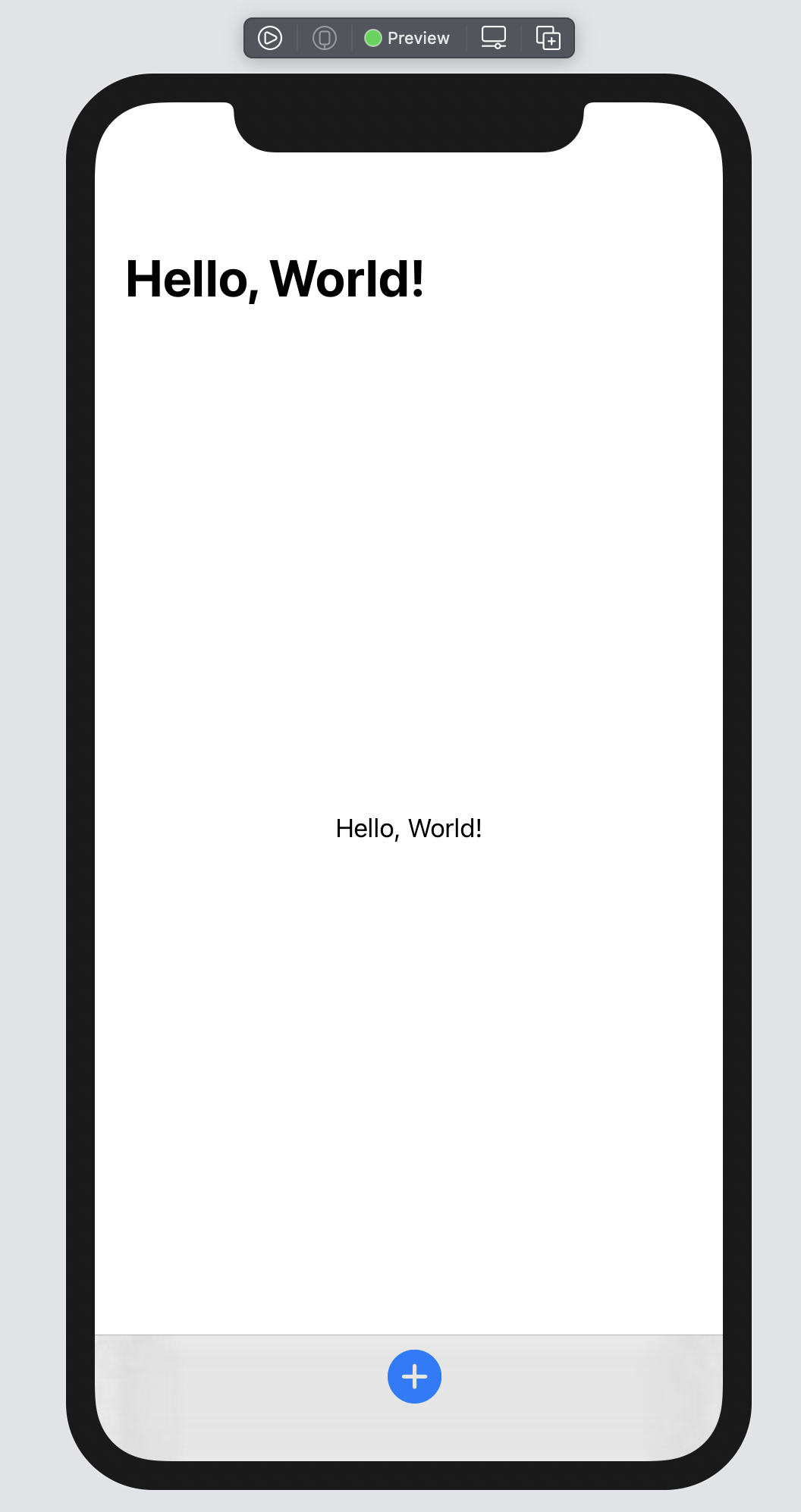
不是我所期望的那样。更奇怪的是,这不是中心对齐,而是几个像素的距离。
那么我该如何:
- 向右对齐?
- 中心对齐?
谢谢
回答 2
Stack Overflow用户
发布于 2020-09-11 13:39:57
我也遇到了同样的问题,下面是我发现的(Xcode 12.0 Beta 6)
右对齐
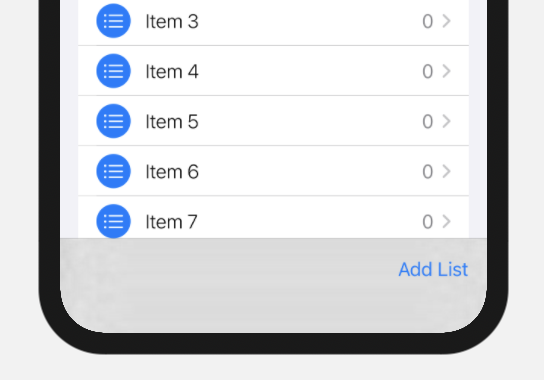
一种方法是使用两个.bottomBar项。
.toolbar(content: {
    ToolbarItem(placement: .bottomBar) {
        Spacer()
    }
    ToolbarItem(placement: .bottomBar) {
        Button(action: {}) {
            Text("Add List")
        }
    }
})稍微干净一点的是使用ToolbarItemGroup和Spacer()。
.toolbar(content: {
    ToolbarItemGroup(placement: .bottomBar) {
        Spacer()
        Button(action: {}) {
            Text("Add List")
        }
    }
})
居中
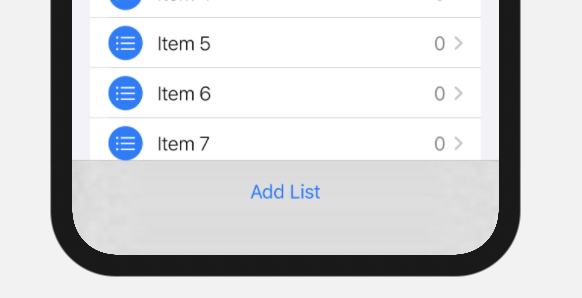
若要将项目居中,可以使用.status作为放置位置。
.toolbar(content: {
    ToolbarItem(placement: .status) {
        Button(action: {}) {
            Text("Add List")
        }
    }
})Stack Overflow用户
发布于 2020-08-17 04:26:28
每个ToolbarItem都必须包含单个视图,所以只需将空格移动到分隔的工具栏项中即可。
用Xcode 12b3测试

    .toolbar {
        ToolbarItem(placement: .bottomBar) {
            Spacer()
        }
        ToolbarItem(placement: .bottomBar) {
            Button(action: { print("Pressed") }) {
                Image(systemName: "plus.circle.fill")
                    .imageScale(.large)
                    .font(.title)
            }
        }
    }
注意:要使其居中,用空格移除工具栏项。
页面原文内容由Stack Overflow提供。腾讯云小微IT领域专用引擎提供翻译支持
原文链接:
https://stackoverflow.com/questions/63441821
复制相关文章
相似问题
腾讯云开发者

Copyright © 2013 - 2026 Tencent Cloud. All Rights Reserved. 腾讯云 版权所有
深圳市腾讯计算机系统有限公司 ICP备案/许可证号:粤B2-20090059  粤公网安备44030502008569号
腾讯云计算(北京)有限责任公司 京ICP证150476号 | 京ICP备11018762号