
使用OpenJDK14调试CLion:未能加载CMake项目
使用OpenJDK14调试CLion:未能加载CMake项目
提问于 2020-08-17 16:50:02
我下载了OpenJDK14的源代码并将它们放在\home\yuanfang\jdk14中,在运行了bash configure --disable-warnings-as-errors和make images之后,我成功地构建了OpenJDK14,新构建的JDK在home\yuanfang\jdk14\build\linux-x86_64-server-release\jdk中。顺便说一下,我正在使用Ubuntu20.04LTS。
然后,我想使用OpenJDK14 IDE调试CLion。我使用了CLion 2020.2,并执行了以下步骤:
- 打开CLion后,我选择Create New CMake project from ,并选择
\home\yuanfang\jdk14目录,这是jdk项目的根目录。 - 我修改了运行/调试配置,使其看起来如下:
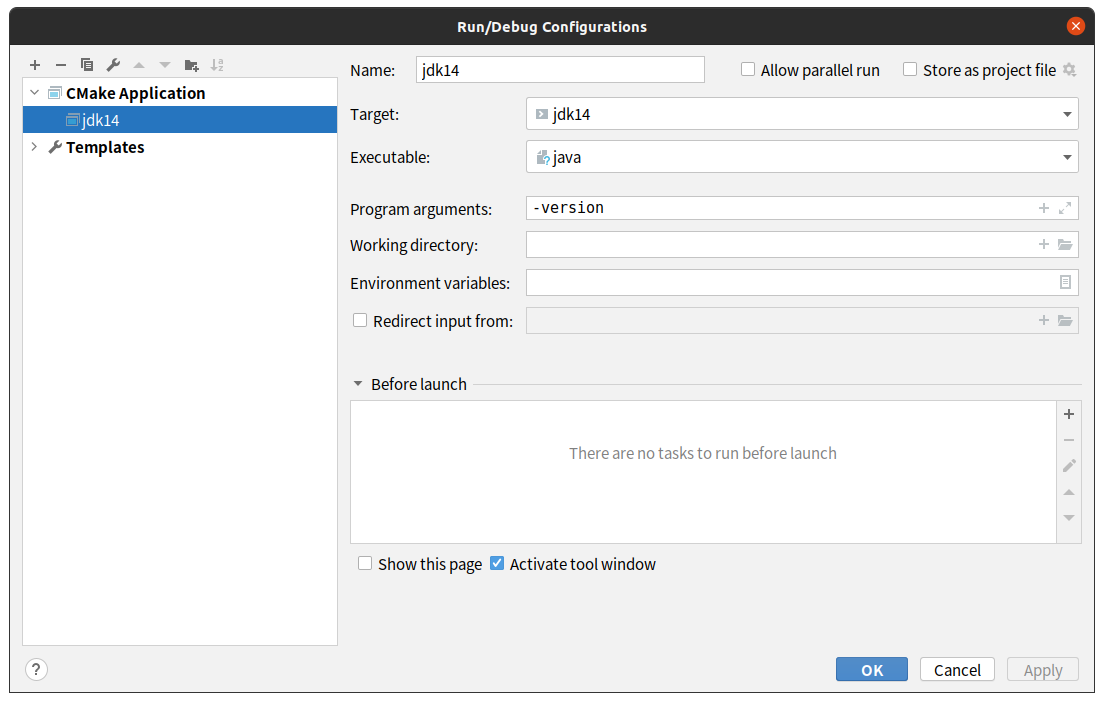
- CLion自动创建一个
CMakeLists.txt,但是文件不能工作,所以在谷歌搜索后,我在https://github.com/ojdkbuild/ojdkbuild/blob/master/src/java-14-openjdk/CMakeLists.txt找到了正确的CMakeLists.txt。然后,我使用正确的CMakeLists.txt重写旧的。 - 我下载了整个存储库(即github.com/ojdkbuild/ojdkbuild),将其解压缩并放入
\home\yuanfang\jdk14中。如下所示,ojdkbuild-master是新添加的文件夹。
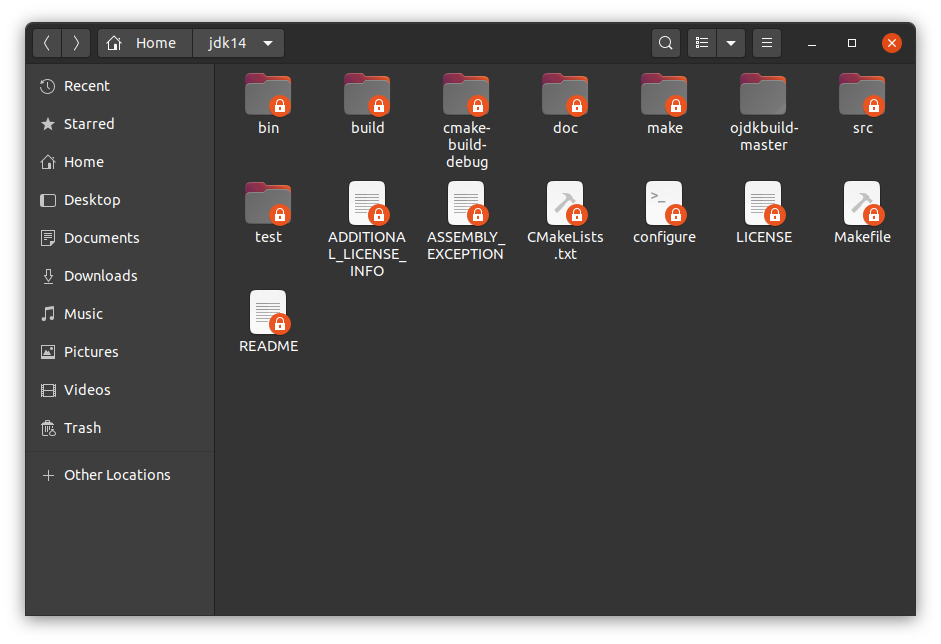
- 我重新加载了CMake项目,但是出现了一些CMake错误(如下所示),为什么CLion找不到这些文件?javaI谷歌搜索,但找不到任何有效的解决方案。有什么我能做的或可以参考的吗?提前谢谢。
CMake Error at CMakeLists.txt:19 (include):
  include could not find load file:

    /home/yuanfang/jdk14/../../resources/cmake/ojdkbuild_common.cmake


CMake Error at CMakeLists.txt:21 (include):
  include could not find load file:

    /home/yuanfang/jdk14/../../resources/cmake/version.cmake


CMake Error at CMakeLists.txt:93 (add_subdirectory):
  add_subdirectory given source
  "/home/yuanfang/jdk14/../../deps/rhino/scripting_tasks" which is not an
  existing directory.


CMake Error at CMakeLists.txt:98 (ojdkbuild_add_subdirectory):
  Unknown CMake command "ojdkbuild_add_subdirectory".


-- Configuring incomplete, errors occurred!
See also "/home/yuanfang/jdk14/cmake-build-debug/CMakeFiles/CMakeOutput.log".

Cannot get compiler information:
    Compiler exited with error code 1: /usr/bin/cc -xobjective-c -I/home/yuanfang/jdk14/build/linux-x86_64-server-release/hotspot/variant-server/gensrc/adfiles......./loading/LibraryLoader/jar_src -g -fpch-preprocess -v -dD -E
    Using built-in specs.
    COLLECT_GCC=/usr/bin/cc
    OFFLOAD_TARGET_NAMES=nvptx-none:hsa
    OFFLOAD_TARGET_DEFAULT=1
    Target: x86_64-linux-gnu
    Configured with: ../src/configure -v --with-pkgversion='Ubuntu 9.3.0-10ubuntu2' --with-bugurl=file:///usr/share/doc/gcc-9/README.Bugs --enable-languages=c,ada,c++,go,brig,d,fortran,objc,obj-c++,gm2 --prefix=/usr --with-gcc-major-version-only --program-suffix=-9 --program-prefix=x86_64-linux-gnu- --enable-shared --enable-linker-build-id --libexecdir=/usr/lib --without-included-gettext --enable-threads=posix --libdir=/usr/lib --enable-nls --enable-clocale=gnu --enable-libstdcxx-debug --enable-libstdcxx-time=yes --with-default-libstdcxx-abi=new --enable-gnu-unique-object --disable-vtable-verify --enable-plugin --enable-default-pie --with-system-zlib --with-target-system-zlib=auto --enable-objc-gc=auto --enable-multiarch --disable-werror --with-arch-32=i686 --with-abi=m64 --with-multilib-list=m32,m64,mx32 --enable-multilib --with-tune=generic --enable-offload-targets=nvptx-none,hsa --without-cuda-driver --enable-checking=release --build=x86_64-linux-gnu --host=x86_64-linux-gnu --target=x86_64-linux-gnu
    Thread model: posix
    gcc version 9.3.0 (Ubuntu 9.3.0-10ubuntu2)
    COLLECT_GCC_OPTIONS='-I' '/home/yuanfang/jdk14/build/linux-x86_64-server-release/hotspot/variant-server/gensrc/adfiles' '-I' '......'-g' '-fpch-preprocess' '-v' '-dD' '-E' '-D' '___CIDR_DEFINITIONS_END' '-mtune=generic' '-march=x86-64'
     cc1obj -E -quiet -v @/tmp/cci3XM6r -imultiarch x86_64-linux-gnu -D ___CIDR_DEFINITIONS_END /tmp/compiler-file5929385022787926768 -mtune=generic -march=x86-64 -fpch-preprocess -g -fworking-directory -fasynchronous-unwind-tables -fstack-protector-strong -Wformat -Wformat-security -fstack-clash-protection -fcf-protection -dD
    cc: fatal error: cannot execute 'cc1obj': execvp: No such file or directory
    compilation terminated.


[Failed to reload]回答 1
Stack Overflow用户
发布于 2020-10-27 08:58:32
- 步骤:查看这个项目:https://github.com/ojdkbuild/ojdkbuild.git
- 步骤:将OpenJDK14的源代码放入ojdkbuild/src/
- 步骤:将reousrces目录和CMakelists.txt复制到OpenJDK14
- 步骤: recomile openjdk并将项目导入CLin
页面原文内容由Stack Overflow提供。腾讯云小微IT领域专用引擎提供翻译支持
原文链接:
https://stackoverflow.com/questions/63455220
复制相关文章
相似问题
腾讯云开发者

Copyright © 2013 - 2026 Tencent Cloud. All Rights Reserved. 腾讯云 版权所有
深圳市腾讯计算机系统有限公司 ICP备案/许可证号:粤B2-20090059  粤公网安备44030502008569号
腾讯云计算(北京)有限责任公司 京ICP证150476号 | 京ICP备11018762号