
颤振增加ListTile高度
颤振增加ListTile高度
提问于 2020-08-18 15:12:05
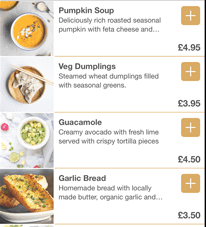
我想有一个列表瓷砖,有一个体面的大小领先形象,然后一个项目的描述和一个图标。
我所发现的,尽管在网上搜索答案,但我无法提高列表砖的高度,无论主导图像是什么高度。
代码:
          ListTile(
            leading: ConstrainedBox(
              constraints: BoxConstraints(
                minWidth: 100,
                minHeight: 260,
                maxWidth: 104,
                maxHeight: 264,
              ),
              child: Image.asset('lib/images/burger_texas_angus.jpg', fit: BoxFit.fill),
            ),
            title: Text('Texas Angus Burger'),
            subtitle: Text('With fries and coke.'),
            trailing: Icon(
              Icons.menu,
            ),
            onTap: () {},
            onLongPress: () {},
            dense: false,
          ),
想让它看起来像这样,在那里他们有一个很好的正方形图标,它似乎决定了列表的高度,而我所做的每一件事都把图像塞进了一个狭窄的瓷砖中。
回答 3
Stack Overflow用户
回答已采纳
发布于 2020-08-23 02:16:03
好的,这个答案是不可能的。ListTile是一个非常非常基本的内置小部件,它只能有一个特定的高度,而你对它无能为力。
如果你想做任何视觉上很酷的事情,比如我在问题中展示的图片等等,你必须创建一个定制卡片。
我将展示基本卡布局的生成代码,该代码将给出与我发布的图像类似的结果,以防有人需要帮助:
              Container(
                  width: MediaQuery.of(context).size.width * 0.94,
                  child: Card(
                    shape: RoundedRectangleBorder(
                      borderRadius: BorderRadius.circular(0.0),
                    ),
                    color: Colors.white70,
                    elevation: 10,
                    child: Row(
                      crossAxisAlignment: CrossAxisAlignment.start,
                      children: <Widget>[
                        Padding(
                          padding: const EdgeInsets.all(2.0),
                          child: ConstrainedBox(
                            constraints: BoxConstraints(
                              maxWidth: MediaQuery.of(context).size.width * 0.28,
                              maxHeight: MediaQuery.of(context).size.width * 0.28,
                            ),
                            child: Image.asset(
                                'lib/images/burger_texas_angus.jpg',
                                fit: BoxFit.fill
                            ),
                          ),
                        ),
                        Column(
                          crossAxisAlignment: CrossAxisAlignment.start,
                          children: <Widget>[
                            Container(
                              width: MediaQuery.of(context).size.width * 0.5,
                              child: Padding(
                                padding: const EdgeInsets.fromLTRB(10, 10, 0, 0),
                                child: Text(
                                  'Texas Angus Burger',
                                  style: TextStyle(
                                    fontWeight: FontWeight.bold,
                                    fontSize: 18,
                                  ),
                                ),
                              ),
                            ),
                            Container(
                              width: MediaQuery.of(context).size.width * 0.5,
                              child: Padding(
                                padding: const EdgeInsets.fromLTRB(5, 10, 0, 0),
                                child: Text(
                                  '100% Australian Angus grain-fed beef with cheese and pickles.  Served with fries.',
                                  style: TextStyle(
                                    fontSize: 12,
                                  ),
                                ),
                              ),
                            ),
                          ],
                        ),
                        Column(
                          children: <Widget>[
                            Padding(
                              padding: const EdgeInsets.fromLTRB(5, 40, 0, 0),
                              child: Text(
                                '\$ 24.00',
                                style: TextStyle(
                                  fontSize: 14,
                                ),
                              ),
                            ),
                          ],
                        ),
                      ],
                    ),
                  ),
                ),
              ],
            ),
),Stack Overflow用户
发布于 2020-08-18 16:13:43
试试这个:
Container(height: 100, child: ListTile(
              title: Text("My Title"),
              trailing: Icon(Icons.arrow_right),
));Stack Overflow用户
发布于 2020-11-29 23:20:59
您可以用容器包装ListTile并给出它的宽度和高度
ListTile(
  leading: Container(
    height: 80,
    width: 80,
    child: CircleAvatar(
      backgroundImage: AssetImage(
          'assets/images/splash_view_images/splash.png'),
    ),
  ),
  title: Text('some text'),
  subtitle:
      Text('some text.'),
),页面原文内容由Stack Overflow提供。腾讯云小微IT领域专用引擎提供翻译支持
原文链接:
https://stackoverflow.com/questions/63471591
复制相关文章
相似问题
腾讯云开发者

Copyright © 2013 - 2026 Tencent Cloud. All Rights Reserved. 腾讯云 版权所有
深圳市腾讯计算机系统有限公司 ICP备案/许可证号:粤B2-20090059  粤公网安备44030502008569号
腾讯云计算(北京)有限责任公司 京ICP证150476号 | 京ICP备11018762号