
使用python试图获取网站上的职务公告位置
使用python试图获取网站上的职务公告位置
提问于 2020-08-19 09:18:01
我试图获取每个作业上的location标记,以便根据位置对它们进行筛选,因为这个选项在在家找工作中不可用,并且一直在使用带有selenium的python。
from selenium import webdriver
from selenium.webdriver.support.ui import WebDriverWait
from selenium.webdriver.support import expected_conditions as EC
from selenium.webdriver.common.by import By
from bs4 import BeautifulSoup
import pandas as pd

driver = webdriver.Chrome("C:\\Program Files (x86)\\Google\\Chrome\\Application\\chromedriver.exe")

driver.get("https://www.seek.com.au/jobs?where=Work%20from%20home")
assert "SEEK" in driver.title

location = WebDriverWait(driver, 25).until(EC.visibility_of_all_elements_located((By.XPATH,
                                                                                   '("//*[@id=""app""]/div/div'
                                                                                   '/div[4]/div/div[3]/section'
                                                                                   '/div[2]/div/div[2]/div["'''
                                                                                   '"1]/div/div[2]/div/div[1]/'
                                                                                   'div[2]/article/div[1]/span'
                                                                                   '[2]/span/strong/span/span"'
                                                                                   ')')))``
当试图找到将位置作为文本的元素时,WebDriverWait似乎会超时(尽管尝试了疯狂的等待时间)。
Traceback (most recent call last):
  File "C:/Users/meagl/Desktop/Python/grabjobs/grabjobs.py", line 13, in <module>
    location = WebDriverWait(driver, 25).until(EC.visibility_of_all_elements_located((By.XPATH,
  File "C:\Users\meagl\anaconda3\envs\Python\lib\site-packages\selenium\webdriver\support\wait.py", line 80, in until
    raise TimeoutException(message, screen, stacktrace)
selenium.common.exceptions.TimeoutException: Message:
我使用的XPATH是最上面的那个。(现为悉尼)我的下一步是什么?
回答 2
Stack Overflow用户
回答已采纳
发布于 2020-08-19 17:41:52
它看起来像在你的xPath中有问题。正如我在下面使用的代码一样,它在页面上打印了所有20个作业的所有位置:
driver.get("https://www.seek.com.au/jobs?where=Work%20from%20home")
assert "SEEK" in driver.title
location = WebDriverWait(driver, 20).until(EC.visibility_of_all_elements_located((By.XPATH, "//span[contains(text(),'location:')]")))
for loc in location:
    print(loc.text)
输出
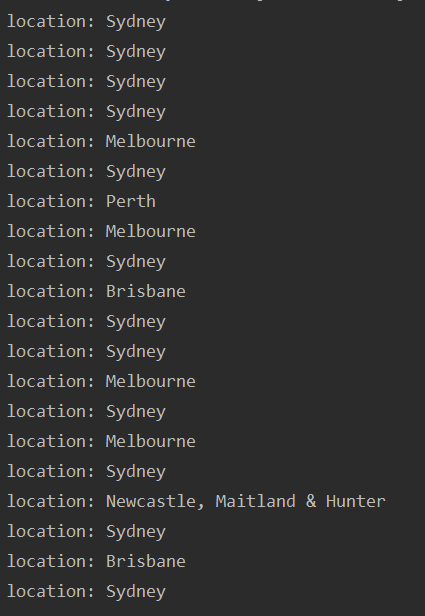
注意:如果你只想得到城市的名字,你可以玩弦乐。
Stack Overflow用户
发布于 2020-08-20 12:26:05
每当您执行这种操作时,都应该仔细选择定位器,在这里,所使用的xpath不起作用。使用xpath的方式//*[text()='location:']将解决您的问题。
页面原文内容由Stack Overflow提供。腾讯云小微IT领域专用引擎提供翻译支持
原文链接:
https://stackoverflow.com/questions/63483793
复制相关文章
相似问题
腾讯云开发者

Copyright © 2013 - 2026 Tencent Cloud. All Rights Reserved. 腾讯云 版权所有
深圳市腾讯计算机系统有限公司 ICP备案/许可证号:粤B2-20090059  粤公网安备44030502008569号
腾讯云计算(北京)有限责任公司 京ICP证150476号 | 京ICP备11018762号