
在archive.org站点上动态创建"a“(锚)元素的错误
我使用此代码创建"a“元素以将其添加到页面中。(在第三方网站上,它是一个用户脚本)
let anchor = document.createElement("a");
anchor.href = new URL("https://duckduckgo.com");
console.log(anchor);

//anchor.target = "_blank";
//anchor.rel = "nofollow noopener noreferrer";
//anchor.click();
在控制台中运行这段代码来检查它。
此代码在所有站点上都正常工作,但web.archive.org上的一些页面除外
例如:
论https://web.archive.org/web/19961220154510/https://www.yahoo.com/
我得到了<a href="https://web.archive.org/web/19961220154510if_/https://duckduckgo.com/"></a>,
但应该是<a href="https://duckduckgo.com/"></a>。
.click() (在上面)打开这个错误的URL。
怎么修呢?
在Chrome和Firefox中都会出现这种情况。
UPD:window.open("https://duckduckgo.com")的工作也是错误的。
它打开https://web.archive.org/web/20080820060021/http://duckduckgo.com/而不是https://duckduckgo.com/。
回答 1
Stack Overflow用户
发布于 2020-08-21 04:46:03
这是因为该站点上的Javascript正在覆盖HTMLAnchorElement.prototype.href。
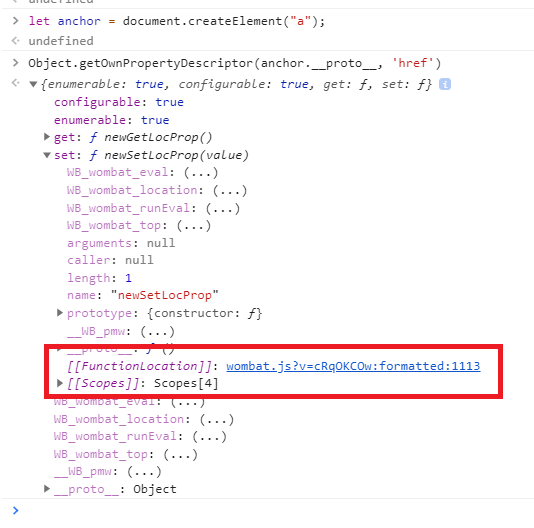
覆盖本机原型是一种糟糕的做法,会导致类似这样的混淆错误。
对于用户脚本,可以通过在页面加载开始时保存对href属性描述符的引用来修复它,然后在错误的内置代码试图重新分配它之后将它重新分配给HTMLAnchorElement.prototype.href:
// ==UserScript==
// @name             0 New Userscript
// @include          https://web.archive.org/web/19961220154510/https://www.yahoo.com/
// @run-at           document-start
// @grant            none
// ==/UserScript==

const originalHrefDescriptor = Object.getOwnPropertyDescriptor(HTMLAnchorElement.prototype, 'href');
window.addEventListener('DOMContentLoaded', () => {
  Object.defineProperty(HTMLAnchorElement.prototype, 'href', originalHrefDescriptor);
  // Now, assigning to .hrefs results in normal behavior again
});确保使用// @run-at document-start来确保用户脚本在运行页面上的任何代码之前运行-这样,您可以在描述符被覆盖之前保存对它的引用。
在这种特殊情况下,还可以为a提供一个_no_rewrite属性,而不是保存描述符:
const a = document.createElement('a');
a._no_rewrite = true;
a.href = 'https://www.google.com';https://stackoverflow.com/questions/63516542
复制相似问题
腾讯云开发者

Copyright © 2013 - 2026 Tencent Cloud. All Rights Reserved. 腾讯云 版权所有
深圳市腾讯计算机系统有限公司 ICP备案/许可证号:粤B2-20090059  粤公网安备44030502008569号
腾讯云计算(北京)有限责任公司 京ICP证150476号 | 京ICP备11018762号