
由于访问被拒绝,无法附加到进程
由于访问被拒绝,无法附加到进程
提问于 2020-08-20 22:57:48
我无法在visual studio 2019中附加调试进程,我收到以下错误消息-无法附加到进程。拒绝访问,请帮助我。
我已经试过了
1. I opened my VS 2019 in admin mode
2. I have tried
From the Start menu, choose Control Panel.
In Control Panel, double-click Administrative tools.
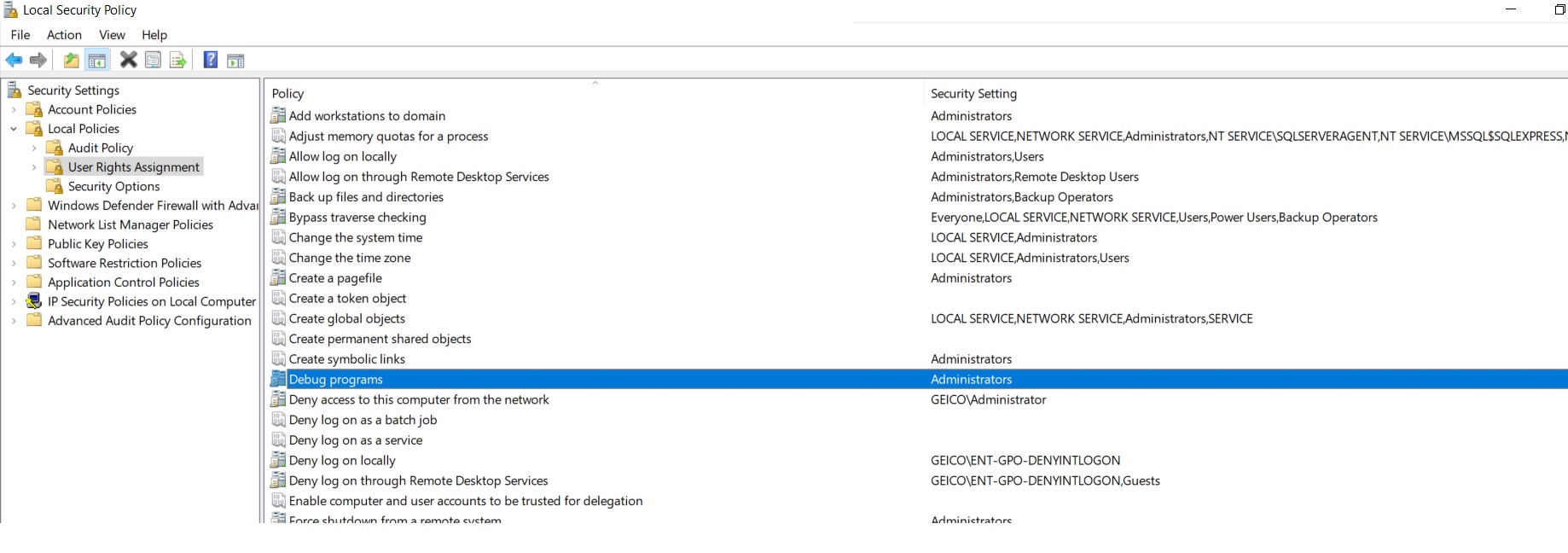
In the Administrative tools window, double-click Local Security Policy.
In the Local Security Policy window, select Local Policies.
In the Policies column, double-click Network access: Sharing and security model for local accounts.
In the Network access: Sharing and security model for local accounts dialog box, change the local security setting to Classic, and click OK.
但是没有运气,但我仍然被拒绝访问错误请建议我这是我的设置-
回答 1
Stack Overflow用户
回答已采纳
发布于 2021-05-18 14:48:30
,我将假设您试图附加到“w3wp.exe”
不知道为什么或如何解决了我的问题,但以下是对我有效的方法:
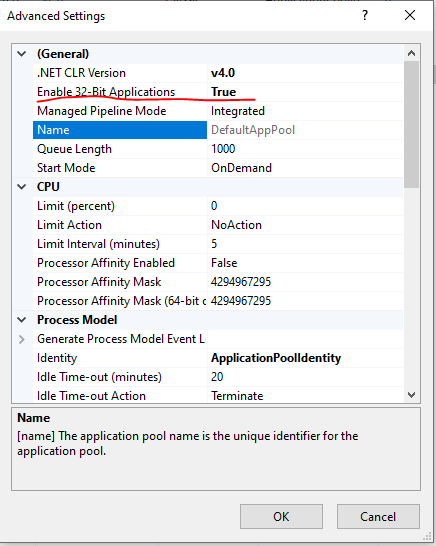
在我尝试了所有的东西(允许“每个人”对多个地方、本地策略等)进行访问之后,我记得我最近在ISS的应用程序池中更改了一个配置。
更具体地说,将“启用32位应用程序”设置为“False”会导致问题。在将此选项更改为“True”后,我成功地附加了“w3wp”。
页面原文内容由Stack Overflow提供。腾讯云小微IT领域专用引擎提供翻译支持
原文链接:
https://stackoverflow.com/questions/63514226
复制相关文章
相似问题
腾讯云开发者

Copyright © 2013 - 2026 Tencent Cloud. All Rights Reserved. 腾讯云 版权所有
深圳市腾讯计算机系统有限公司 ICP备案/许可证号:粤B2-20090059  粤公网安备44030502008569号
腾讯云计算(北京)有限责任公司 京ICP证150476号 | 京ICP备11018762号