
创建google实例时出错
我试图遵循Datalab:云视频中的笔记本,在执行datalab create ai-adventures命令时,我遇到了这个错误。
ERROR: (gcloud.compute.instances.create) Could not fetch resource:
 - The user does not have access to service account '*@compute-system.iam.gserviceaccount.com'.  User: '*@gmail.com'.  Ask a project owner to grant you the iam.serviceAccountUser role on the service account
很少有值得注意的事情;
- 我是项目负责人。
- 我尝试创建了一个新的服务帐户
tutorial@*.iam.gserviceaccount.com,但这没有起作用。
任何建议都将不胜感激!
编辑1
下面是信息,正如您在检查gcloud auth list指令时所看到的,我是所有者,但它告诉我我没有访问权限。
~ ⌚ 18:40:34
$ datalab create ai-adventures-3 --machine-type=n1-standard-4 --zone=us-central1-b
Creating the disk ai-adventures-3-pd
Creating the instance ai-adventures-3
ERROR: (gcloud.compute.instances.create) Could not fetch resource:
 - The user does not have access to service account 'service-510602609611@compute-system.iam.gserviceaccount.com'.  User: 'XXX@gmail.com'.  Ask a project owner to grant you the iam.serviceAccountUser role on the service account

A nested call to gcloud failed, use --verbosity=debug for more info.

~ ⌚ 15:02:59
$ gcloud auth list
          Credentialed Accounts
ACTIVE  ACCOUNT
*       XXX@gmail.com
        AAA@gmail.com

To set the active account, run:
    $ gcloud config set account `ACCOUNT`


~ ⌚ 15:03:45
$回答 1
Stack Overflow用户
发布于 2020-08-24 22:00:57
我尝试用不同的方式与不同的用户和帐户服务连接,在我自己的项目中重现您的错误。
我找到了能帮你的东西。
- 首先,我用OS
debian-9-drawfork-v20200207创建了一个新的debian-9-drawfork-v20200207。 - 我通过SSH登录到这个新实例。
- 但是,当我试图使用命令创建这个datalab实例时
datalab create --verbosity=debug example-datalab-2 --machine-type n1-standard-1
我收到了一个错误。
- 然后我发送以下命令
gcloud auth list
我收到了这样的消息:
                  Credentialed Accounts
ACTIVE  ACCOUNT
   *   XXXXX@developer.gserviceaccount.com

To set the active account, run:
    $ gcloud config set account `ACCOUNT`
这意味着如果我尝试用这个帐户服务创建新的datalab实例,但是这个帐户没有创建笔记本实例的角色。
- 然后,我用
gcloud auth login命令将用户更改为一个拥有所有者角色的帐户,然后重新运行datalab create命令,它就成功了。 - 为了证实它运行良好,我使用了命令
datalab connect example-datalab-2
我收到了这样的消息
Connecting to example-datalab-2.
This will create an SSH tunnel and may prompt you to create an rsa key pair. To manage these keys, see https://cloud.google.com/compute/docs/instances/adding-removing-ssh-keys
Waiting for Datalab to be reachable at http://localhost:8081/
This tool needs to create the directory [/home/directory/.ssh] before
being able to generate SSH keys.

Do you want to continue (Y/n)?  y

Generating public/private rsa key pair.
.
.
.
Updating project ssh metadata...done.
Waiting for SSH key to propagate.

The connection to Datalab is now open and will remain until this command is killed.
Click on the *Web Preview* (square button at top-right), select *Change port > Port 8081*, and start using Datalab.然后,如果我访问http://localhost:8081/,我可以看到:
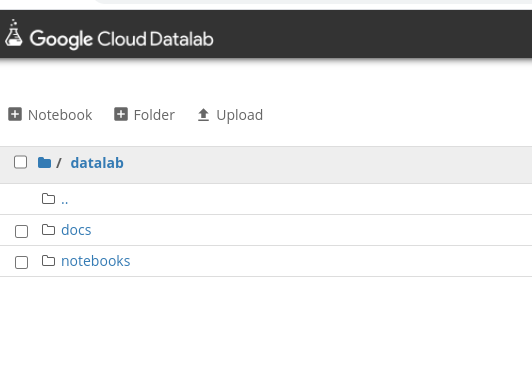
值得一提的是,我第一次尝试时收到了另一条错误消息。
ERROR: (gcloud.source.repos.list) User [user@example.com] does not have permission to access project [myproject] (or it may not exist): Cloud Source Repositories API has not been used in project xxxxxxxx before or it is disabled.
我修复了这个问题,使用命令启用服务。
gcloud beta services enable sourcerepo.googleapis.com
另一方面,为了更准确地解决此问题,我建议使用以下调试标志重新运行该命令,以帮助诊断问题:
datalab create --verbosity=debug datalab-instance-name
另外,我找到了两个指南,可以帮助你完成你的任务:
- 快速启动指南,它向您展示如何使用Datalab命令行工具来设置和打开Google。
- 创建一个新的笔记本实例指南。
我希望你能找到有用的信息。
编辑1
关于您提到的tutorial@*.iam.gserviceaccount.com服务帐户,我发现了下面的文档,它说您可以使用服务帐户而不是默认的服务帐户来创建datalab,但是您需要添加以下角色:
roles/compute.instanceAdmin.v1
roles/iam.serviceAccountUser
因此,请检查SA是否具有这些角色,然后可以运行相同的命令+ --service-account,如下所示:
datalab create ai-adventures --service-account=tutorial@*.iam.gserviceaccount.com
您可以在下面的链接中看到更多信息。
这个问题比我想象的更有趣,我在使用Datalab时遇到了几个问题,我们可以考虑一下2018年1月11日发布的视频you 提到过,随着Google平台的快速发展,一些可以在这一天工作的东西可能在两年后完全改变。
有了这一点,我建议您使用https://console.cloud.google.com/ai-platform/notebooks/?_ga=2.267278988.305402083.1598273128-638966553.1591892739,因为它具有与Datalab相似的特性,并且根据下面的文档,它是在2020年3月31日发布的。
在试用它时,它似乎符合您的用例,而且它还具有通过使用R笔记本连接到Bigquery的功能。
https://stackoverflow.com/questions/63563853
复制相似问题
腾讯云开发者

Copyright © 2013 - 2026 Tencent Cloud. All Rights Reserved. 腾讯云 版权所有
深圳市腾讯计算机系统有限公司 ICP备案/许可证号:粤B2-20090059  粤公网安备44030502008569号
腾讯云计算(北京)有限责任公司 京ICP证150476号 | 京ICP备11018762号