
开放GL中体素模型的纹理映射
我正在关注一个关于使用LWJGL在YouTube上打开GL的视频系列,到目前为止,我已经成功地使用obj格式正确地呈现了3d模型和纹理。我想在我的游戏中使用基于体素的模型,所以我进入了MagicaVoxel软件,导出了一个带有obj格式的纹理示例,但是纹理没有得到正确的映射。的确,有些颜色的映射似乎是正确的,但其他面孔的纹理却是完整的。
以下是预期结果的图片:

而实际结果是:
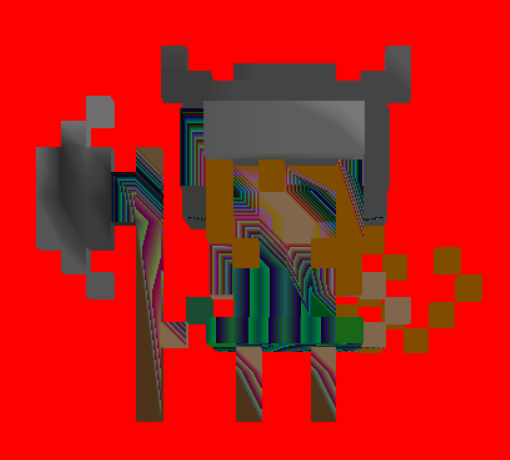
我认为问题来自纹理和opengl插值它的方式,纹理是一条带有颜色的1*256线,而在obj文件中,只将所需的颜色放在uv坐标上。
我做了一个简单的例子来帮助理解正在发生的事情:只有3个立方体彼此对齐,还有一个3像素长的纹理,有3种不同的颜色,这是obj文件的代码,纹理太小,看不见,但实际上只有3个彩色像素。
# normals
vn -1 0 0
vn 1 0 0
vn 0 0 1
vn 0 0 -1
vn 0 -1 0
vn 0 1 0

# texcoords
vt 0.25 0.5
vt 0.5 0.5
vt 0.75 0.5

# verts
v -0.1 0 0
v -0.1 0 -0.1
v -0.1 0.1 0
v -0.1 0.1 -0.1
v 0.2 0 0
v 0.2 0 -0.1
v 0.2 0.1 0
v 0.2 0.1 -0.1
v -0.1 0 0
v -0.1 0.1 0
v 0 0 0
v 0 0.1 0
v 0.1 0 0
v 0.1 0.1 0
v 0.2 0 0
v 0.2 0.1 0
v -0.1 0 -0.1
v -0.1 0.1 -0.1
v 0 0 -0.1
v 0 0.1 -0.1
v 0.1 0 -0.1
v 0.1 0.1 -0.1
v 0.2 0 -0.1
v 0.2 0.1 -0.1
v -0.1 0 0
v 0 0 0
v 0.1 0 0
v 0.2 0 0
v -0.1 0 -0.1
v 0 0 -0.1
v 0.1 0 -0.1
v 0.2 0 -0.1
v -0.1 0.1 0
v 0 0.1 0
v 0.1 0.1 0
v 0.2 0.1 0
v -0.1 0.1 -0.1
v 0 0.1 -0.1
v 0.1 0.1 -0.1
v 0.2 0.1 -0.1

# faces
f 3/2/1 2/2/1 1/2/1
f 4/2/1 2/2/1 3/2/1
f 5/1/2 6/1/2 7/1/2
f 7/1/2 6/1/2 8/1/2
f 11/2/3 10/2/3 9/2/3
f 12/2/3 10/2/3 11/2/3
f 13/3/3 12/3/3 11/3/3
f 14/3/3 12/3/3 13/3/3
f 15/1/3 14/1/3 13/1/3
f 16/1/3 14/1/3 15/1/3
f 17/2/4 18/2/4 19/2/4
f 19/2/4 18/2/4 20/2/4
f 19/3/4 20/3/4 21/3/4
f 21/3/4 20/3/4 22/3/4
f 21/1/4 22/1/4 23/1/4
f 23/1/4 22/1/4 24/1/4
f 29/2/5 26/2/5 25/2/5
f 30/3/5 27/3/5 26/3/5
f 30/2/5 26/2/5 29/2/5
f 31/1/5 28/1/5 27/1/5
f 31/3/5 27/3/5 30/3/5
f 32/1/5 28/1/5 31/1/5
f 33/2/6 34/2/6 37/2/6
f 34/3/6 35/3/6 38/3/6
f 37/2/6 34/2/6 38/2/6
f 35/1/6 36/1/6 39/1/6
f 38/3/6 35/3/6 39/3/6
f 39/1/6 36/1/6 40/1/6 正如您可以看到的,为3个顶点获取的3个UV坐标是相同的,但在OpenGL中,这是结果(它们应该是红色、蓝色和黄色):

下面是我的OBJ文件读取器代码(在Java中),我调用它来创建vao和要呈现的内容:
public static RawModel loadObjModel(String fileName, Loader loader) {
        FileReader fr = null;
        try {
            fr = new FileReader(new File("res/" + fileName + ".obj"));
        } catch (FileNotFoundException e) {
            System.err.println("Couldn't load file!");
            e.printStackTrace();
        }
        BufferedReader reader = new BufferedReader(fr);
        String line;
        List<Vector3f> vertices = new ArrayList<Vector3f>();
        List<Vector2f> textures = new ArrayList<Vector2f>();
        List<Vector3f> normals = new ArrayList<Vector3f>();
        List<Integer> indices = new ArrayList<Integer>();
        float[] verticesArray = null;
        float[] normalsArray = null;
        float[] textureArray = null;
        int[] indicesArray = null;
        try {

            while (true) {
                line = reader.readLine();
                String[] currentLine = line.split(" ");
                if (line.startsWith("v ")) {
                    Vector3f vertex = new Vector3f(Float.parseFloat(currentLine[1]),
                            Float.parseFloat(currentLine[2]), Float.parseFloat(currentLine[3]));
                    vertices.add(vertex);
                } else if (line.startsWith("vt ")) {
                    Vector2f texture = new Vector2f(Float.parseFloat(currentLine[1]),
                            Float.parseFloat(currentLine[2]));
                    textures.add(texture);
                } else if (line.startsWith("vn ")) {
                    Vector3f normal = new Vector3f(Float.parseFloat(currentLine[1]),
                            Float.parseFloat(currentLine[2]), Float.parseFloat(currentLine[3]));
                    normals.add(normal);
                } else if (line.startsWith("f ")) {
                    textureArray = new float[vertices.size() * 2];
                    normalsArray = new float[vertices.size() * 3];
                    break;
                }
            }

            while (line != null) {
                if (!line.startsWith("f ")) {
                    line = reader.readLine();
                    continue;
                }
                String[] currentLine = line.split(" ");
                String[] vertex1 = currentLine[1].split("/");
                String[] vertex2 = currentLine[2].split("/");
                String[] vertex3 = currentLine[3].split("/");

                processVertex(vertex1,indices,textures,normals,textureArray,normalsArray);
                processVertex(vertex2,indices,textures,normals,textureArray,normalsArray);
                processVertex(vertex3,indices,textures,normals,textureArray,normalsArray);
                line = reader.readLine();
            }
            reader.close();

        } catch (Exception e) {
            e.printStackTrace();
        }

        verticesArray = new float[vertices.size()*3];
        indicesArray = new int[indices.size()];

        int vertexPointer = 0;
        for(Vector3f vertex:vertices){
            verticesArray[vertexPointer++] = vertex.x;
            verticesArray[vertexPointer++] = vertex.y;
            verticesArray[vertexPointer++] = vertex.z;
        }

        for(int i=0;i<indices.size();i++){
            indicesArray[i] = indices.get(i);
        }
        return loader.loadToVAO(verticesArray, indicesArray, textureArray);

    }

    private static void processVertex(String[] vertexData, List<Integer> indices,
            List<Vector2f> textures, List<Vector3f> normals, float[] textureArray,
            float[] normalsArray) {
        int currentVertexPointer = Integer.parseInt(vertexData[0]) - 1;
        indices.add(currentVertexPointer);
        Vector2f currentTex = textures.get(Integer.parseInt(vertexData[1])-1);
        textureArray[currentVertexPointer*2] = currentTex.x;
        textureArray[currentVertexPointer*2+1] = 1 - currentTex.y;
        Vector3f currentNorm = normals.get(Integer.parseInt(vertexData[2])-1);
        normalsArray[currentVertexPointer*3] = currentNorm.x;
        normalsArray[currentVertexPointer*3+1] = currentNorm.y;
        normalsArray[currentVertexPointer*3+2] = currentNorm.z;
    }
这是我的片段着色器:
#version 400 core

in vec2 pass_textureCoords;

out vec4 out_colour;

uniform sampler2D textureSampler;

void main(void){

    out_colour = texture(textureSampler,pass_textureCoords);
}
这是我的顶点着色器:
#version 400 core

in vec3 position;
in vec2 textureCoords;

out vec2 pass_textureCoords;

uniform mat4 transformationMatrix;
uniform mat4 projectionMatrix;
uniform mat4 viewMatrix;

void main(void){

    gl_Position = projectionMatrix * viewMatrix * transformationMatrix * vec4(position.xyz,1.0);
    pass_textureCoords = textureCoords;
}
下面是我的呈现方法,名为每一个帧:
public void render(Entity entity,StaticShader shader) {

        TexturedModel texturedModel = entity.getTexturedModel();
        RawModel model = texturedModel.getRawModel();
        GL30.glBindVertexArray(model.getVaoID());

        GL20.glEnableVertexAttribArray(0);
        GL20.glEnableVertexAttribArray(1);

        Matrix4f transformationMatrix = Maths.createTransformationMatrix(entity.getPosition(), entity.getRotation(), entity.getScale());
        shader.loadTransformationMatrix(transformationMatrix);

        GL13.glActiveTexture(GL13.GL_TEXTURE0);


        GL11.glBindTexture(GL11.GL_TEXTURE_2D, texturedModel.getTexture().getID());

        GL11.glDrawElements(GL11.GL_TRIANGLES, model.getVertexCount(),GL11.GL_UNSIGNED_INT,0);

        GL20.glDisableVertexAttribArray(0);
        GL20.glDisableVertexAttribArray(1);

        GL30.glBindVertexArray(0);
    }
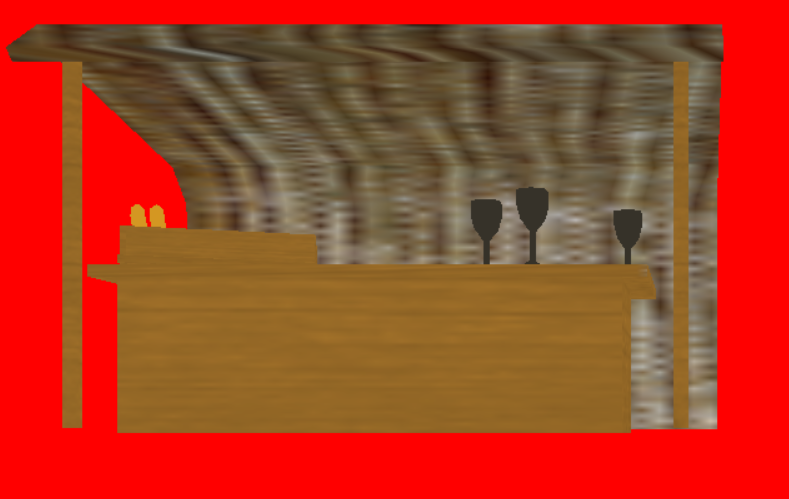
我不明白我错过了什么,同样,它已经适用于一个质地很大的搅拌机模型:
回答 1
Stack Overflow用户
发布于 2020-08-26 17:51:35
您的Wavefront OBJ文件加载程序实际上只在一个非常特殊的情况下工作,即,任何两个顶点都不共享纹理坐标或法线,因此v、vn和vt规范之间有1:1的对应关系。不过,情况通常并非如此。忽略了Wavefront文件加载器也只能在所有“f”行出现之后才能工作(这也不总是这样),那么您还会遇到一些其他问题。因此,目前的主要问题是,假设“v”和“vt”行之间存在1:1的对应关系,但情况并非如此。通常,不能简单地使用'v‘索引(通过'f’行中第一个‘/’分隔的值指定)作为OpenGL元素缓冲区索引,因为OpenGL只有一个元素索引,以便统一地索引位置、纹理和法线数组,而Wavefront文件格式有三个不同的索引,每个索引分别用于位置、纹理和法线。因此,您应该做的是重新考虑/重写Wavefront OBJ文件加载器,以便它基本上收集所有位置(v)、纹理坐标(vt)和法线(vn)信息,然后每当您遇到一个面板(f)时,就会在指定的索引处(在“f”行)将位置、纹理和法线信息附加到最终的结果缓冲区中。不能简单地使用从“f”行的位置索引派生的单个索引。您要么根本不使用任何索引,要么简单地使用连续递增索引作为OpenGL元素缓冲区。
但首先,我强烈建议阅读Wavefront文件格式的实际规范,如:http://paulbourke.net/dataformats/obj/
https://stackoverflow.com/questions/63602478
复制相似问题
腾讯云开发者

Copyright © 2013 - 2026 Tencent Cloud. All Rights Reserved. 腾讯云 版权所有
深圳市腾讯计算机系统有限公司 ICP备案/许可证号:粤B2-20090059  粤公网安备44030502008569号
腾讯云计算(北京)有限责任公司 京ICP证150476号 | 京ICP备11018762号