
将Excel移植到LibreOffice: AddressOf
我在某个Excel中有一个函数,它设置了一个计时器。当我试图运行代码时,LibreOffice Calc抱怨说“括号不匹配”。
以下是所讨论的职能:
Sub StartTimer()
    Dim f As Single
    f = Range("K2").Value
    Dim t As Single
    t = 1 / f
    t = t / 2
    TimerID = SetTimer(0&, 0&, t * 1000&, AddressOf TimerProc)
End Sub当IDE出错时,代码中突出显示的部分是:SetTimer(0&, 0&, t * 1000&, AddressOf --我认为这是它遇到问题的AddressOf部件,它似乎不像一个关键字。在LibreOffice的VBA实现中,是否存在与此类似的内容?谷歌搜索往往只产生微软的文档,这是没有帮助的。
以下是完整的模块:
Rem Attribute VBA_ModuleType=VBAModule
Option VBASupport 1
Private Declare Sub Sleep Lib "kernel32" (ByVal dwMilliseconds As Long)
Public dTime As Date

Public Declare Function SetTimer Lib "user32" ( _
    ByVal HWnd As Long, ByVal nIDEvent As Long, _
    ByVal uElapse As Long, ByVal lpTimerFunc As Long) As Long
Public Declare Function KillTimer Lib "user32" ( _
    ByVal HWnd As Long, ByVal nIDEvent As Long) As Long

Public TimerID As Long

Sub StartTimer()
    Dim f As Single
    f = Range("K2").Value
    Dim t As Single
    t = 1 / f
    t = t / 2
    TimerID = SetTimer(0&, 0&, t * 1000&, AddressOf TimerProc)
End Sub

Sub EndTimer()
    On Error Resume Next
    KillTimer 0&, TimerID
End Sub

Sub TimerProc(ByVal HWnd As Long, ByVal uMsg As Long, _
    ByVal nIDEvent As Long, ByVal dwTimer As Long)
      Dim c As Integer
      c = Range("K1").Value
      c = c Xor 1
      Range("K1").Value = c
End Sub

Sub Macro1()
    Dim c As Integer
    c = Range("K1").Value
    c = c Xor 1
    Range("K1").Value = c

    Dim f As Single
    f = Range("K2").Value
    Dim t As Single
    t = 1 / f
    Sleep (t * 1000)

    c = Range("K1").Value
    c = c Xor 1
    Range("K1").Value = c
End Sub回答 1
Stack Overflow用户
发布于 2020-09-04 07:23:06
在LibreOffice中使用完全与微软工具相关的解决方案并不是一个好主意。如果您失去了软件包的主要优势--多平台,您的解决方案将无法在Linux或MacOS上工作。
定时器的原理非常简单--一个单独的线程只需计算时间并向主代码发出信号。
在基本的LibreOffice中,没有创建线程的方法。但是Basic并不是唯一可用的编程语言。
让我们看看这个例子。挺旧的,但还能用。
基本代码不是很复杂。
Sub Timermacro
Rem This procedure is called by pressing the START button -
Rem indicates to the timer how often it should work and how many times and starts it.
Dim nTime As Long, nCount As Long
Rem These variables - oJob1 and oP - are described in the adjacent module.
    oP = GenerateTimerPropertySet()
    oJob1 = createUnoListener("JOB1_", "com.sun.star.task.XJobExecutor")
    oP.xJob = oJob1
    getParams(nTime, nCount)
    oP.lMaxIterations    = nCount
    oP.lPeriodInMilliSec = nTime * 1000
    oP.start()
End Sub

Sub StopTimer
Rem This is the handler for pressing the STOP button. Everything is very simple here.
    oP.stop()
End Sub

Function GenerateTimerPropertySet() As Any
Dim oSP As Variant
Dim oScript As Variant
    oSP    = ThisComponent.getScriptProvider("")
Rem Pay attention to this line - this is the main trick of this solution
Rem The current document (location=document) contain BeanShell code (language=BeanShell))!
Rem It's called timer.bsh and is in the timer library (timer.timer.bsh)
    oScript = oSP.getScript("vnd.sun.star.script:timer.timer.bsh?language=BeanShell&location=document")
    GenerateTimerPropertySet = oScript.invoke(Array(), Array(), Array())
End Function

Sub JOB1_trigger(s As String)
Rem Here we are simply demonstrating that the timer is doing its job.
Rem After each timer is triggered, add the current date and time and countdown number.
Dim oSheet As Variant
Dim oCursor As Variant
Dim aRangeAddress As New com.sun.star.table.CellRangeAddress
Dim nEndRow As Long
Dim oCellRangeByPosition As Variant
Dim oDataArray As Variant

    oSheet = ThisComponent.getSheets().getByIndex(0)
    oCursor = oSheet.createCursor()

    oCursor.gotoEndOfUsedArea(False)
    aRangeAddress = oCursor.getRangeAddress()
    nEndRow = aRangeAddress.EndRow+1

    oCellRangeByPosition = oSheet.getCellRangeByPosition(0, nEndRow, 1, nEndRow)
    oDataArray = oCellRangeByPosition.getDataArray()
    oDataArray(0)(0) = Format(Now,"YYYY-MM-DD HH:mm:SS")
    oDataArray(0)(1) = s
    oCellRangeByPosition.setFormulaArray(oDataArray)
End Sub

Sub getParams(nTime As Long, nCount As Long)
Rem This procedure prepares parameters for the timer.
Rem In this case, they are simply read from the cells of the first sheet of the current book.
Rem But you can set them in any way - ask in the dialog, calculate by the current time,
Rem generate according to a special algorithm, etc.
Dim oSheet As Variant
    oSheet = ThisComponent.getSheets().getByIndex(0)
    nTime = oSheet.getCellByPosition(4, 4).getValue()
    nCount = oSheet.getCellByPosition(4, 5).getValue()
End Sub
解决方案的主要窍门在这里:
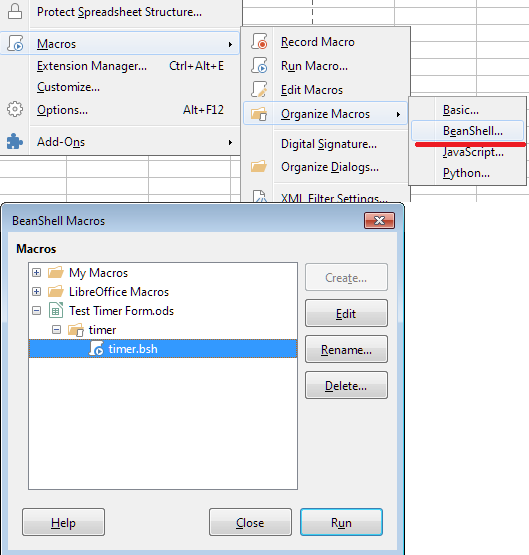
基于代码中的一个注释,ms777很久以前就发布了这篇文章,当时OO2.4还在使用中。已经很难找到OpenOffice在任何地方,这个解决方案发布的站点已经很长时间没有存在了,但是这个解决方案是有效的。
我引用的是ms777的代码,没有改动,“原样”:
import com.sun.star.uno.Type;
    import com.sun.star.uno.UnoRuntime;
    import com.sun.star.lib.uno.helper.PropertySet;
    import com.sun.star.lib.uno.helper.WeakBase;
    import com.sun.star.task.XJobExecutor;
    import com.sun.star.lang.XInitialization;
    import com.sun.star.beans.PropertyValue;
    import com.sun.star.beans.XPropertyChangeListener;
    import com.sun.star.beans.PropertyChangeEvent;
    import com.sun.star.lang.EventObject;
    import com.sun.star.uno.AnyConverter;
    import com.sun.star.xml.crypto.sax.XElementStackKeeper ; // defines a start and a stop routine

    // Workaround for  http://qa.openoffice.org/issues/show_bug.cgi?id=89978 needed from OO 2.4 onwards
    Thread.currentThread().setContextClassLoader(this.getClass().getClassLoader());

    // This prevents an error message when executing the script a second time

    try { Class.forName("ms777Timer_06");}
      catch (ClassNotFoundException e) {
      System.out.println( "class not found - compiling start" );


    public class ms777Timer_06 extends PropertySet  implements XElementStackKeeper
      {

    // These are the properties of the PropertySet
      public boolean bFixedRate = true;
      public boolean bIsRunning = false;
      public int lPeriodInMilliSec = 2000;
      public int lDelayInMilliSec = 0;
      public int lMaxIterations = 5;
      public int lCurrentIteration = 0;
      public XJobExecutor xJob = null;

    // These are some additional properties
      Task xTask =null;
      Timer xTimer = null;

      public ms777Timer_06()  {
        registerProperty("bFixedRate",  (short) 0);
        registerProperty("bIsRunning",  (short) com.sun.star.beans.PropertyAttribute.READONLY);
        registerProperty("lPeriodInMilliSec",  (short) 0);
        registerProperty("lDelayInMilliSec",  (short) 0);
        registerProperty("lMaxIterations",  (short) 0);
        registerProperty("lCurrentIteration",  (short) 0);
        registerProperty("xJob",  (short) com.sun.star.beans.PropertyAttribute.MAYBEVOID);
        xTimer = new Timer();
        }

    //XElementStackKeeper
      public void start() {
        stop();
        if (xJob==null) {return;}
        xTask = new Task();
        lCurrentIteration = 1;
        bIsRunning = true;
        if (bFixedRate) {
          xTimer.scheduleAtFixedRate( xTask, (long) lDelayInMilliSec, (long) lPeriodInMilliSec );
          } else {
          xTimer.schedule( xTask, (long) lDelayInMilliSec, (long) lPeriodInMilliSec );
          }
        }

      public void stop() {
        lCurrentIteration = 0;
        bIsRunning = false;
        if (xTask!=null) { xTask.cancel();}
        }

      public void retrieve(com.sun.star.xml.sax.XDocumentHandler  h, boolean  b) { }

    class Task extends TimerTask  {
        public void run()  {
            xJob.trigger(lCurrentIteration.toString());
            lCurrentIteration +=1;
            if (lCurrentIteration > lMaxIterations) {
              stop();
              }
          }
        }
      }

    System.out.println( "class not found - compiling end" );
    } // of   catch (ClassNotFoundException e)

    System.out.println( "generating timer property set ... " );
    return new ms777Timer_06();
我希望这能解决你的问题。
https://stackoverflow.com/questions/63725770
复制相似问题
腾讯云开发者

Copyright © 2013 - 2026 Tencent Cloud. All Rights Reserved. 腾讯云 版权所有
深圳市腾讯计算机系统有限公司 ICP备案/许可证号:粤B2-20090059  粤公网安备44030502008569号
腾讯云计算(北京)有限责任公司 京ICP证150476号 | 京ICP备11018762号