
windos 2012 r2安全事件日志自定义插入
我试图在windows 2012 r2中写入日志,我可以这样编写应用程序日志,
Write-EventLog -LogName Application -Source "mysource" other parameters goes here 它正确地工作,并在windowslog/应用程序中编写此日志。
在那之后,我就像这样为了安全日志而努力
Write-EventLog -LogName Security -Source "Microsoft-Windows-Security-Auditing" other parameters goes here 把这个错误还给我
Write-EventLog : The registry key for the log "Security" for source "Microsoft-Windows-Security-Auditing" could not be
opened.
At line:1 char:1
+ Write-EventLog -LogName Security -Source "Microsoft-Windows-Security-Auditing" - ...
+ ~~~~~~~~~~~~~~~~~~~~~~~~~~~~~~~~~~~~~~~~~~~~~~~~~~~~~~~~~~~~~~~~~~~~~~~~~~~~~~~~
    + CategoryInfo          : PermissionDenied: (:) [Write-EventLog], Exception
    + FullyQualifiedErrorId : AccessDenied,Microsoft.PowerShell.Commands.WriteEventLogCommand
在此之后,我搜索并找到一个用于编写安全日志的函数-- AuthzReportSecurityEventı猜测ı可以使用该函数编写日志,如果ı可以这样做,那么ı还有另一个问题:如何在powershell或python中使用该函数?我想我可以通过pywin32模块使用这个函数吗?或者我可以直接用powershell脚本调用吗?您能告诉我任何示例吗?ı如何调用此函数并使用此函数在安全日志中写入日志。
当我遵循“争取太阳”的建议时,我可以写安全日志。
回答 1
Stack Overflow用户
发布于 2020-09-08 08:18:12
ı猜测ı可以使用这个函数编写日志,如果ı可以这样做,那么ı还有另一个问题:如何在powershell或python中使用这个函数?
在Windows 2003中,安全日志写入访问限制在没有通过引入一组特殊API来改变基本设计的情况下有所放松(参见图2)。这些API在内部使用(LPCs)与LSA交互,指示它代表应用程序生成审计日志。该机构优雅而简单。
首先,应用程序通过调用AuthzRegisterSecurityEventSource向LSA注册一个安全事件源句柄。这个API唯一感兴趣的参数是事件源的名称,该名称几乎可以是任何内容,但有一些限制。例如,它不能被命名为“安全”,因为该名称是为系统使用保留的。此调用返回的安全事件源句柄用于以下步骤。
接下来,通过调用两个紧密相关的API中的一个来生成事件: AuthzReportSecurityEvent或AuthzReportSecurityEventFromParams。最后,当应用程序关闭时,它通过调用AuthzUnregisterSecurityEventSource取消注册安全事件源句柄。
参考:安全日志
您能告诉我任何示例吗?ı如何调用此函数并使用此函数在安全日志中写入日志。
代码示例:(C++)
#include <stdio.h>
#include <iostream>
#include <string>
#include <strsafe.h>
#include <windows.h>
#include <Authz.h>
#include <Ntsecapi.h>


#pragma comment(lib,"Authz.lib")
#pragma comment(lib,"Advapi32.lib")

BOOL SetPrivilege(
    HANDLE hToken,          // access token handle
    LPCTSTR lpszPrivilege,  // name of privilege to enable/disable
    BOOL bEnablePrivilege   // to enable or disable privilege
)
{
    TOKEN_PRIVILEGES tp;
    LUID luid;

    if (!LookupPrivilegeValue(
        NULL,            // lookup privilege on local system
        lpszPrivilege,   // privilege to lookup
        &luid))        // receives LUID of privilege
    {
        printf("LookupPrivilegeValue error: %u\n", GetLastError());
        return FALSE;
    }

    tp.PrivilegeCount = 1;
    tp.Privileges[0].Luid = luid;
    if (bEnablePrivilege)
        tp.Privileges[0].Attributes = SE_PRIVILEGE_ENABLED;
    else
        tp.Privileges[0].Attributes = 0;

    // Enable the privilege or disable all privileges.

    if (!AdjustTokenPrivileges(
        hToken,
        FALSE,
        &tp,
        sizeof(TOKEN_PRIVILEGES),
        (PTOKEN_PRIVILEGES)NULL,
        (PDWORD)NULL))
    {
        printf("AdjustTokenPrivileges error: %u\n", GetLastError());
        return FALSE;
    }

    if (GetLastError() == ERROR_NOT_ALL_ASSIGNED)

    {
        printf("The token does not have the specified privilege. \n");
        return FALSE;
    }

    printf("Get the specified privilege! \n");

    return TRUE;
}


int main(int argc, const char* argv[])
{
    // Declare and initialize variables.

    BOOL bResult = TRUE;
    DWORD event_id = 4624;
    AUTHZ_SECURITY_EVENT_PROVIDER_HANDLE hEventProvider = NULL;
    PAUDIT_PARAMS p;
    std::string Source_Name = "Test security audit";
    std::wstring ws;
    std::string pbuf = "What is your purpose ?";
    std::wstring ws_buf;
    int return_code = 0;
    int i = 0;
    // Register the audit provider.
    HANDLE token;
    HANDLE hevent_source;
    ws.assign(Source_Name.begin(), Source_Name.end());
    ws_buf.assign(pbuf.begin(), pbuf.end());

    if (!OpenProcessToken(GetCurrentProcess(), TOKEN_ADJUST_PRIVILEGES | TOKEN_QUERY, &token))
        return FALSE;

    SetPrivilege(token, L"SeAuditPrivilege", true);

    AUTHZ_SOURCE_SCHEMA_REGISTRATION ar;
    memset(&ar, 0, sizeof(ar));
    ar.dwFlags = AUTHZ_ALLOW_MULTIPLE_SOURCE_INSTANCES;
    ar.szEventSourceName = &ws[0];
    ar.szEventMessageFile = &ws_buf[0];
    ar.szEventSourceXmlSchemaFile = NULL;
    ar.szEventAccessStringsFile = &ws_buf[0];
    ar.szExecutableImagePath = NULL;

    AuthzInstallSecurityEventSource(0, &ar);

    bResult = AuthzRegisterSecurityEventSource(0, ws.c_str(), &hEventProvider);
    int err = GetLastError();
    if (!bResult)
    {
        printf("AuthzRegisterSecurityEventSource failed, error is %d\n", err);
        return_code = -1;
    }

    SID id;
    if (hEventProvider)
    {
        // Generate the audit.
        while (i < 10) {
            bResult = AuthzReportSecurityEvent(
                APF_AuditSuccess,
                hEventProvider,
                event_id,
                NULL,
                3,
                APT_String, L"Jay Hamlin",
                APT_String, L"March 21, 1960",
                APT_Ulong, 45);
            int err1 = GetLastError();
            if (!bResult)
            {
                printf("AuthzReportSecurityEvent failed, error is %d\n", err1);
                return_code = -2;
                break;
            }

            i++;
        }

        AuthzUnregisterSecurityEventSource(0, &hEventProvider);
        AuthzUninstallSecurityEventSource(0, &ws[0]);
    }
    std::cout << "Exit  : " << return_code << std::endl;
    getchar();
}注意:在运行代码示例之前,您必须在本地安全策略中做一些事情。步骤可参考:https://stackoverflow.com/a/18242724/11128312
将权限分配给当前用户后,请重新启动计算机以使其生效。
更新:
请转到本地政策->审核政策。启用“审核对象访问”以确保成功和失败。
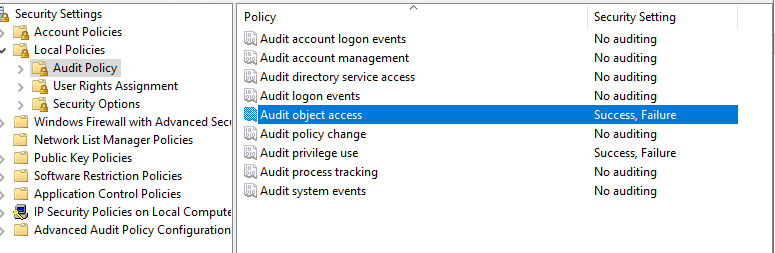
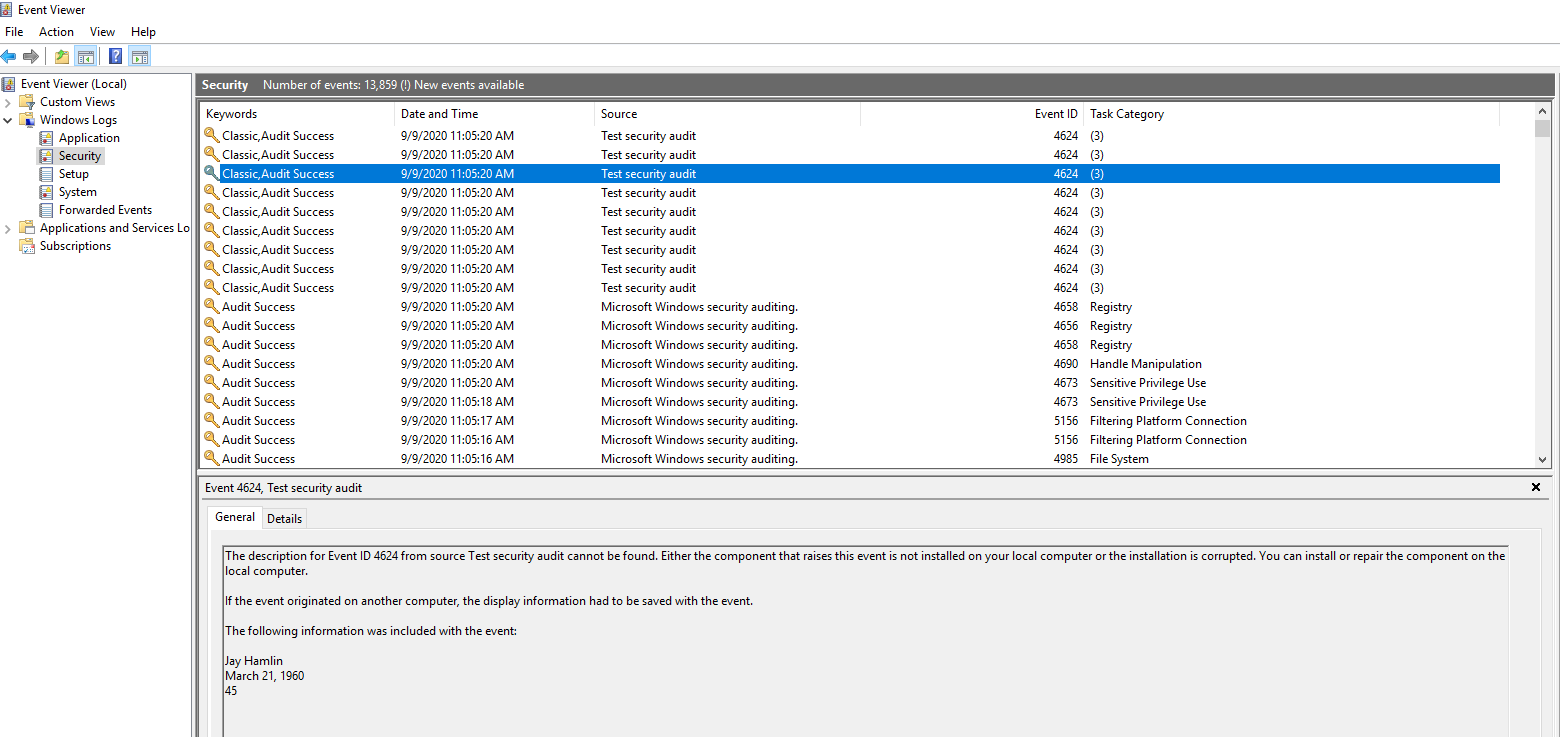
然后再重新构建和调试,您将发现事件查看器中出现了安全日志。
https://stackoverflow.com/questions/63738071
复制相似问题
腾讯云开发者

Copyright © 2013 - 2026 Tencent Cloud. All Rights Reserved. 腾讯云 版权所有
深圳市腾讯计算机系统有限公司 ICP备案/许可证号:粤B2-20090059  粤公网安备44030502008569号
腾讯云计算(北京)有限责任公司 京ICP证150476号 | 京ICP备11018762号