
游戏敌人不会往下移动--塔防御游戏
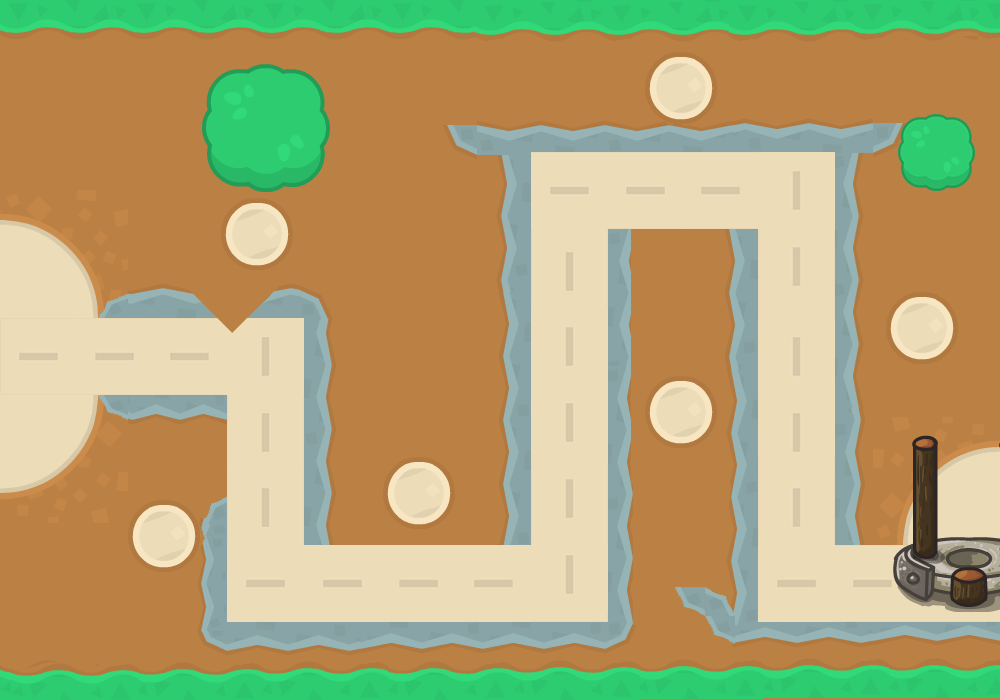
我在这里的问题是,对于我的敌人在我的塔防御游戏中的最后两个检查点,敌人不会在第二次最后一步移动,直到他们伤害了塔楼视频,他们只是向前移动,为什么他们只是离开那里。
最后一个也是一样
    # move the enemy
    for spider in spiders:
        if spider.x < 230:
            spider.x += spider.speed


        elif spider.y < 160:
            spider.x += spider.speed
        elif spider.x > 540:
            spider.y -= spider.speed
        elif spider.y < 566:
            spider.y += spider.speed
        elif spider.y > 290:
            spider.x += spider.speed

        elif spider.y > 566:
            spider.x += spider.speed

        # THIS part isnt working IDK why if the enemy is close to the 4th check point it should go down but it wont??
        elif spider.x < 628:
            spider.y += spider.speed

        # idk if this part will work because the last second part didnt work
        elif spider.y < 550:
            spider.x += spider.speed
我的完整代码
import pygame,random

pygame.init()

# window
window = pygame.display.set_mode((1000,700), pygame.NOFRAME)

red = (0,255,0)

#
class spider:
    def __init__(self,x,y,height,width,color):
        self.x = x
        self.y = y
        self.height = height
        self.width = width
        self.color = color
        self.speed = 13
        self.rect = pygame.Rect(x,y,height,width)
        self.health = 10
        self.hitbox = (self.x + 20, self.y, 26,60)


        # image frame
        self.image = [pygame.image.load("weak (1).png"),
                      pygame.image.load("weak (2).png"),
                      pygame.image.load("weak (3).png"),
                      pygame.image.load("weak (4).png"),
                      pygame.image.load("weak (5).png"),
                      pygame.image.load("weak (6).png"),
                      pygame.image.load("weak (7).png"),
                      pygame.image.load("weak (8).png"),
                      pygame.image.load("weak (9).png"),
                      pygame.image.load("weak (10).png"),
                      pygame.image.load("weak (11).png"),
                      pygame.image.load("weak (12).png"),
                      pygame.image.load("weak (13).png"),
                      pygame.image.load("weak (14).png"),
                      pygame.image.load("weak (15).png"),
                      pygame.image.load("weak (16).png"),
                      pygame.image.load("weak (17).png"),
                      pygame.image.load("weak (18).png"),
                      pygame.image.load("weak (19).png")]


        self.image = [pygame.transform.scale(image,(image.get_width()//2,image.get_height()//2)) for image in self.image]


        self.anim_index = 0
        self.walkrights = 0
        self.fps = 40
        self.clock = pygame.time.Clock()
        self.direction = "up"
        self.direction = "right"


    def draw(self):
        self.rect.topleft = (self.x,self.y)

        self.clock.tick(self.fps)
        image_list = self.image


        if self.anim_index >= len(image_list):
            self.anim_index = 0

        player_image = image_list[self.anim_index]
        self.anim_index += 1


        player_rect = player_image.get_rect(center = self.rect.center)
        player_rect.centerx += 3 # 10 is just an example
        player_rect.centery += -10# 15 is just an example
        window.blit(player_image, player_rect)


        self.hitbox = (self.x + -18, self.y, 46,60)
        pygame.draw.rect(window, (255,0,0), (self.hitbox[0], self.hitbox[1] - 40, 40, 13)) # NEW
        pygame.draw.rect(window, (231, 76, 60), (self.hitbox[0], self.hitbox[1] - 40, 80 - (5 * (10 - self.health)), 13))
spiders = []
platformGroup = pygame.sprite.Group
level = [
    "                                                                                                       ",
    "                                                                                                     ",
    "                                                                                                      ",
    "                                                                                                           ",
    "                                                                                                     ",
    "                                                                                                               ",
    "                                                                                                     ",
    "    c         c       c          c           c            c         c           c           c                        ",
    "                                                                                                          ",
    "                                                                                               ",
    "                                                                                                       ",
    "                                                                                                  ",
    "                                                                                                       ",
    "                                                                                                       "]


for iy, row in enumerate(level):
    for ix, col in enumerate(row):
        if col == "c":
            new_platforms = spider(ix*-24, iy*46, 50,50,(23, 32, 42))
            spiders.append(new_platforms)


class tower:
    def __init__(self,x,y,height,width,color):
        self.x = x
        self.y =y
        self.height = height
        self.width = width
        self.color = color
        self.rect = pygame.Rect(x,y,height,width)
        self.health = 10
        self.hitbox = (self.x + -18, self.y, 46,60)

    def draw(self):
        self.rect.topleft = (self.x,self.y)
        self.hitbox = (self.x + -18, self.y, 46,60)
        pygame.draw.rect(window, (255,0,0), (self.hitbox[0], self.hitbox[1] - 40, 140, 25)) # NEW
        pygame.draw.rect(window, (46, 204, 113), (self.hitbox[0], self.hitbox[1] - 40, 140 - (5 * (10 - self.health)), 25))


tower1 = tower(875,450,50,50,red)


# check points for the player to turn
class check():
    def __init__(self,x,y,height,width,color):
        self.x = x
        self.y = y
        self.height = height
        self.width = width
        self.color = color
        self.rect = pygame.Rect(x,y,height,width)
    def draw(self):
        self.rect.topleft = (self.x,self.y)
        pygame.draw.rect(window,self.color,self.rect)

check1 = check(250,366,50,50,red)
check2 = check(250,566,50,50,red)
check3 = check(540,566,50,50,red)
check4 = check(780,166,50,50,red)
check5 = check(780,550,50,50,red)


checks = [check1,check2,check3,check4,check5]


# the background for my gameee
bg = pygame.image.load("bg2.png")


# redraw window
def draw():
    window.fill((0,0,0))
    window.blit(bg,(0,0))


    for spider in spiders:
        spider.draw()

    for check in checks:
        check.draw()
    tower1.draw()


clock = pygame.time.Clock()
fps = 60

# the main loop
runninggame = True
while runninggame:
    clock.tick(fps)
    for event in pygame.event.get():
        if event.type == pygame.QUIT:
            runninggame = False


    # move the enemy
    for spider in spiders:
        if spider.x < 230:
            spider.x += spider.speed


        elif spider.y < 160:
            spider.x += spider.speed
        elif spider.x > 540:
            spider.y -= spider.speed
        elif spider.y < 566:
            spider.y += spider.speed
        elif spider.y > 290:
            spider.x += spider.speed

        elif spider.y > 566:
            spider.x += spider.speed

        # THIS part isnt working IDK why if the enemy is close to the 4th check point it should go down but it wont??
        elif spider.x < 628:
            spider.y += spider.speed

        # idk if this part will work because the last second part didnt work
        elif spider.y < 550:
            spider.x += spider.speed


    # redraw the window
    draw()


    pygame.display.update()
pygame.quit()
回答 3
Stack Overflow用户
发布于 2020-09-04 11:30:58
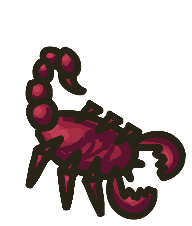
我建议将蝎子沿点列表(spider_move)移动。使用一个变量来声明下一个点的索引(spider_move_to),并将蝎子移到这个点(next_p)。每次到达一个点,然后增加索引(spider_move_to += 1)。如果列表中没有更多的点,那就停止移动。若要移动蝎子,请计算当前dx的位置与列表(next_p)中的点之间的差异( spider、dy)。蝎子(spider.x,spider.y)的位置由spider.speed增加或减少,取决于dx和dy的数量
spider_move_to = 0
spider_move = [
   (240, 330), (240, 550), (540, 550), (540, 160),
   (770, 160), (770, 550), (870, 550)]

runninggame = True
while runninggame:
   # [...]

   if spider_move_to < len(spider_move):
       next_p = spider_move[spider_move_to]
       dx, dy = (next_p[0] - spider.x, next_p[1] - spider.y)

       if dx > spider.speed:
           spider.x += spider.speed
       elif dx < -spider.speed:
           spider.x -= spider.speed
       else:
           spider.x = next_p[0]

       if dy > spider.speed:
           spider.y += spider.speed
       elif dy < -spider.speed:
           spider.y -= spider.speed
       else:
           spider.y = next_p[1]

       if spider.x == next_p[0] and spider.y == next_p[1]:
           spider_move_to += 1

# [...]如果有多个蝎子,那么我建议将spider_move_to作为类spider的一个属性。
class spider:
    def __init__(self,x,y,height,width,color):
        # [...]

        self.spider_move_to
使用属性而不是全局变量:
spider_move = [
   (240, 330), (240, 550), (540, 550), (540, 160),
   (770, 160), (770, 550), (870, 550)]

runninggame = True
while runninggame:
   # [...]

   for spider in spiders:
       if spider.spider_move_to < len(spider_move):
           next_p = spider_move[spider.spider_move_to]
           dx, dy = (next_p[0] - spider.x, next_p[1] - spider.y)

           # [...]

           if spider.x == next_p[0] and spider.y == next_p[1]:
               spider .spider_move_to += 1

# [...] Stack Overflow用户
发布于 2020-09-04 03:26:55
Stack Overflow用户
发布于 2020-09-04 03:27:27
在查看您的代码时,我注意到了这个奇怪的地方。
elif spider.x > 540:
    spider.y -= spider.speed
..。
elif spider.x < 628:
    spider.y += spider.speed
这是基于您提供的订单。第二个elif永远不能运行,因为爬行器永远不会运行-x意味着我们永远无法得到一个< 540的结果,这意味着540永远是真的,这也意味着既然Elif总是运行第一个真条件,那么我们实际上就不能得到一个值,它会导致条件< 628在>540之前运行。我建议修改代码,通过添加self.checkpoint作为每个蜘蛛的属性来消除出现这种情况的可能性。然后,当它到达检查点时,您将在if中进行检查。
elif spider.x > 540 and (spider.checkpoint = 3 or spider.checkpoint = 4):
    if spider.checkpoint != 4:
        spider.checkpoint = 4
    spider.y -= spider.speed
对于每个检查点,这将在第一次运行时将其增加到下一个检查点,并将其保持在那里,这样当您到达下一个检查点时,只需将每个数字增加1,这样蜘蛛就知道它要旅行到哪个检查点。
https://stackoverflow.com/questions/63734280
复制相似问题
腾讯云开发者

Copyright © 2013 - 2026 Tencent Cloud. All Rights Reserved. 腾讯云 版权所有
深圳市腾讯计算机系统有限公司 ICP备案/许可证号:粤B2-20090059  粤公网安备44030502008569号
腾讯云计算(北京)有限责任公司 京ICP证150476号 | 京ICP备11018762号