
如何更改vue-good-table中选定的行标签区域
如何更改vue-good-table中选定的行标签区域
提问于 2020-09-07 08:46:28
我使用的是vue-good-table,我正在尝试更改所选行框中的标签区域。查看文档,唯一可用的插槽是所选的行操作。
有没有用标签和“清除”操作编辑左侧的方法/插槽?(不仅仅是他们的文字)
回答 1
Stack Overflow用户
回答已采纳
发布于 2020-09-30 04:14:12
更新:
如前所述,没有任何来自库的直接配置来实现您想要实现的目标。CSS唯一的解决方案如下所示,请看一下这个码箱
<template>
...
</template>
<style>
.vgt-selection-info-row {
  font-size: 0 !important;
}
.vgt-selection-info-row__actions.vgt-pull-right {
  visibility: visible;
  float: none !important;
}
</style>
原始答案:
图书馆里没有任何东西是现成支持的。您可以使用table-actions插槽在右上角显示表级操作,也可以使用selected-row-actions插槽在选择信息栏上显示选定行的操作,如:
<div slot="selected-row-actions">
  <button @click="countSelected()">Sected Row Action</button>
</div>
<div slot="table-actions">
  Table Actions
</div>
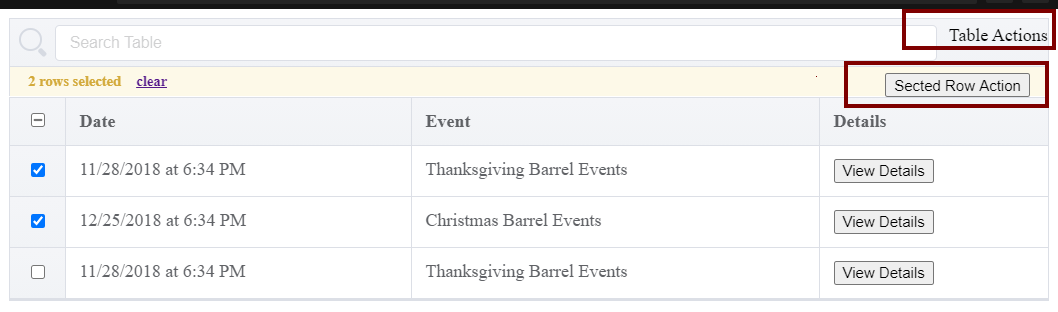
话虽如此,我们正在谈论的HTML (耶!)因此,没有什么可以阻止您重写库的默认样式。
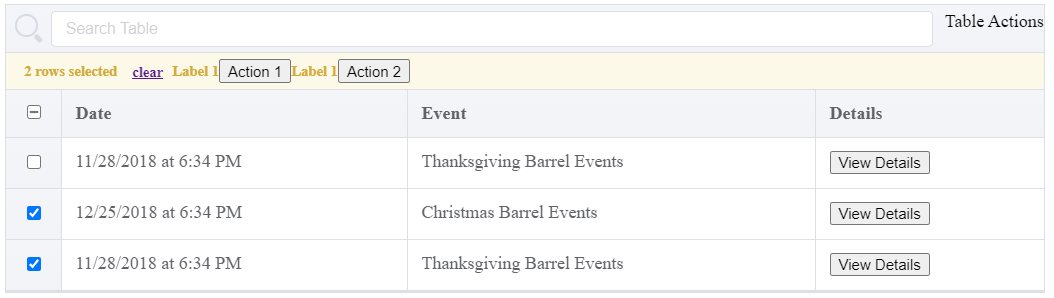
您可以使用以下样式使用selected-row-actions插槽,并在清除按钮旁边移动插槽:
<template>
...
<div slot="selected-row-actions">
    <label>Label 1</label>
    <button @click="countSelected()">Action 1</button>
    <label>Label 1</label>
    <button @click="countSelected()">Action 2</button>
</div>
...
</template>
<style>
  .vgt-selection-info-row__actions.vgt-pull-right {
    float: none !important;
    margin-left: 5px;
    display: inline;
  }
  .vgt-selection-info-row__actions.vgt-pull-right div {
    display: inline-block;
  }
</style>
PS:如果您想重新打开并跟踪库,那么已经有一个关闭的BUG 519。
页面原文内容由Stack Overflow提供。腾讯云小微IT领域专用引擎提供翻译支持
原文链接:
https://stackoverflow.com/questions/63774232
复制相关文章
相似问题
腾讯云开发者

Copyright © 2013 - 2026 Tencent Cloud. All Rights Reserved. 腾讯云 版权所有
深圳市腾讯计算机系统有限公司 ICP备案/许可证号:粤B2-20090059  粤公网安备44030502008569号
腾讯云计算(北京)有限责任公司 京ICP证150476号 | 京ICP备11018762号