
如何在重新启动应用程序时使用方法?
我目前正在使用SwiftUI开发一个应用程序。
当应用程序在第4‘进程重新启动时,我想使用一种方法,如下所示:
sceneDidBecomeActive
- 构建并运行此project.Then控制台显示
scenesceneWillEnterForegroundonAppear
- Pless的主页按钮和应用程序转到后台。然后控制台显示了
sceneDidEnterBackground
sceneWillResignActive
- 双击主页按钮并移除应用程序屏幕。然后控制台显示
Message from debugger: Terminated due to signal 9
- 按下应用程序图标并重新启动应用程序。然后控制台没有显示任何内容,我想在这里使用一种方法。
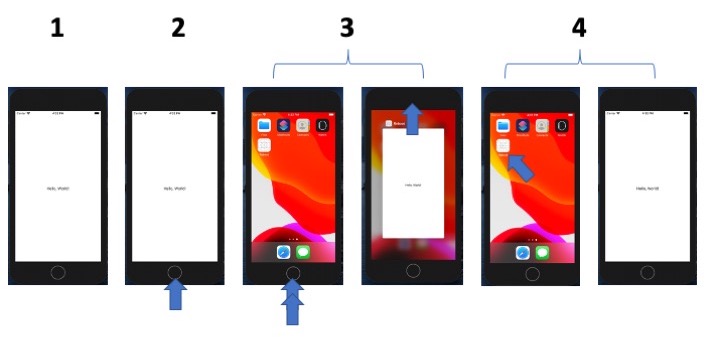
但我不能用任何生命周期方法..。
有什么办法吗?
以下是密码:
SceneDelegate.swift
import UIKit
import SwiftUI

class SceneDelegate: UIResponder, UIWindowSceneDelegate {

    var window: UIWindow?


    func scene(_ scene: UIScene, willConnectTo session: UISceneSession, options connectionOptions: UIScene.ConnectionOptions) {

        let contentView = ContentView()

        if let windowScene = scene as? UIWindowScene {
            let window = UIWindow(windowScene: windowScene)
            window.rootViewController = UIHostingController(rootView: contentView)
            self.window = window
            window.makeKeyAndVisible()
        }

        print("scene")
    }

    func sceneDidDisconnect(_ scene: UIScene) {
       print("sceneDidDisconnect")
    }

    func sceneDidBecomeActive(_ scene: UIScene) {
        print("sceneDidBecomeActive")
    }

    func sceneWillResignActive(_ scene: UIScene) {
       print("sceneWillResignActive")
    }

    func sceneWillEnterForeground(_ scene: UIScene) {
       print("sceneWillEnterForeground")
    }

    func sceneDidEnterBackground(_ scene: UIScene) {
       print("sceneDidEnterBackground")
    }


}
ContentView.swift
import SwiftUI

struct ContentView: View {
    var body: some View {
        VStack {
            Text("Hello, World!")
        }.onAppear(){
            print("onAppear")
        }
    }
}

struct ContentView_Previews: PreviewProvider {
    static var previews: some View {
        ContentView()
    }
}
Xcode: 11.7版
Swift: Swift 5
回答 1
Stack Overflow用户
发布于 2020-09-08 10:27:05
那么,一旦你终止应用程序,调试器也断开了与应用程序的连接。因此,无法在控制台中获得更多的消息。您必须从Xcode重新启动应用程序,以便启动一个带有附加调试器的新实例。当你这样做的时候,你又回到了第一步。
您可以在应用程序转到后台时存储时间戳。然后,如果您终止该应用程序并重新启动它,您可以检查application(_ application: UIApplication, didFinishLaunchingWithOptions launchOptions:)方法中经过了多少时间。
如果最多过了x秒,您可以得出结论,有人终止了应用程序,然后决定重新启动它。如果超过x秒,或者没有时间戳被存储,这意味着它只是一个常规的应用程序启动。
https://stackoverflow.com/questions/63791264
复制相似问题
腾讯云开发者

Copyright © 2013 - 2026 Tencent Cloud. All Rights Reserved. 腾讯云 版权所有
深圳市腾讯计算机系统有限公司 ICP备案/许可证号:粤B2-20090059  粤公网安备44030502008569号
腾讯云计算(北京)有限责任公司 京ICP证150476号 | 京ICP备11018762号