
Excel -如何在Excel中将带有货币的一行拆分为多行?
Excel -如何在Excel中将带有货币的一行拆分为多行?
提问于 2020-09-07 21:38:30
我有以下数据:
Product           GBP        USD        EUR         CAD
----------------------------------------------------------
Adidas Shoe       8         30         25           25
Puma Shoe         7         40         30           25
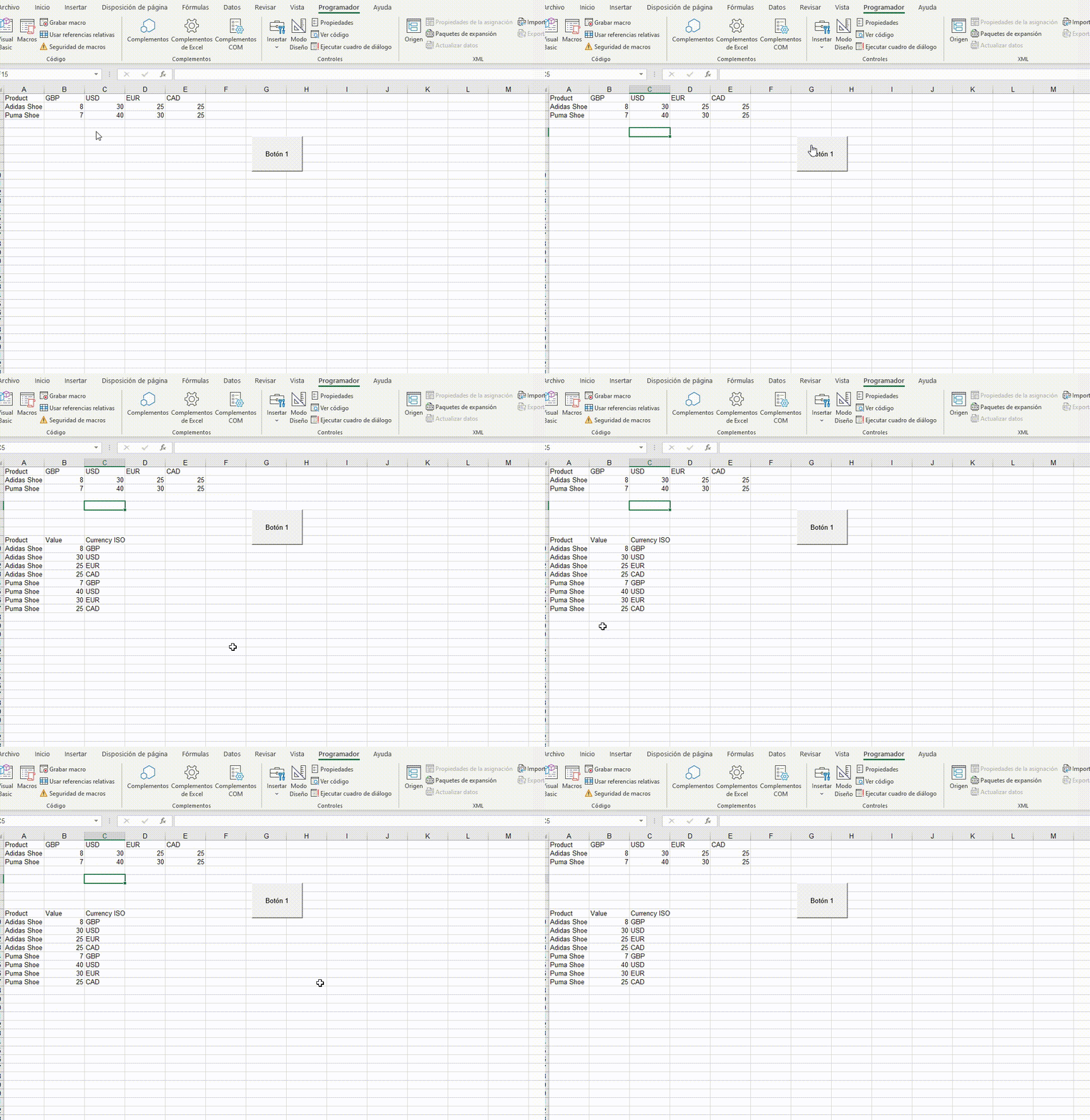
如何在Excel 2020中将数据分成以下几个部分?用宏?
Product           VALUE     CURRENCYISO
----------------------------------------------------------
Adidas Shoe       8          GBP
Adidas Shoe       30         USD
Adidas Shoe       25         EUR
Adidas Shoe       25         CAD
Puma Shoe         7          GBP
Puma Shoe         40         USD
Puma Shoe         30         EUR
Puma Shoe 25 CAD回答 2
Stack Overflow用户
回答已采纳
发布于 2020-09-08 00:01:36
不是最干净的,但能帮上忙:
Dim MiMatriz As Variant
Dim i As Long, ZZ As Long
Dim MyRow As Long


MiMatriz = Range("A1").CurrentRegion.Value

'type row number where data is going to be pasted. HEaders will be one row over
MyRow = 10

Range("A" & MyRow - 1).Value = "Product"
Range("B" & MyRow - 1).Value = "Value"
Range("C" & MyRow - 1).Value = "Currency ISO"


'we start array at 2 because first index got headers
For i = 2 To UBound(MiMatriz) Step 1
    For ZZ = 2 To 5 Step 1 'your range got 5 columns of data
        Range("A" & MyRow).Value = MiMatriz(i, 1) 'product
        Range("B" & MyRow).Value = MiMatriz(i, ZZ) 'value
        Range("C" & MyRow).Value = MiMatriz(1, ZZ) 'header
        MyRow = MyRow + 1
    Next ZZ
Next i

Erase MiMatriz
Stack Overflow用户
发布于 2020-09-07 22:12:06
我相信他们可能是更好的方法,但我这里有一个解决方案:
Sub TransposeData()

Dim lastrow As Long, lastcolumn As Long, ws As Worksheet, irow As Long, icolumn As Long, lrowout As Long

Application.ScreenUpdating = False

Set ws = Sheets("Sheet1") 'your sheet name
lastrow = ws.Range("F" & Rows.Count).End(xlUp).Row 'Change "F" to product list
lastcolumn = ws.Cells(4, Columns.Count).End(xlToLeft).Column 'Change "4" to the row with the headers

For irow = 5 To lastrow 'what row number does the data start from (exluding headers)
    For icolumn = 7 To lastcolumn 'what column number does the data start from (exluding product names)
        lrowout = ws.Range("R" & Rows.Count).End(xlUp).Row 'Change "R" to column output will be in
        ws.Range("R" & lrowout + 1).Value = ws.Range("F" & irow).Value 'Change "R" to where your product name will be
        ws.Range("S" & lrowout + 1).Value = ws.Cells(irow, icolumn).Value 'Change "S" to where value will be
        ws.Range("T" & lrowout + 1).Value = ws.Cells(4, icolumn).Value 'Change "T" to where currency will be
    Next icolumn
Next irow

Application.ScreenUpdating = True

End Sub页面原文内容由Stack Overflow提供。腾讯云小微IT领域专用引擎提供翻译支持
原文链接:
https://stackoverflow.com/questions/63784574
复制相关文章
相似问题
腾讯云开发者

Copyright © 2013 - 2026 Tencent Cloud. All Rights Reserved. 腾讯云 版权所有
深圳市腾讯计算机系统有限公司 ICP备案/许可证号:粤B2-20090059  粤公网安备44030502008569号
腾讯云计算(北京)有限责任公司 京ICP证150476号 | 京ICP备11018762号