
将句子中的一个特定单词粗体化,但不要在",引导书呆子“之前突出整个句子
将句子中的一个特定单词粗体化,但不要在",引导书呆子“之前突出整个句子
提问于 2020-09-09 04:08:37
第一句:优步,937万美元的股本。斯蒂尔·尼科劳斯,书呆子领队。(我想在“”之后用粗体字。)在",“之前,以及",”之前的“,”也就是银行的名称和公司的名称,在这个例子中是Stifel Nicolaus&Uber。还有“。”出现在9.37MM句子2:谷歌,$750百万信用交易。摩根大通,首席书呆子。
我的代码:
Set Where = Range("P2", Range("P" & Rows.Count).End(xlUp))
  With Where
    .Value = .Value
    .Font.Bold = False
  End With
  For Each This In Where
    i = InStr(This, ", Lead Bookrunner.")
    If i = 0 Then i = Len(This) + 1
    This.Characters(1, i - 1).Font.Bold = True
  Next
For Each This In Where
    i = InStr(This, ".")
    If i = 0 Then i = Len(This) + 1
    This.Characters(1, i - 1).Font.Bold = False
  Next
For Each This In Where
    i = InStr(This, ",")
    If i = 0 Then i = Len(This) + 1
    This.Characters(1, i - 1).Font.Bold = True
  Next
我通过代码的结果是:优步( Uber ),9美元。37 am股票。斯蒂尔·尼科劳斯·尼古拉斯( Stifel Nicolaus ),Bookrunner首席执行官。结果我想要的是:优步,9.37万美元的股票。Stifel Nicolaus,Bookrunner首席执行官。
回答 1
Stack Overflow用户
回答已采纳
发布于 2020-09-09 04:57:17
该格式是否总是像文本逗号文本,完整停止文本逗号文本(引导Bookrunner)?文本(Uber)逗号文本($9.37MM股票)
如果格式将保持这样,那么它是非常简单的,真的。
逻辑:
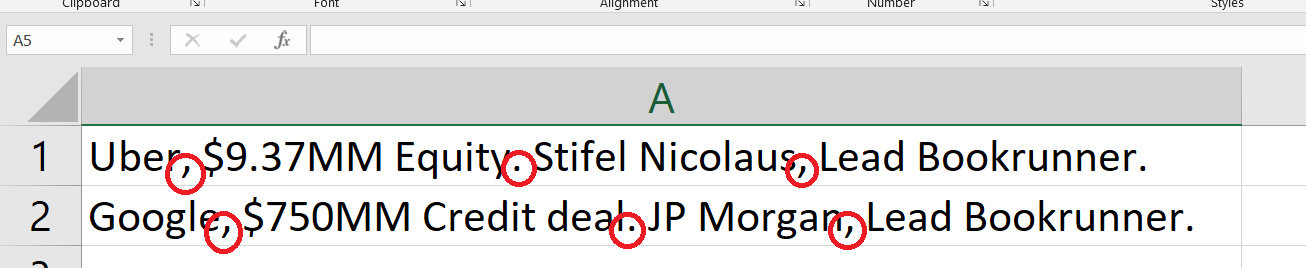
代码:
我已经对密码进行了评论。如果你还被困住了,可以在下面留下评论。
这就是你想要的吗?
Option Explicit

Option Explicit

Sub Sample()
    Dim ws As Worksheet
    Dim lRow As Long
    Dim i As Long
    Dim lPos As Long, rPosDot As Long, rPosComma As Long, strLen As Long
    Dim cellValue As String

    '~~> Change this to the relevant sheet
    Set ws = Sheet1

    With ws
        '~~> Find last row
        lRow = .Range("A" & .Rows.Count).End(xlUp).Row

        '~~> Loop through the range
        For i = 1 To lRow
            With .Range("A" & i)
                '~~> Remove bold formatting
                .Font.Bold = False

                cellValue = .Value2

                If InStr(1, cellValue, "(") Then
                    .Font.Bold = True
                ElseIf InStr(1, cellValue, "Lead Bookrunner", vbTextCompare) Then
                    '~~> Store the length of the cell value
                    strLen = Len(cellValue)

                    '~~> Find the position of "," from left
                    lPos = InStr(1, cellValue, ",")

                    '~~> Find the position of "," from right
                    rPosComma = InStrRev(cellValue, ",", -1, vbTextCompare)

                    '~~> We need this so that we can find the position of "." on the
                    '~~> right of the ","
                    cellValue = Left(cellValue, rPosComma)

                    '~~> Find the position of "." from the right of ","
                    rPosDot = InStrRev(cellValue, ".", -1, vbTextCompare)

                    '~~> Bold the characters
                    .Characters(Start:=1, Length:=lPos - 1).Font.FontStyle = "Bold"
                    .Characters(Start:=rPosDot + 1, Length:=rPosComma - rPosDot - 1).Font.FontStyle = "Bold"
                End If
            End With
        Next i
    End With
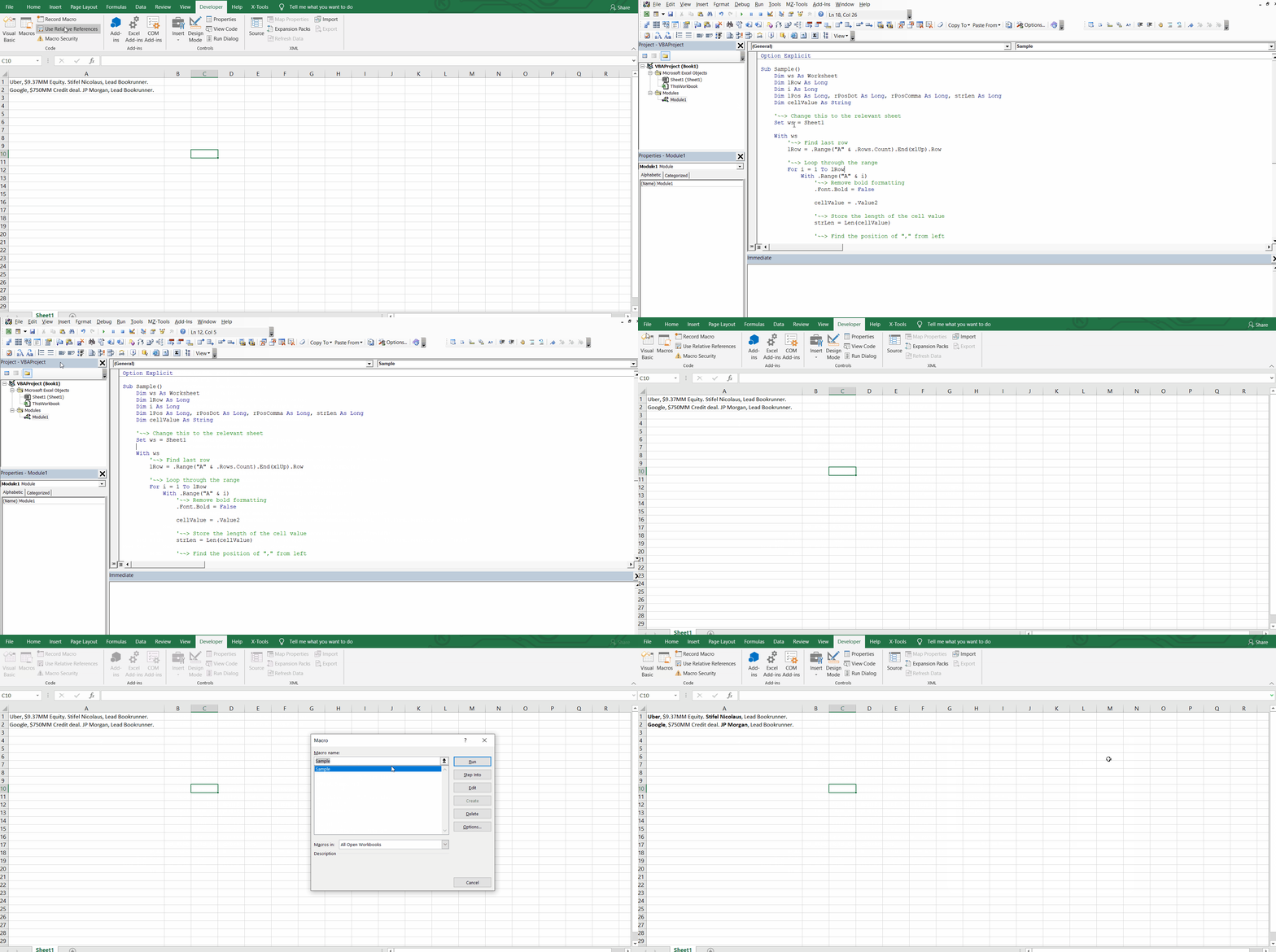
End Sub行动中的:
页面原文内容由Stack Overflow提供。腾讯云小微IT领域专用引擎提供翻译支持
原文链接:
https://stackoverflow.com/questions/63804601
复制相关文章
相似问题
腾讯云开发者

Copyright © 2013 - 2026 Tencent Cloud. All Rights Reserved. 腾讯云 版权所有
深圳市腾讯计算机系统有限公司 ICP备案/许可证号:粤B2-20090059  粤公网安备44030502008569号
腾讯云计算(北京)有限责任公司 京ICP证150476号 | 京ICP备11018762号