
获取背景颜色要更改的问题
获取背景颜色要更改的问题
提问于 2020-09-11 21:31:07
我有一个按钮,以切换夜间模式,使用更深的颜色为组件。问题是,一旦我打开夜间模式,它就会在组件的底部/轮廓处留下一个白色的条形。所以我假设背景没有正确的变化。第一个函数是设置颜色,第二个函数是改变背景,我假设问题是这个第二个函数或index.html
function switchNightMode(){

  if(isNightMode){
    setIsNightMode(false);
  }
  else{
    setIsNightMode(true);
  }

  //Setting colors and a duplicate for storing since this runs asynchronously

  if(isNightMode){
    setNightMode(
      {
        background: "#413250",
        bannerText: "#413250",
        listText: "#FFFFFF",
        banner: "#FFFFFF",
        inputBackground: "#465C68"
      });

      const currSession = {
        background: "#413250" ,
        bannerText: "#413250" ,
        listText: "#FFFFFF",
        banner: "#FFFFFF",
        inputBackground: "#465C68"
      };

      localStorage.setItem("startupNightMode", JSON.stringify(currSession));
  }
  else{
    setNightMode({
      background: "#FFFFFF" ,
      bannerText: "#FFFFFF" ,
      listText: "#000000",
      banner: "#55BAF1",
      inputBackground: "#465C68"
    });

    const currSession = {
      background: "#FFFFFF" ,
      bannerText: "#FFFFFF" ,
      listText: "#000000",
      banner: "#55BAF1",
      inputBackground: "#465C68"
    };

    localStorage.setItem("startupNightMode", JSON.stringify(currSession));
  }
}
变化背景:
React.useEffect(() => {
    const savedBackground = localStorage.getItem("startupNightMode");
    document.body.style.backgroundColor = savedBackground.background;
  }, [])
index.html:
<!DOCTYPE html>
<html lang="en">
  <head>
    <meta charset="utf-8" />
    <meta name="viewport" content="width=device-width, initial-scale=1" />
    <meta name="theme-color" content="#000000" />
    <meta
      name="description"
      content="Web site created using create-react-app"
    />
    <link rel="apple-touch-icon" href="%PUBLIC_URL%/logo192.png" />
    <!--
      manifest.json provides metadata used when your web app is installed on a
      user's mobile device or desktop. See https://developers.google.com/web/fundamentals/web-app-manifest/
    -->
    <link rel="manifest" href="%PUBLIC_URL%/manifest.json" />

    <link
      href="https://fonts.googleapis.com/css?family=Roboto&display=swap"
      rel="stylesheet"
    />
    <link
      href="https://fonts.googleapis.com/css2?family=Work+Sans:wght@500&display=swap"
      rel="stylesheet"
    />
    <title>React App</title>
    <style>
      html,
      body,

      body{
        height:100%
      }
    </style>
  </head>
  <body>
    <noscript>You need to enable JavaScript to run this app.</noscript>
    <div id="root"></div>
  </body>
</html>回答 2
Stack Overflow用户
回答已采纳
发布于 2020-09-11 23:22:14
这并不能确切地回答你的问题,但我想提出一个稍微不同的方法来解决这个问题。将CSS移动到样式表中,并在html或body元素上切换一个夜间模式类,并使所有样式都在那里流动。
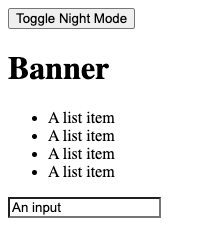
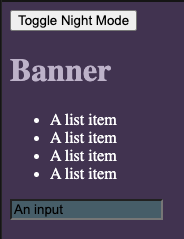
import React from "react";
import "./styles.css";

// constant for className and local storage key
const NIGHT_MODE = "night-mode";

export default function App() {
  const html = document.querySelector("html");

  const toggleNightMode = () => {
    html.classList.toggle(NIGHT_MODE);

    // update localStorage value
    localStorage.setItem(NIGHT_MODE, html.classList.contains(NIGHT_MODE));
  };

  React.useEffect(() => {
    // restore night mode from local storage on mount
    const isNightMode = localStorage.getItem(NIGHT_MODE);
    if (isNightMode) {
      html.classList.add(NIGHT_MODE);
    }
  }, [html]);

  return (
    <div className="App">
      <button onClick={toggleNightMode}>Toggle Night Mode</button>
      <h1 className="banner">Banner</h1>
      <ul>
        <li>A list item</li>
        <li>A list item</li>
        <li>A list item</li>
        <li>A list item</li>
      </ul>
      <input value="An input" />
    </div>
  );
}:root {
--background: #ffffff;
--bannerText: #ffffff;
--listText: #000000;
--banner: #55baf1;
--inputBackground: #465c68;
}
.night-mode {
--background: #413250;
--bannertext: #bdb1c9;
--listtext: #ffffff;
--banner: #ffffff;
--inputbackground: #465c68;
}
body {
background: var(--background);
}
.banner {
color: var(--bannertext);
}
ul {
color: var(--listtext);
}
input {
background: var(--inputbackground);
}Stack Overflow用户
发布于 2020-09-11 22:20:17
我的猜测是,由于setState是异步的,当您的代码到达isNightMode的第二次条件检查时,它还没有被设置为新的值。您应该只需要对所有逻辑使用一个条件。
function switchNightMode(){

  if(isNightMode){
    setIsNightMode(false);

    setNightMode({
      background: "#413250",
      bannerText: "#413250",
      listText: "#FFFFFF",
      banner: "#FFFFFF",
      inputBackground: "#465C68"
    });

    const currSession = {
      background: "#413250" ,
      bannerText: "#413250" ,
      listText: "#FFFFFF",
      banner: "#FFFFFF",
      inputBackground: "#465C68"
    };

      localStorage.setItem("startupNightMode", JSON.stringify(currSession));
  } else {
    setIsNightMode(true);

    setNightMode({
      background: "#FFFFFF" ,
      bannerText: "#FFFFFF" ,
      listText: "#000000",
      banner: "#55BAF1",
      inputBackground: "#465C68"
    });

    const currSession = {
      background: "#FFFFFF" ,
      bannerText: "#FFFFFF" ,
      listText: "#000000",
      banner: "#55BAF1",
      inputBackground: "#465C68"
    };

    localStorage.setItem("startupNightMode", JSON.stringify(currSession));
  }
}
我还没有测试过你的代码,但我认为这是可行的。
此外,我还重写了您的代码,使其更加枯燥。
function switchNightMode(){
  const lightMode = {
      background: "#413250",
      bannerText: "#413250",
      listText: "#FFFFFF",
      banner: "#FFFFFF",
      inputBackground: "#465C68"
    }

  const darkMode = {
      background: "#FFFFFF" ,
      bannerText: "#FFFFFF" ,
      listText: "#000000",
      banner: "#55BAF1",
      inputBackground: "#465C68"
    }

  let currentMode;

  if(isNightMode){
    setIsNightMode(false);
    currentMode = lightMode;
  } else {
    setIsNightMode(true);
    currentMode = darkMode;
  }

  setNightMode(currentMode);

  localStorage.setItem("startupNightMode", JSON.stringify(currentMode));
}页面原文内容由Stack Overflow提供。腾讯云小微IT领域专用引擎提供翻译支持
原文链接:
https://stackoverflow.com/questions/63854552
复制相关文章
相似问题
腾讯云开发者

Copyright © 2013 - 2026 Tencent Cloud. All Rights Reserved. 腾讯云 版权所有
深圳市腾讯计算机系统有限公司 ICP备案/许可证号:粤B2-20090059  粤公网安备44030502008569号
腾讯云计算(北京)有限责任公司 京ICP证150476号 | 京ICP备11018762号