
ImageMagick和Wand之间连接部件的输出?
ImageMagick和Wand之间连接部件的输出?
提问于 2020-09-14 07:24:13
我试图使用Windows10下的连接组件特性获取颜色的坐标
3.8.5
- ImageMagick
- Python 7.0.10-29 Q8 x64 2020-09-05
使用ImageMagick和下面的命令,我可以正确地得到坐标。
>convert input.png -define connected-components:verbose=true -define connected-components:area-threshold=100 -connected-components 8
-auto-level out:null
Objects (id: bounding-box centroid area mean-color):
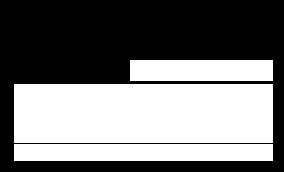
0: 284x172+0+0 133.5,60.0 26161 srgb(0,0,0)
2: 259x59+14+84 143.0,113.0 15281 srgb(255,255,255)
3: 259x17+14+144 143.0,152.0 4403 srgb(255,255,255)
1: 143x21+130+60 201.0,70.0 3003 srgb(255,255,255)
当我使用带有Python3 3/Wand的连接组件时,就会得到不同的输出。
Python 3.8.5 (tags/v3.8.5:580fbb0, Jul 20 2020, 15:57:54) [MSC v.1924 64 bit (AMD64)] on win32
Type "help", "copyright", "credits" or "license" for more information.
>>> from wand.image import Image
>>> with Image(filename='input.png') as img:
...    objects = img.connected_components()
...
>>> for cc_obj in objects:
...    print("{0._id}: {0.size} {0.offset}".format(cc_obj))
...
0: (284, 172) (0, 0)
0: (0, 0) (0, 0)
14: (84, 98784247810) (0, 0)
0: (0, 0) (0, 0)
>>>
为什么输出与python/Wand不同?怎么修呢?提前谢谢。
下面是输入的图像。
下面是输入的图像。
回答 1
Stack Overflow用户
回答已采纳
发布于 2020-09-14 21:38:22
下面是一个使用Python调用ImageMagick命令行的示例(用于修剪图像的多余背景):
import subprocess
cmd = 'convert 0.png -fuzz 30% -trim +repage 0_trim.png'
subprocess.check_output(cmd, shell=True, universal_newlines=True)
另一个备选方案是:
import subprocess
cmd = 'convert 0.png -fuzz 30% -trim +repage 0_trim.png'
subprocess.call(cmd, shell=True)
页面原文内容由Stack Overflow提供。腾讯云小微IT领域专用引擎提供翻译支持
原文链接:
https://stackoverflow.com/questions/63879788
复制相关文章
相似问题
腾讯云开发者

Copyright © 2013 - 2026 Tencent Cloud. All Rights Reserved. 腾讯云 版权所有
深圳市腾讯计算机系统有限公司 ICP备案/许可证号:粤B2-20090059  粤公网安备44030502008569号
腾讯云计算(北京)有限责任公司 京ICP证150476号 | 京ICP备11018762号